

Yes, GoHighLevel Conversation AI can save data to your CRM but it depends entirely on how you configure it.
If you explicitly train the bot to ask for and map specific fields (name, email, phone), that data gets written to the contact record. Casual information mentioned in conversation does not automatically become structured CRM data. Conversation history is stored, but it is not the same as a clean, queryable contact field. For anything beyond basic lead capture payments, detailed service preferences, complex intake data you need workflows or webhooks.
This Answer Started on Reddit
A GHL user asked this exact question on r/GoHighLevel. GhlScaleUp replied with the detailed answer below and the response resonated with hundreds of users who were silently struggling with the same misunderstanding about how Conversation AI handles data.
The question from the community:

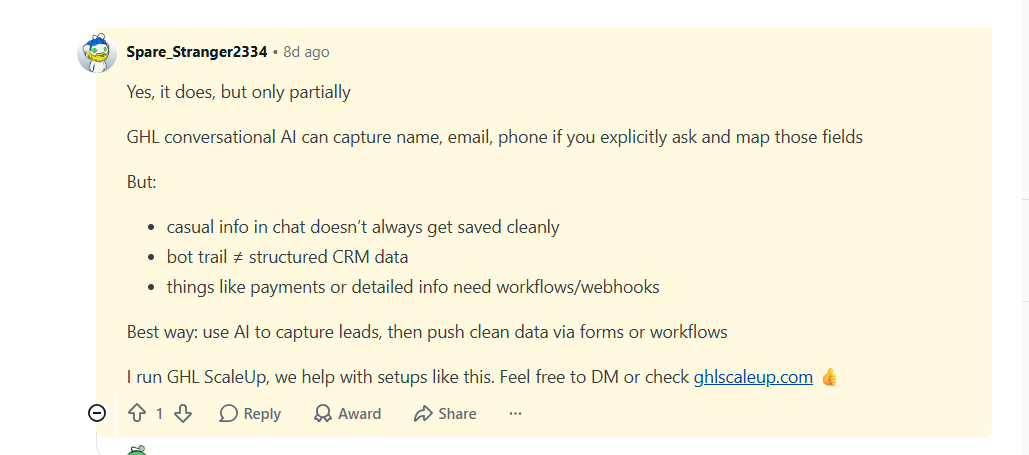
Our team leader's response (the answer that became this guide):
This blog post expands on that Reddit answer with step-by-step setup instructions.
View the original Reddit thread1. What GoHighLevel Conversation AI Does (and Doesn't) Save
GoHighLevel Conversation AI is not a passive listener that stores everything said in a conversation. It is an active system that executes the instructions you give it in the bot prompt. What gets saved to your CRM depends entirely on what you have explicitly told the bot to collect.
The bot runs inside the GHL Conversations inbox. It can send messages, qualify leads, ask questions, and book appointments. Everything the bot does is logged as a conversation thread on the contact record.That thread is visible, searchable, and part of the contact's history.
But a conversation thread is not the same as a structured CRM field. And this distinction is where most GHL users run into problems.
2. The Key Difference: Conversation History vs Structured CRM Fields
This is the most important concept in this entire article. Understanding it saves hours of debugging.
Conversation History
When your GHL AI bot talks to a lead, every message is stored as a conversation log on the contact's record.
What it is: Permanent, searchable context for your team.
What it is NOT: A structured data field. You cannot filter contacts by something mentioned in a conversation or trigger automation based on a phrase said in chat.
Structured CRM Fields
Structured fields live on the main contact record: name, email, phone, custom fields, tags, pipeline stage.
What they are: Queryable, actionable data points that power your automations.
How data gets there: Bot must be configured to map answers to fields, or a workflow/webhook pushes data after the conversation.
Most GHL users assume the AI is 'intelligent enough' to recognise that a lead mentioned their email address and save it automatically. It does not work this way. The AI stores the conversation. It does not extract and file data without instructions. If you want a field populated, you have to tell the bot to ask for it and map it or use a workflow to extract it afterwards.
3. What Actually Gets Saved and What Doesn't
What GHL Conversation AI DOES save
- Full conversation transcript (visible in contact record)
- Name, email, phone IF bot is explicitly prompted to ask and map
- Appointment booking (if connected to GHL calendar)
- Contact created automatically from first message
- Tag applied by bot (if configured in prompt)
- Custom field updated IF field mapping is set up in bot config
What it does NOT save automatically
- Casually mentioned info not mapped to a field
- Specific preferences or details mentioned in passing
- Payment details or transaction data
- Complex intake data (service type, location, property size, etc.)
- Calculated or inferred data points
- Data requiring validation or conditional logic
As of early 2026, GHL Conversation AI now retains full conversation history across multiple sessions. If a lead texted three weeks ago and returns, the bot remembers the prior context and responds accordingly. This is a significant improvement for lead nurturing but it still does not mean that prior conversation data becomes structured CRM fields automatically. Context memory and field data are separate systems.
4. How to Capture Clean Data from AI Conversations
The best architecture for most GHL setups: use the AI to start and qualify the conversation, then push structured data through a form or workflow at the point of conversion.
Method 1: Configure the bot to ask and map specific fields
In your Conversation AI bot prompt, explicitly instruct the bot to ask for specific information and map the response to a GHL contact field.
- Write: 'Ask the contact for their full name. Map this to the First Name and Last Name fields.'
- Do the same for email and phone. Be explicit the bot follows your instructions literally.
- For custom fields, create them in GHL first, then reference by name in the prompt.
- Test with a real conversation before going live.
Method 2: Use a post-conversation form
After the AI qualifies the lead, it books them or directs them to a short intake form. The form submission is what populates your structured CRM fields cleanly.This is the most reliable method for anything beyond name, email, and phone because forms force structured input and GHL maps form fields to contact fields natively.
Method 3: Workflow to extract and write data
If a lead mentions specific information in a conversation, you can configure a workflow that triggers when that conversation ends and uses an AI step or webhook to extract key details and update custom fields. This requires more technical setup but gives you the most flexibility.
For agencies running this type of setup for clients, this is something we configure regularly at GHL Scale Up (ghlscaleup.com). If your AI conversations are happening but the data isn't landing cleanly in your CRM, this is usually a configuration issue not a platform limitation.
Book a free 30-minute audit and we'll show you exactly what's missing5. When to Use Workflows and Webhooks Instead
For more complex data capture needs beyond name, email, and phone workflows and webhooks are the right tool, not the bot prompt alone.
Use a workflow when:
- You need to trigger automation based on what the lead said
- You want to update custom fields after the conversation with conditional logic
- You need to assign the contact to a team member based on conversation outcome
- You want to enrol the lead in a follow-up sequence depending on their answers
Use a webhook when:
- You need to push conversation data to an external CRM, spreadsheet, or database
- You need real-time data exchange during the conversation
- You need to validate or enrich data using a third-party API
- You're connecting GHL to another system (Salesforce, HubSpot, Airtable)
AI conversations are the entry point, not the data store. Use the AI to engage, qualify, and create the contact. Use forms, workflows, or webhooks to ensure the data from that conversation lands in the right fields structured, clean, and actionable. The bot trail tells the story. The CRM fields power the automation.
→ For the full guide on building GHL workflows: How to Set Up GoHighLevel Workflow Automation for Beginners →
6. Frequently Asked Questions
Does GoHighLevel Conversation AI automatically save lead data to the CRM?
Partially. GoHighLevel Conversation AI automatically creates a contact record and logs the full conversation transcript when someone messages your bot. However, specific data points like name, email, phone, or custom fields are only saved to structured CRM fields if you explicitly configure the bot to ask for them and map the responses. Casual information mentioned in conversation is stored in the chat log but does not become a queryable CRM field without additional setup.
What data does GoHighLevel Conversation AI capture by default?
By default, GHL Conversation AI creates a contact from the first interaction (using the phone number or email channel identifier) and stores the full conversation history on that contact record. It will also apply tags and update pipeline stages if you have configured the bot to do so. Name, email, phone, and any custom fields are only captured if the bot prompt explicitly instructs the bot to ask for and map those fields.
Why is my GHL AI bot having conversations but not saving data to contact fields?
This is the most common configuration issue. The bot stores conversation history automatically, but structured field data only saves if you have mapped the bot's collected answers to specific GHL contact fields in the bot configuration. Open your Conversation AI bot settings, review the prompt, and confirm that you have explicitly told the bot to ask for each field and specified which GHL field it maps to. Then test with a live conversation and check the contact record.
Can GHL Conversation AI capture payment information?
No. GHL Conversation AI cannot capture or process payment information. Payments require a dedicated GHL order form or invoice connected to Stripe. The correct workflow is: AI qualifies the lead and books or directs them to a payment page. The payment confirmation then triggers a workflow to update the contact record, tag the contact as a paying customer, and initiate the onboarding sequence.
Does GoHighLevel Voice AI also save data to the CRM?
Yes, and in some ways more thoroughly than Conversation AI. GHL Voice AI transcribes the full call and logs it to the contact record. It can also trigger workflows and update custom fields based on the call outcome. Using Voice AI Custom Actions, the agent can even call webhooks mid-conversation to push or pull data from external systems in real time. Voice AI call data is stored alongside the transcript and is accessible from the contact record.
What is the best way to capture structured data from a GHL AI conversation?
The most reliable architecture is: (1) use Conversation AI to qualify the lead and collect basic fields (name, email, phone) by mapping them explicitly in the bot prompt, (2) direct the lead to a short GHL form for any additional structured data (service type, location, appointment preferences), and (3) configure a post-conversation workflow to update the pipeline stage, apply tags, and enrol the contact in the appropriate follow-up sequence based on their answers. This keeps your CRM data clean and your automations reliable.
Related Articles in This Series
GHL conversations happening but data not landing in your CRM?
This is a configuration issue, not a platform limitation. We audit GHL accounts and fix these setups every week. Book a free 30-minute call and we'll show you exactly what's missing in your Conversation AI configuration.
Book Your Free GHL Audit