
Start Here: Why Didn't the Contact Enter Again?
- Has this contact entered the workflow before? Check Enrollment History to confirm.
- Did a new triggering event actually occur? Don't assume verify the second action genuinely happened.
- Is Allow Re-entry enabled in the workflow's settings?
- Did the new event satisfy every trigger condition, the same way the first one did? A repeat event can still fail qualification.
- Was the contact in a state that affects eligibility already active in the workflow, or otherwise?
- Does Enrollment History show a second enrollment? If yes, re-entry worked stop troubleshooting re-entry and move to execution instead.
What Does Re-Entry Mean in a GoHighLevel Workflow?
A contact who already has one enrollment in a workflow can, under the right conditions, generate a second, independent enrollment when a later event satisfies the same trigger again. Whether that second enrollment actually happens is controlled by the workflow's re-entry configuration it isn't automatic just because the trigger fired once before.
Example: a lead submits a Consultation Request form and enters a workflow. Weeks later, the same lead submits the same form again. The instinct is to expect a second, identical enrollment. What actually happens depends on whether the workflow allows re-entry, whether the contact's current state permits it, and whether this second submission satisfies the trigger's filters exactly as the first one did.
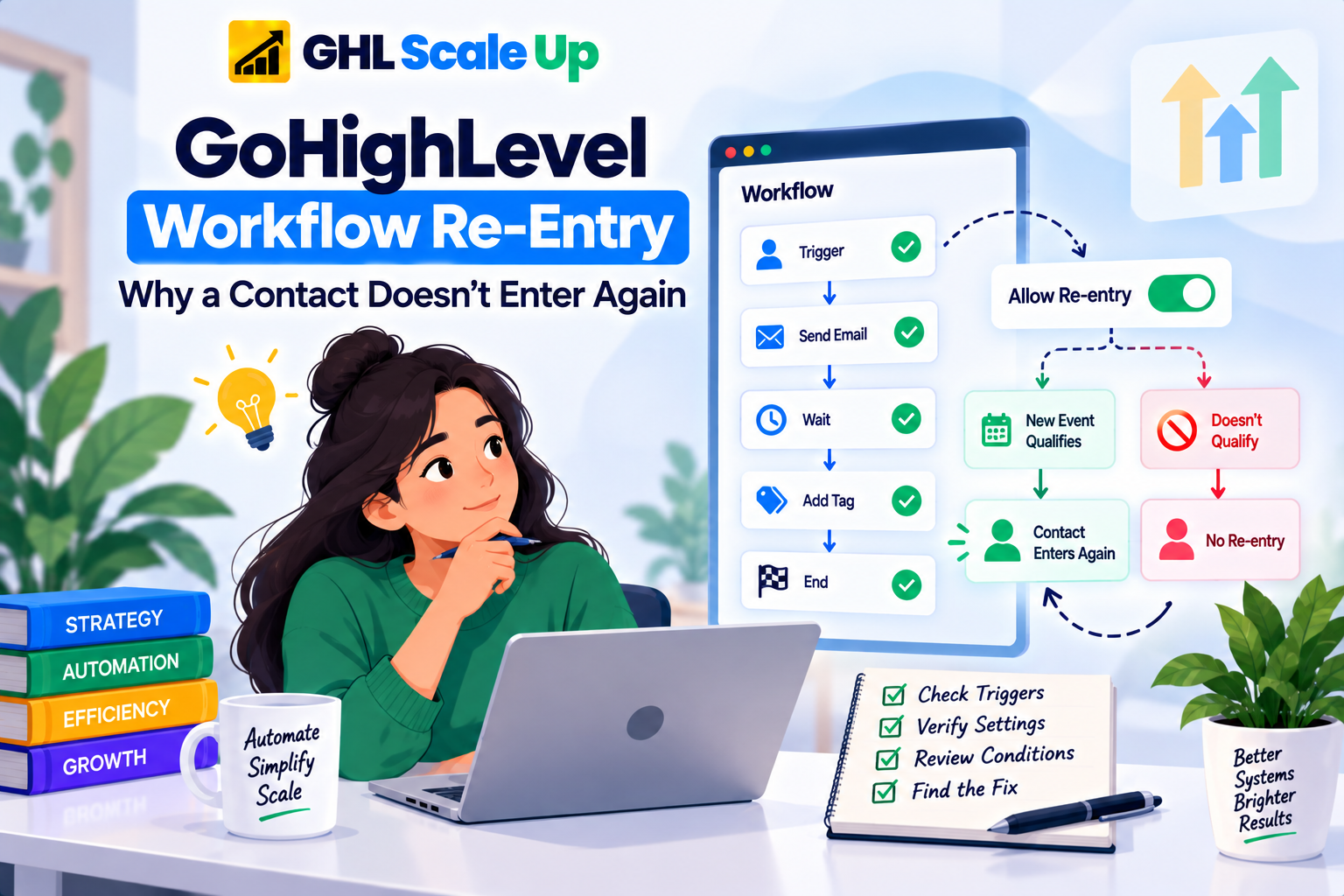
What Does Allow Re-Entry Do in GoHighLevel?
Allow Re-entry is a workflow-level setting: enabled, a contact can enter again after fully completing the workflow or being manually removed from it. Disabled, a contact who already has a completed or active run generally can't generate another one, even if the trigger fires again.
What it does not do is override everything else. A repeat event still has to satisfy the trigger's own filters form identity, pipeline and stage, tag, or whatever the trigger checks exactly as the original event did. Enabling Allow Re-entry doesn't fix a mismatched filter, a workflow that's still in Draft, or a second event that isn't actually the one the trigger is listening for. It removes one specific restriction; it doesn't relax the rest of the qualification logic.
Re-entry behavior also isn't identical across every trigger type, and this is where a lot of confusion comes from. Appointment-based triggers have a documented exception: a brand-new appointment booking re-enters the contact regardless of the Allow Re-entry setting, and a contact can even have more than one active run at once from separate appointments. But that exception is narrower than it sounds a trigger watching for an appointment status change, like a reschedule, still requires Allow Re-entry to be enabled and the updated appointment to match the trigger's filters. Recurring appointment series don't generate new entries through the standard booking trigger at all. Invoice-based triggers carry a similar always-allow exception for new invoices. Don't assume one appointment or invoice rule applies to every trigger on the account verify it for the specific trigger you're troubleshooting.
First Enrollment vs. Repeat Enrollment
| Situation | The Question That Actually Matters |
|---|---|
| First enrollment | Did the contact's event satisfy the trigger at all? |
| A second event occurs | Can this contact enter the workflow again, given its re-entry settings? |
| Second event happened, no second enrollment | Is re-entry allowed, and did the new event genuinely qualify? |
| Contact enrolled a second time | What happened during that new run a separate, execution-level question |
How Do You Troubleshoot GoHighLevel Workflow Re-Entry?
- Confirm the first enrollment. Enrollment History should show the contact actually entered previously don't assume from memory.
- Confirm the second event actually happened. Verify the specific action, not a similar one.
- Compare the two events directly. Same form? Same appointment type or calendar? Same pipeline and stage? Same relevant field values? A second event that differs from the first in any filtered attribute won't qualify the same way.
- Check Allow Re-entry in the workflow's settings.
- Check the trigger filters again, independent of re-entry a repeat event still needs to pass them.
- Check the contact's current state still active in this workflow, or genuinely finished.
- Check Enrollment History for a second record.
- If a second enrollment exists, stop troubleshooting re-entry. The remaining question belongs to execution troubleshooting, not this article.
Using Enrollment History to Confirm Re-Entry
You don't need a deep dive here that's a separate article but for re-entry specifically, Enrollment History answers exactly the question you need: does a second, distinct enrollment record exist for this contact, and when did it occur relative to the second event? A second record confirms re-entry worked; its absence, alongside a confirmed second event, points you back to Allow Re-entry and trigger filters rather than anywhere downstream.
It's Not Always Allow Re-Entry
Before you conclude the setting is the problem, rule out the alternatives each of these produces the exact same symptom:
- The second event genuinely didn't happen yet
- It happened, but it's a different event than the trigger expects
- The event happened but failed a trigger filter, unrelated to re-entry at all
- Relevant contact, opportunity, or appointment data changed between the first and second event
- The workflow's configuration itself changed since the first enrollment
- You're testing against the wrong contact or the wrong event
- The contact did re-enter, and the real issue is a downstream action that didn't run
Treating every "didn't enter again" as an Allow Re-entry problem is how people flip a setting, see nothing change, and conclude the platform is broken when the actual cause was never re-entry at all.
Why Doesn't the Same Contact Re-Enter After Submitting a Form Again?
Same sequence as above, applied: confirm the second submission actually happened, confirm it was the same form the trigger is watching, confirm Allow Re-entry is on, then check Enrollment History for a second record. If the problem turns out to be specific to how the form trigger itself behaves rather than re-entry, that's a dedicated form-trigger troubleshooting topic, not this one.
Why Doesn't a Contact Re-Enter After Another Appointment?
Appointment workflows have their own wrinkle, covered above: a new booking typically re-enters regardless of Allow Re-entry, but a status-change trigger like a reschedule still needs the setting enabled and the updated appointment to match every filter. If the appointment gets cancelled or marked no-show while a contact is mid-workflow, that contact is removed from the run entirely a different behavior from re-entry, and worth ruling out before assuming a setting is misconfigured. Deeper appointment-trigger-specific troubleshooting beyond re-entry belongs to its own dedicated topic.
Can an Opportunity Trigger a Workflow Again?
Yes, under the same general rules the new opportunity event has to satisfy the trigger's pipeline and stage conditions, and re-entry has to be permitted. One opportunity-specific detail worth knowing: a separate Allow Multiple Opportunity setting controls whether each opportunity tied to a contact runs its own independent execution. It's also worth knowing that simply updating an existing opportunity's details while it's active in a workflow does not restart that workflow it continues from wherever it currently is, using the updated values. That's a common point of confusion worth ruling out before assuming a re-entry problem. Deeper pipeline and stage-specific trigger troubleshooting belongs to its own dedicated topic.
Re-Entry vs. Workflow Execution
No second enrollment exists → the problem is still re-entry and trigger qualification everything above this section.
A second enrollment exists → re-entry worked. Continuing to adjust the Allow Re-entry setting at this point won't fix anything, because it already did its job. What's left is an execution question: did that second run actually complete the way you expected? That's a distinct diagnostic process, not a re-entry one.
Workflow Re-Entry Decision Tree
Has this contact entered the workflow before?
→ No this isn't a re-entry problem. Start with initial trigger and enrollment troubleshooting.
→ Yes continue.
Did a new triggering event actually occur?
→ No the problem is the event, not re-entry.
→ Yes continue.
Does the event satisfy every trigger condition?
→ No fix the qualification issue; re-entry isn't relevant yet.
→ Yes continue.
Is re-entry permitted for this trigger and contact state?
→ No review the re-entry configuration and any trigger-specific exceptions.
→ Yes continue.
Does Enrollment History show a second enrollment?
→ No continue investigating re-entry, qualification, and contact state.
→ Yes re-entry worked. Move to execution troubleshooting.
Common Re-Entry Scenarios
| What Happened | What to Check | Where to Go Next |
|---|---|---|
| Contact never entered the workflow at all | Trigger and qualification | Initial trigger troubleshooting |
| Contact entered once, not again | Re-entry setting, new event, trigger filters | This article |
| Allow Re-entry is disabled | Re-entry configuration | This article |
| Allow Re-entry is enabled, still no second enrollment | The actual event, filters, and contact state | This article |
| Second enrollment exists | Execution of that run | Enrollment History / execution troubleshooting |
| Problem is specific to a form trigger | Form trigger configuration | Form-specific troubleshooting |
| Problem is specific to an appointment trigger | Appointment trigger configuration and status handling | Appointment-specific troubleshooting |
| Problem is specific to an opportunity/pipeline trigger | Pipeline, stage, and multiple-opportunity settings | Opportunity-specific troubleshooting |
The Diagnostic Principle
A repeated event and a repeated enrollment are not automatically the same thing. Work the chain in order: previous enrollment, new event, trigger qualification, re-entry permission, then Enrollment History as the evidence that tells you whether it actually worked. If a second enrollment exists, the re-entry question is answered whatever's left is an execution problem, and that's a different diagnostic process entirely.
Frequently Asked Questions
What is workflow re-entry in GoHighLevel?
The ability for a contact who already has one enrollment in a workflow to generate a second, independent enrollment when a later event satisfies the trigger again governed by the workflow's re-entry configuration, not automatic.
What does Allow Re-entry do in GoHighLevel?
It permits a contact to enter a workflow again after completing or being removed from a previous run. It doesn't override trigger filters a repeat event still has to qualify on its own.
Can the same contact enter a GoHighLevel workflow more than once?
Yes, if Allow Re-entry is enabled (or the trigger has its own re-entry exception, as some appointment and invoice triggers do) and the new event satisfies every trigger condition.
Why does my GoHighLevel workflow trigger once but not again?
Most commonly because Allow Re-entry is disabled, the second event doesn't match the trigger's filters the way the first one did, or the second event hasn't actually happened yet.
Why isn't my workflow re-enrolling a contact even though Allow Re-entry is enabled?
The setting only removes the re-entry restriction the new event still has to independently satisfy the trigger. Check the event and filters again, separately from re-entry.
How can I confirm whether a contact entered the workflow again?
Check Enrollment History for that contact. A second, distinct record confirms re-entry; its absence points back to the trigger and re-entry configuration.
Does a new triggering event always cause a workflow to re-enroll?
No. It only does if re-entry is permitted for that contact's state and the event fully satisfies the trigger's conditions.
What should I check if the contact re-entered but the workflow action didn't happen?
Stop looking at re-entry the trigger worked. Investigate execution for that specific run instead.
Related Articles in This Series
Need Help Fixing a Workflow Re-Entry Issue?
We diagnose and fix GoHighLevel workflow re-entry problems for agencies and businesses.
Book Your Free Troubleshooting Session
GHL Scale Up is a specialised GoHighLevel implementation and SaaS growth agency. Based in India, we serve agencies and businesses across 6 countries with 200+ GoHighLevel builds delivered. This guide reflects direct experience troubleshooting workflow re-entry issues across hundreds of GHL accounts. All troubleshooting details verified against official documentation as of September 2026.
ghlscaleup.com