
Two Sources, Two Levels of Urgency: What the Notice Says and What the Documentation Says
Two kinds of HighLevel source describe this change, and they don't carry the same weight. Keeping them apart matters because one of them is the reason you're reading this.
| Source | What It Says | What It Means for You |
|---|---|---|
| HighLevel's account notification | API v1 was deprecated on December 31, 2025, and will be shut down on November 30, 2026. From December 1, 2026, v1 endpoints are unavailable and integrations still making v1 requests may fail. | If you received it, this is your working deadline. |
| HighLevel's API documentation and migration guide | V1 reached end-of-support on December 31, 2025. Existing connections may continue to work, with no support or updates. The documentation reviewed for this guide does not state a shutdown date. | "May continue to work" describes support status. It is not a promise. |
| HighLevel's June 26, 2026 post | No immediate shutoff; active V1 integrations continue to function for now; new V1 keys are disabled; plan the migration rather than wait for an outage. | "For now" is the operative phrase. |
If you received the notice, plan to its date. The absence of that date from public pages is not evidence it will move. HighLevel has moved a deprecation date before: an older version of its webhook guide gave July 1, 2026 for a signature change, and current versions say September 1, 2026. Plan on the date you were given.
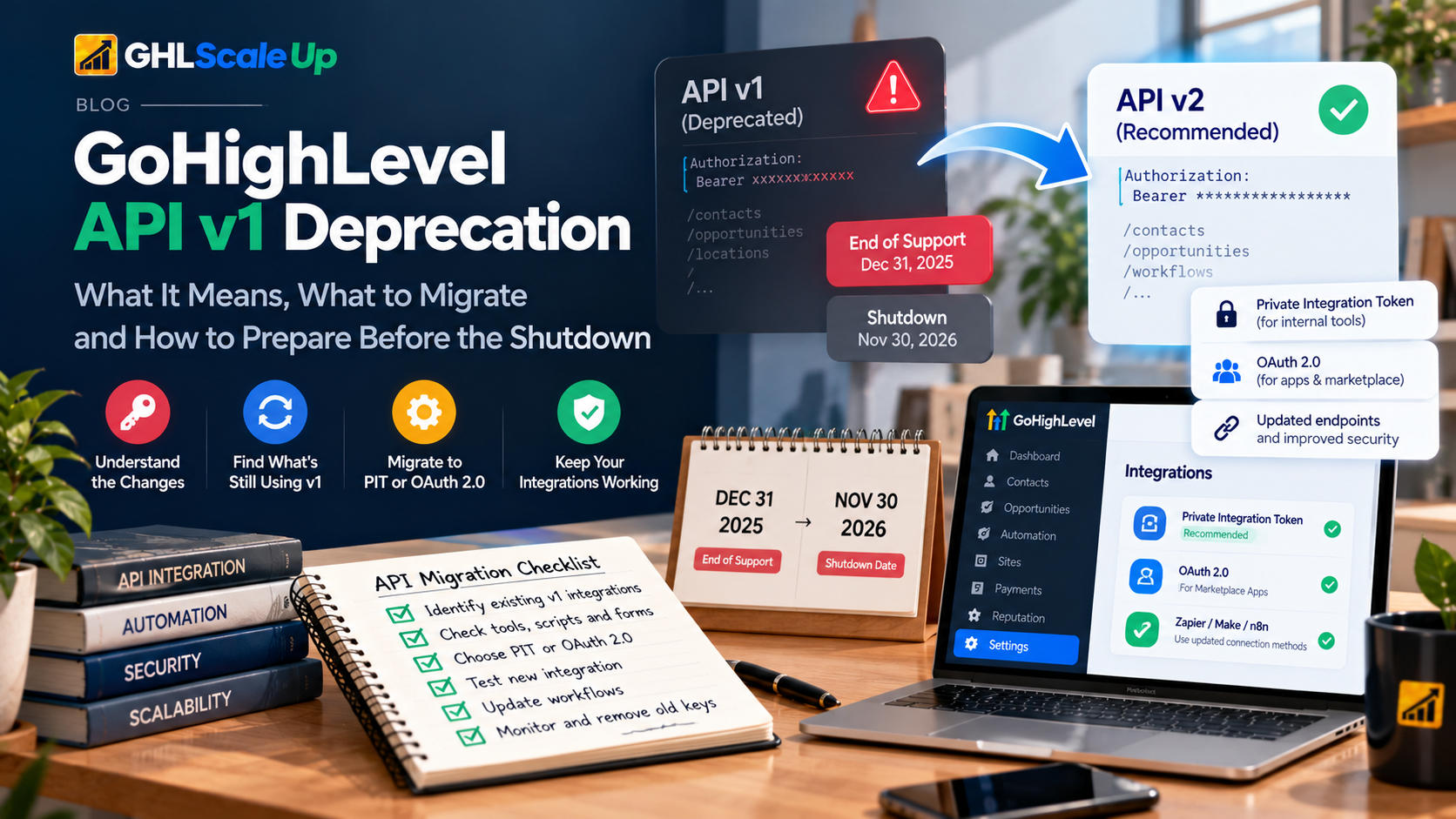
Deprecation, End-of-Support and Shutdown Are Three Different Events
| Date | What Happened or Will Happen | Source |
|---|---|---|
| December 31, 2025 | End-of-support. No fixes, security patches, new features or troubleshooting for v1. Existing integrations may keep working. | Public documentation |
| 2026 (undated in documentation) | New legacy key creation removed. Legacy keys inactive for 90 days are marked Expired. | Public documentation |
| November 30, 2026 | Shutdown date. | Account notification |
| December 1, 2026 | v1 endpoints unavailable; integrations still making v1 requests may fail. | Account notification |
End-of-support is not a shutdown. For almost a year, "it still works" has been true and has meant that nobody is maintaining it. An integration that works today is not evidence that it will work after the shutdown date, and the second row of that table is already running on its own clock.
What "API v1" Means in Plain English
Sometimes the action you want can't happen entirely inside HighLevel. Another system needs to push information in, or pull it out. An API is the doorway for that conversation. API v1 is the older doorway. It is opened with a legacy API key, which HighLevel describes as unrestricted access to your account's data. The newer doorway works with tokens that carry only the permissions you choose.
That one fact explains most of the urgency. A legacy key is a master key. Anything holding it, whether a tool, a contractor's script or an old laptop, can act on the whole account, which is why HighLevel is retiring the model.
The Terms HighLevel Uses, Kept Apart
| Term | What It Is | Why It Matters Here |
|---|---|---|
| API v1 (legacy API) | The older interface, authenticated with an API key | The thing being retired |
| Legacy API key | A broad-access credential created at agency or sub-account level | New ones can't be created; inactive ones expire |
| Current API (called "v2" in HighLevel's material) | The scoped interface for contacts, opportunities, workflows and more | Where migrated integrations land |
| Version header | A per-request header that selects a version of the current API. Date-based (such as 2021-07-28) or named (v3 onward) | Not the same as "API v1". The shutdown concerns the legacy key interface, not which date-based version a current integration sends |
| Private Integration Token (PIT) | A fixed token you create in settings with chosen scopes | HighLevel's recommended replacement for internal tools |
| OAuth 2.0 | An authorization flow for apps that other accounts install; tokens expire daily and refresh | The path for public or Marketplace apps |
| Marketplace (public) app | An app other HighLevel accounts install | Needs OAuth, not a PIT |
| Webhook | HighLevel sending event data to a URL you control | A different mechanism from API calls into HighLevel |
Private Integration Token in Four Lines
- What it is: a credential an integration uses to authenticate with HighLevel, created in settings with only the permissions (scopes) you choose.
- Why it exists: to replace the broad access of a legacy key with least-privilege access.
- How it affects you: a migrated integration needs a new credential, and often a different set of permissions, rather than a copy of the old one.
- When it matters: for internal tools and automations that connect one business's account. HighLevel's guidance is that PITs are for internal use and OAuth 2.0 is for apps other accounts install.
Who Is Actually Affected: Not Every HighLevel User
The shutdown matters if something in your environment still calls the legacy API. Plenty of HighLevel accounts run entirely on native workflows, forms and integrations that already use the current API and never touch a legacy key. If you received the notice, something does. The task is to find out what.
Seeing Zapier, Make or n8n in your stack proves nothing by itself. The question is which connection each one uses.
| Where It May Hide | Why It May Use v1 | How to Check |
|---|---|---|
| Zapier | A connection made with a pasted API key rather than a current sign-in. HighLevel's guide says to use the latest actions and versions of Zapier's HighLevel app. | Open each Zap's HighLevel step and check the connected account and app version |
| Make | Make labels its API-key connection types (Company and Agency) as deprecated and recommends its OAuth 2.0 connection types | Check the connection type on each HighLevel module |
| n8n | n8n's own documentation says its API-key credential is for API v1 and its OAuth2 credential is for API v2 | Check which credential each HighLevel node uses |
| Custom forms and scripts | A key pasted into code years ago | Search code, environment settings and server logs for the legacy host and key use |
| Server-side apps, middleware, client portals | Built before Private Integrations existed | Ask whoever maintains them |
| External CRMs and lead-routing tools | Sync built on a key | Check the integration settings on the other side |
| Reporting dashboards | Scheduled pulls that run on a timer | Check the data source's credentials |
| Agency-built systems for clients | Reused patterns across sub-accounts | Check each sub-account and each client project |
The Hard Part Is Finding What Still Depends on the Old API
Legacy integrations survive for years because they work. Nobody writes documentation for something that has never failed. The original developer moves on. The credential lives inside another tool, so the business owner sees only the outcome: a contact appears, a number updates, a notification arrives. The mechanism is invisible until it stops.
A business can have hundreds of workflows inside HighLevel and still depend on a single undocumented script outside it for lead capture. That is why this reads as a developer notice and behaves like a continuity problem. Think of every connection as one of three flows, and ask where a credential sits in each.
| Flow | Direction | Where the Legacy Dependency May Sit |
|---|---|---|
| A | External app or form → integration → HighLevel API → contact or opportunity | The credential the integration uses to write into HighLevel |
| B | HighLevel → API read → external system or dashboard | The credential the external system uses to pull data out |
| C | HighLevel workflow → webhook or automation → external application | Usually not an API v1 call itself, but the receiving system may call back using a legacy key |
How to Find Out Whether Your HighLevel Setup Still Uses API v1
Work through these in order. Each answers a different question, and none requires writing code.
- Read the notice for specifics. Note which account or sub-account it names and anything it lists. Don't assume it names the tool.
- Look for legacy API keys in settings, at both agency and sub-account level. A key marked Expired hasn't been used for 90 days, which tells you it is either dormant or seasonal. Keys still shown as active are being used, or were refreshed recently.
- List every tool that talks to HighLevel: Zapier, Make, n8n, custom applications, forms, scripts, CRM integrations, middleware and agency-built systems.
- Check the connection type inside each tool, using the table above. A connection described as API key, legacy or deprecated is a candidate.
- Find out who built each one, where its documentation is, and whether that person is still reachable.
- Don't use revocation as a test. Revoking or deleting a key to see what complains is a production experiment. HighLevel's own guide says to leave the old setup running until the replacement works.
The help pages reviewed here don't describe a report showing which tool made which v1 call, so discovery usually comes from the tool side and from logs. Keep a simple inventory as you go.
What Could Stop Working, and What Probably Won't
Your whole HighLevel account is not going offline. Specific integrations that depend on unavailable v1 endpoints may fail, and how badly depends entirely on what each one does.
| Flow Affected | What May Happen | How You'd Notice |
|---|---|---|
| Web form or ad lead → HighLevel | Leads stop arriving as contacts | A quiet inbox and a drop in new contacts |
| HighLevel → external CRM or tool | Data stops syncing outward | Two systems drifting apart |
| Custom script or application | Requests return errors | Error logs, if anyone reads them |
| Reporting dashboard | Numbers stop updating | Stale figures that look plausible |
| Workflows that depend on the incoming data | They never start because the contact never arrives | Follow-up that silently doesn't happen |
| A seasonal or quarterly integration | Its key may already be marked Expired after 90 days of inactivity | A failure that looks unrelated to the shutdown |
The dangerous failures are the quiet ones. A loud error gets fixed. A lead form that stops creating contacts looks, from the outside, like a slow week.
Is This Just Replacing the API Key? Usually Not
HighLevel's migration guide tells you not to assume this is only an authentication change, because requests and responses can differ between the legacy and current APIs. Its June 26 post says most migration problems come from scope mapping, authentication handling and webhook configuration, not from changing a URL.
| What May Change | Legacy (v1) | Current API |
|---|---|---|
| Credential | API key | Private Integration Token or OAuth 2.0 token |
| Where it's sent | Authorization header with the key (commonly documented by integration platforms) | Authorization header (HighLevel's migration guide shows the Bearer format) |
| Host | A v1 host, commonly documented as rest.gohighlevel.com/v1 | services.leadconnectorhq.com |
| Version | None | A Version header on each request |
| Permissions | Everything in the account | Only the scopes you select |
| Request shape | As the v1 endpoint defines it | As the current endpoint defines it; HighLevel's own create-contact example sends locationId in the body |
| Response handling | v1 response format | Current response format; code or tool mappings may need changing |
| Field mapping and context | Account or location implied by the key | Location or agency context may need to be explicit |
| Errors and limits | Older behaviour | Current behaviour and documented rate limits; confirm they suit your volume |
| Webhooks | Separate concern | Check signature verification |
The v1 host and the header details come from integration-platform documentation rather than HighLevel's current pages, so confirm them against your own code. The pattern holds regardless: a credential swap alone rarely finishes the job.
What Replaces API v1: Private Integration Token, OAuth 2.0 or Something Else
There isn't one replacement. HighLevel's own guidance splits it by what the integration is, and a wrong choice here is costly to undo.
| Situation | Likely Path | Why | Watch For |
|---|---|---|---|
| An internal tool or automation connecting your own account (custom script, n8n or Make calling the API) | Private Integration Token | Scoped, created in settings, HighLevel's recommended path for internal tools | Token is shown once. Create one per tool. Rotation is recommended every 90 days with a 7-day overlap. Up to 20 per agency and per location |
| An app other accounts install | OAuth 2.0 | PITs are for internal use only; OAuth supports multi-account installs | Access tokens expire daily and need refreshing |
| Zapier or Make built-in connector | The tool's current connection method | The connector handles authentication its own way | Use the tool's latest HighLevel app version and its OAuth-style connection; check its current documentation |
| An agency running many client sub-accounts from one tool | An architecture decision: agency-level PIT, per-sub-account PITs or an OAuth app | Each fits a different access pattern | Don't default to one broad token. Least privilege is the point |
| A flow that doesn't need an external tool at all | Rebuild natively with workflows or webhooks | The migration is a chance to delete an integration | Confirm the native feature actually covers every step |
Private Integrations are created at agency and sub-account level. By default agency admins can create them, and the permission can be restricted by role. If you can't find the setting, HighLevel says to check that the feature is enabled under Labs. HighLevel's API documentation also still describes differences in API access by plan, so confirm what yours supports before committing to a design.
A Safe Migration Sequence
Notice received → Find the dependency → Choose the path → Rebuild alongside → Test → Cut over → Retire the old
The sequence in one line. The highlighted step is where HighLevel's guidance is most specific: don't edit the live automation.
- Inventory every legacy dependency: the keys, the tools using them, what each one does and who owns it.
- Document what each integration really does before building anything: trigger, source, action, endpoint, fields, destination, permissions, expected response and downstream effect.
- Decide the architecture using the table above. Don't force a PIT onto everything.
- Create replacement credentials with only the scopes that integration needs. Copy the token somewhere secure immediately, because HighLevel shows it once.
- Build the new implementation alongside the old one. HighLevel's guide says not to edit existing, active automations. Keep them running, create new ones, and duplicate rather than modify.
- Test properly (next section), with a test lead first.
- Cut over deliberately. Turn on the new automation, pause the old one, watch the first real records, and only then delete the old automation and key. Running both live against the same trigger can process one lead twice.
- Monitor and document. Write down what exists now, which token belongs to what, and when each is due for rotation.
Testing the Replacement: Why a Successful Login Proves Almost Nothing
A successful authentication test proves a credential is valid. It doesn't prove the business process works, which is the thing you're actually trying to protect.
| Layer | Question | A Pass Proves | It Doesn't Prove |
|---|---|---|---|
| Authentication | Can the new credential authenticate? | The token is valid | That it can do anything useful |
| Authorization | Does it have the right scopes? | The permitted actions | That every needed action is permitted |
| Endpoint | Is the right current endpoint used? | The call reaches something | That it's the right one |
| Request | Are parameters and fields correct? | The shape is accepted | That values are right |
| Response | Does the tool read the new response correctly? | Parsing works | That every field maps |
| Business process | Does the intended action happen? | A contact or record appears | That it appears in the right place |
| Downstream | Did the next system receive it? | The chain started | That it finished |
| Error handling | What happens when the API returns an error? | The failure path exists | That anyone notices |
| Duplicates | Could one record be processed twice? | No repeat in the test | No repeat in production |
| Production behaviour | Does it hold under realistic volume and edge cases? | Normal cases work | Rare ones. Test blank fields and repeat submissions |
One successful record is a demonstration, not a test. Run at least a second, different, realistic record before trusting it.
When a Migrated Integration Misbehaves
| Problem | Likely Cause | What to Check | Corrective Action |
|---|---|---|---|
| It authenticates but doesn't create the expected record | A missing scope, wrong endpoint, wrong location ID, changed request format or field mapping | The scopes on the token, the endpoint and request body against HighLevel's current documentation, and the location ID | Correct the scope or request; test with a single record |
| It works for one sub-account but not another | A token created at sub-account level used against a different sub-account, or location context missing | Where the token was created and which location each request names | Create the right token level, or make the location explicit |
| Records are processed twice after cutover | Old and new automations both live on the same trigger | Which automations are active for that trigger | Pause the old one; confirm no duplicate Zap or scenario remains |
| Everything worked, then stopped later | A rotated or expired token, or a copied token never updated | Token rotation dates and which tool holds which token | Update the tool with the new token; use the rotation overlap |
| Webhooks arrive but are rejected | Signature verification still expects the old header | Which signature header the receiver verifies | Verify the current header |
| A downstream workflow doesn't start | The upstream contact never arrived or arrived without expected fields | The contact record and the workflow's trigger | Fix the upstream record first |
Ten Migration Mistakes That Cause Outages
- Deleting the old key before the replacement works.
- Editing the live automation without a copy. Duplicate it, then change the duplicate.
- Assuming it's a credential swap. Requests, responses and scopes may differ.
- Granting the new token too much. Copying broad v1 access into a PIT defeats the purpose.
- Testing only that authentication succeeds.
- Testing one record and calling it done.
- Ignoring downstream systems. A contact created correctly can still fail to trigger what comes next.
- Migrating one integration and missing another. An inventory is the defence.
- Not documenting the result. The next person will face the same mystery you did.
- Discovering late that the developer is gone. Find out now who built each integration.
A Separate Deprecation in the Same Project: Webhook Signatures
Webhooks are HighLevel sending event data to a URL you control, which is a different mechanism from API calls into HighLevel. HighLevel's webhook guide says the legacy X-WH-Signature header (RSA) is deprecated on September 1, 2026, after which webhooks are signed only with X-GHL-Signature (Ed25519). An earlier version of the guide gave July 1, 2026 for the same change.
This isn't part of the API v1 shutdown. It matters because a project that moves every API call to a Private Integration can still leave a webhook receiver verifying only the old header. Many simple receivers don't verify signatures at all, in which case there is nothing to change. If yours does, check it now, since the date in the current guide has passed.
Can You Migrate This Yourself, or Does It Need a Specialist?
The more undocumented, interconnected and business-critical a system is, the more a proper audit is worth. Complexity, not importance, is what separates the two columns below.
| Situation | Self-Migration? | Specialist Worth Considering? |
|---|---|---|
| One simple internal integration you understand | Possibly | Optional |
| One known Zapier or Make connection | Possibly | Optional |
| An unknown legacy dependency | Risky | Yes. Discovery is the hard part |
| Custom code | Usually needs technical review | Yes |
| Multiple integrations | Risky | Yes |
| A client-facing production system | Risky | Yes |
| Multiple sub-accounts | Risky | Yes |
| The original developer is unknown or unreachable | Risky | Yes |
| Business-critical lead routing | Risky | Yes |
| A custom API application | A technical migration | Yes |
| Several legacy API keys | An audit is advisable | Yes |
Where you can get help matters. HighLevel's API documentation says its Support team doesn't provide setup code auditing or developer consulting, though bugs can be reported and a developer community exists. A single, well-defined integration is often a freelancer job. Anything spanning several systems benefits from architecture planning and testing, which is the freelancer-versus-agency distinction explained in where to hire GoHighLevel experts, along with vetting questions and the account-access questions to settle before anyone touches your account.
What to Gather Before You Ask Anyone for Help
- The HighLevel notice email, in full.
- The affected account and sub-accounts.
- Each integration's name, what it does and the external tool involved.
- Which credential each one uses, described without exposing the secret.
- Screenshots of settings, scenarios and Zaps with secrets hidden.
- How it behaves today and what correct behaviour looks like.
- Known errors, and when they started.
- Any developer documentation or code repository.
- Webhook URLs and what receives them.
- Which workflows are business-critical.
- Who originally built each integration, and whether they're reachable.
Never paste a live API key, token or secret into a public support thread, an article comment, a screenshot or an AI prompt. HighLevel says to share a Private Integration Token only with trusted parties and notes it can't be shown again. Granting a developer access to create their own scoped integration is often safer than handing over an existing credential.
Why Waiting Makes This Harder
Nothing about this requires panic. It requires time, and the time shrinks in predictable ways as the date HighLevel gave you approaches:
- There is less time to find unknown dependencies, and discovery is the slowest part.
- Tracking down the original developer takes longer than anyone expects.
- There is less room to test with realistic volume and edge cases.
- A planned migration turns into an emergency one, done under failure rather than beside a working system.
- Scheduling production changes gets harder when several integrations all need attention in the same weeks.
- Keys inactive for 90 days may already be marked Expired, so some failures can arrive earlier than any shutdown date.
How an Integration Audit Works, and Where GHL Scale Up Fits
If your setup is complicated, the useful first step isn't a rebuild. It's an audit that answers four questions: what is calling HighLevel, what does each call do, what replaces it, and what happens to the business if it stops.
GHL Scale Up's integrations and API development service covers custom API connections, webhooks and Zapier or Make integrations, and describes a process that runs from discovery and architecture mapping through connection and authentication, workflow configuration, and testing with real data and monitoring. For an API v1 warning, that translates into an audit-first sequence:
Audit → Identify → Plan → Rebuild → Test → Cut over → Validate
- Audit and identify: list every legacy credential and the tools, scripts and forms using each one.
- Plan: establish what each integration does, what replaces it, and whether the credential type is a PIT, OAuth or something else.
- Rebuild and test: build alongside the old integration and test the layers in the table above.
- Cut over and validate: switch deliberately, watch real records, then retire the old credentials.
Whether a given setup turns out to be a quick connection change or a rebuild is what an audit establishes. No outcome is promised in advance.
Not sure what in your HighLevel account is still using API v1? The integrations service page above describes how to request an integration audit. Bring the checklist from the previous section.
The Question to Answer This Week
The deadline matters less than what it forces. Every business that received this notice is being asked a question it should have been able to answer already: what is connected to our CRM, who built it, and what breaks if it stops. The migration is the smaller task. The inventory is the one most people skip.
Start there. Even if you end up changing a single credential in ten minutes, you'll know your lead capture, your sync and your reporting no longer depend on something nobody can name.
Frequently Asked Questions About the HighLevel API v1 Deprecation
What is HighLevel API v1?
The older HighLevel API, authenticated with a legacy API key that gives broad access to an agency's or sub-account's data. HighLevel's materials also call it API 1.0.
Is HighLevel API v1 deprecated?
Yes. HighLevel's documentation says it reached end-of-support on December 31, 2025. Existing integrations may continue to work but receive no updates or support, and new legacy API keys can't be created.
When is HighLevel API v1 shutting down?
HighLevel's account notification says November 30, 2026, with v1 endpoints unavailable from December 1, 2026. HighLevel's public documentation reviewed for this guide does not state a shutdown date, so treat the notification as the source if you received it.
What happens when API v1 is shut down?
Integrations still making v1 requests may fail. What that looks like depends on the integration: leads that stop arriving, data that stops syncing, errors in scripts or dashboards that stop updating.
How do I know if I use HighLevel API v1?
Look for legacy API keys in agency and sub-account settings, list every tool that connects to HighLevel, and check each connection type. Make labels its API-key connections deprecated, n8n's API-key credential is for v1, and a Zap may use a legacy key connection. The help pages reviewed here don't describe a usage report.
Are HighLevel API keys deprecated?
Legacy API keys belong to API v1, which is end-of-support. New legacy keys can't be created, and keys unused for 90 days may be marked Expired. HighLevel recommends Private Integration Tokens for new credentials.
What replaces HighLevel API v1?
It depends on the integration. HighLevel points internal tools and automations to Private Integration Tokens and public or Marketplace apps to OAuth 2.0. Built-in connectors in tools like Zapier, Make and n8n have their own current connection types.
Do Zapier, Make or n8n connections need to be migrated?
Only if the specific connection uses the legacy API key. Check each tool's connection or credential type rather than assuming either way.
Is the migration only an API key change?
Not necessarily. HighLevel's migration guide says not to assume it is only an authentication change, because requests and responses can differ. Scopes, headers, endpoints, field mapping and error handling may all change.
Can I migrate a HighLevel API integration myself?
Possibly, if it is one simple integration you fully understand. Unknown dependencies, custom code, multiple integrations, client-facing systems and business-critical lead routing are better audited by someone technical first.
Who can migrate a HighLevel API integration?
A developer or HighLevel integration specialist. HighLevel Support says it doesn't provide setup code auditing or developer consulting, though it accepts bug reports and runs a developer community.
Related Articles in This Series
Need Help Migrating from API v1?
We help businesses audit and migrate their HighLevel API v1 integrations safely.
Book Your Free Assessment
GHL Scale Up is a specialised GoHighLevel implementation and SaaS growth agency. Based in India, we serve agencies and businesses across 6 countries with 200+ GoHighLevel builds delivered. This guide reflects direct experience auditing and migrating HighLevel API v1 integrations. All product details verified against HighLevel documentation as of October 2026.
ghlscaleup.com