
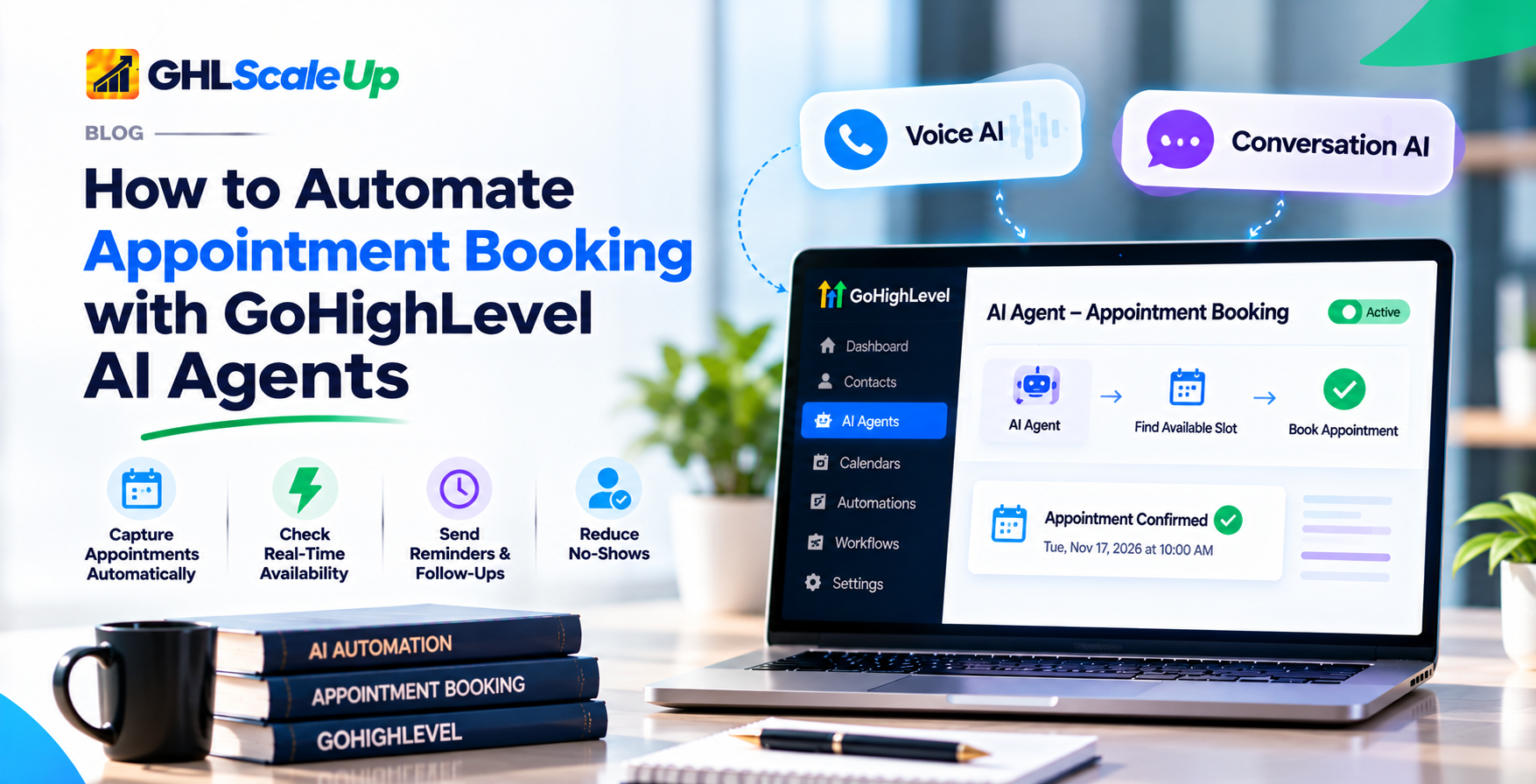
What does what
The AI agent holds the conversation and picks the slot. The calendar decides which slots exist and sends booking confirmations. Workflows handle everything after the booking, such as reminders, pipeline stages and no-show follow-up. Mixing these up is the most common reason a setup disappoints.
Can a GoHighLevel AI Agent Book Appointments Automatically?
Yes, if you configure it. HighLevel's Voice AI article says the agent offers open time slots during a live call, collects missing details, and confirms the booking without sending the caller to an external page. The Conversation AI article says the bot checks availability on the connected calendar, suggests time slots, and confirms the booking in the conversation.
Two details from the documentation are worth knowing early. Conversation AI interprets dates from the original message timestamp, skips slots that have already passed, and blocks a booking that conflicts with an appointment the contact already has. And Conversation AI does not collect online payment during booking, so a deposit has to be handled another way.
Voice AI or Conversation AI: Which Should Book Your Appointments?
Choose by where your contacts already talk to you, not by which feature sounds newer. Many businesses end up using both, each on its own calendar rules.
When Should You Use Voice AI for Booking?
Use Voice AI when the person is likely to call: urgent services, mobile-first customers, or anyone who will not fill out a form. Remember that Voice AI does not currently support the Services option in its booking setup, and call minutes are billed separately from text conversations.
When Should You Use Conversation AI for Booking?
Use Conversation AI when leads arrive by SMS, website chat, Facebook, Instagram, WhatsApp or email. It supports Multiple Calendars and Services on prompt-based bots, which is useful when one business offers several appointment types.
Voice AI vs Conversation AI Booking Compared
| Question | Voice AI | Conversation AI |
|---|---|---|
| Single calendar | Yes | Yes |
| Multiple calendars | Yes, at least two, intent-based | Yes, prompt-based bots only |
| Services | Not available | Prompt-based, public services only |
| Reschedule or cancel | Conditional, confirm in account | Toggles for form-based bots; confirm for others |
| Online payment in booking | Not documented | Not collected |
| Human handoff | Call transfer action (API docs) | Human handover, stop bot, transfer bot |
How Does Automated Appointment Booking Work Step by Step?
The flow below is the same in both agents, with the channel changing the experience. Step 8 belongs to the calendar and workflows, not the AI.
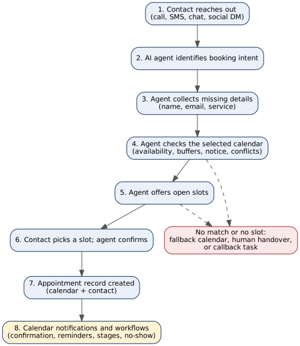
- Contact reaches out by call, text, chat or social message.
- The agent identifies booking intent from the conversation.
- It collects missing details, such as an email address, before confirming. Qualification answers can be gathered first and saved to contact custom fields.
- It checks the selected calendar, which applies availability, buffers, minimum notice and conflict settings.
- It offers open slots. In Voice AI single-calendar mode you control how many days, slots per day and hours between slots are offered.
- The contact picks a slot and the agent confirms it.
- An appointment is created on the calendar and tied to the contact.
- Calendar notifications and workflows take over for confirmations, reminders, stages and follow-up.
What Do You Need Before You Set Up AI Booking?
- A GoHighLevel sub-account with Voice AI or Conversation AI available. Plan and region availability is not stated in the booking articles, so check yours.
- At least one calendar with availability, duration, buffers and booking rules already set. Two or more if you want intent-based routing.
- Any external calendar you rely on connected, so existing events block slots.
- A decision about which contact details the agent must collect.
- A plan for what happens when the AI cannot book: who gets notified and how.
- Funding for AI usage. See the cost section below.
How Do You Set Up the Calendar So the AI Offers the Right Slots?
The agent can only offer what the calendar allows. If the AI offers odd times or none, look at the calendar first.
Which Calendar Settings Change the Slots the AI Can Offer?
| Setting (as named in the calendar availability article) | What it controls | Effect on AI booking |
|---|---|---|
| Slot Duration | Length of the appointment | Sets how long each offered slot is |
| Slot Interval | How often start times occur | Sets which start times can be offered |
| Buffer | Time kept before or after bookings | Removes back-to-back slots |
| Appointments per Slot | Bookings that can share a slot | Above 1 allows overlaps, per the article's FAQ |
| Appointments per Day | Daily cap, per calendar | Full days offer nothing |
| Minimum Scheduling Notice | Lead time required | Hides near-term slots |
| Date Range | How far ahead people can book | Limits how far out the AI can offer |
| Office Hours | When bookings are allowed | Separate from the AI agent's own working hours |
This article was last modified in July 2024, so setting names may differ slightly in your account. The HighLevel Voice AI article confirms the agent respects availability, buffers, minimum notice and conflict settings. Time zone handling and round robin are not explained in the sources read here, so confirm them in your account if you have a team or contacts in other time zones.
Should You Use One Calendar or Multiple Calendars?
Use one calendar if every appointment is the same kind. Use multiple calendars when different services, departments or specialists need different rules. Each calendar gets a short description and optional keywords, and you can set a fallback calendar for requests that match nothing.
- Keep descriptions short and avoid overlapping phrases between calendars (Voice AI guidance).
- Keep the list focused. HighLevel sets no maximum for Conversation AI but recommends a concise list for accurate matching.
- In Conversation AI, calendar details are only used to classify intent. If the bot should talk about those services, add that information to the prompt.
- Multiple calendars in Conversation AI need a prompt-based bot.
How Do You Set Up Voice AI to Book Appointments?
These steps follow HighLevel's Voice AI booking article (modified 10 September 2026). Menu labels may change, so match them to your account.
- In the sub-account, open AI Agents > Voice AI and create or open an agent.
- Review the basic agent setup, including agent details and phone or availability settings.
- In the Actions section, click New Action and select Appointment Booking. (The same article also says "Book Appointment" elsewhere; confirm the label in your account.)
- Choose Single Calendar or Multiple Calendars.
- For a single calendar, pick the calendar and set Offering Days, Appointment slots per day and Hours between slots.
- For multiple calendars, add eligible calendars, write a short description and routing cues for each, and set fallback behavior if wanted.
- Save, then run test calls before routing real callers to the agent.
Where data lands: recordings, transcripts and summaries appear in Voice AI call logs; qualification answers go to contact custom fields; custom booking form answers go to the appointment record.
How Do You Set Up Conversation AI to Book Appointments?
These steps follow the Conversation AI booking article (modified 27 October 2026).
- Open AI Agents > Conversation AI and create or open a bot.
- Set the bot name, wait time before responding and initial message.
- Under Bot Goals, choose the contact details to collect. HighLevel recommends collecting only what you need.
- Enable Appointment Booking and pick the calendar. Choose Single Calendar, Multiple Calendars (prompt-based only) or Services (prompt-based only).
- Add instructions covering services, availability and the booking flow in the prompt and training content.
- Set post-booking and cancel or reschedule options if you want them.
- Save and run the bot in trial mode before going live. New bots may start Off, and Suggestive mode lets staff review replies before Auto-Pilot sends them.
Example prompt wording (illustrative, adapt before use)
This is an example written for this guide, not text from HighLevel. It shows the kind of instructions that go in the prompt. The booking action itself is configured in the Appointment Booking setup, not in the prompt.
You help visitors of Example Dental book a cleaning or a consultation. Ask for their name and email before offering times. Only offer times returned by the calendar. Never guess availability. If the person asks about pricing or insurance, answer from the knowledge provided, and if you do not know, hand the conversation to a human. Do not promise outcomes or give medical advice.
How Do You Send Confirmations and Reminders After the AI Books?
The agent books; other parts of the system notify. HighLevel says booking confirmations come from the calendar's notification settings and that Voice AI post-call emails are separate. Reminders, stage changes and no-show follow-up are normally built in workflows, using the appointment events your account offers.
| Job | Owner | Where to set it |
|---|---|---|
| Offer and book the slot | AI agent | Voice AI action or Conversation AI Appointment Booking |
| Decide which slots exist | Calendar | Calendar availability settings |
| Send booking confirmation | Calendar notifications | Calendar notification settings |
| Send reminders, move pipeline stage, chase no-shows | Workflow | Workflows (see the workflow automation guide) |
| Alert staff when AI is stuck | Handover or workflow | See how to notify a human from Conversation AI |
Workflow trigger names for appointments were not verified in this research. Check the trigger list in your account before building.
Can GoHighLevel AI Agents Reschedule or Cancel Appointments?
Sometimes, and it depends on the agent and the bot type.
- Conversation AI form-based bots: toggles under Bot Goals > Appointment Details let the bot reschedule or cancel, including several appointments in one conversation. The article says this needs Lab features, and it is inconsistent about whether the activation can be undone, so read the prompt in your account before enabling.
- Conversation AI general: the setup article says bots can help contacts book, reschedule or cancel, based on your configuration.
- Voice AI: the booking article does not mention rescheduling or cancelling. Another article says it works only if enabled for the agent, without steps. Confirm in your account before promising callers this option.
Whether the contact is notified of a change depends on your calendar and workflow settings.
What Happens When the AI Can't Find a Slot or the Booking Fails?
Plan this on purpose. The documentation describes Voice AI fallback behavior (show available services, use a fallback calendar, or trigger another guided action) but not every failure case. Conversation AI offers human handover and stop bot on prompt-based and flow-based bots.
| Situation | What to configure |
|---|---|
| Request matches no calendar | A fallback calendar |
| No slots in the offered window | Widen Date Range or Offering Days; review minimum notice and daily caps |
| Caller wants a person | Call transfer (Voice AI API lists a CALL_TRANSFER action) or human handover (Conversation AI) |
| Contact abandons mid-booking | A workflow follow-up that checks for no appointment after a set time |
| Staff must see failures | Notification or task through a workflow |
How Do You Check AI Booking Works Before Going Live?
Run each scenario yourself on a test contact and read the resulting appointment record, not just the conversation.
- Book the first open slot and confirm the appointment appears on the right calendar with the right contact.
- Ask for a time that is already taken, a time inside the buffer, and a time inside minimum notice. The agent should not offer them.
- Ask for a time outside office hours and a date beyond the Date Range.
- Book twice for the same contact and see what the agent does.
- Use a request that matches no calendar and confirm the fallback.
- Ask something the agent should not answer and confirm the handoff happens.
- Check that the confirmation, reminders and any pipeline change fire from the calendar and workflows.
- Check call logs or conversation history for where answers and recordings are stored.
- If you serve contacts in other time zones, book from one and confirm the time shown on both sides.
Why Is My GoHighLevel AI Agent Not Booking Appointments?
| Symptom | Likely cause | What to check |
|---|---|---|
| Agent never offers times | No Appointment Booking action or setting on the agent | Voice AI Actions; Conversation AI Bot Goals |
| Agent offers no open slots | Availability, buffers, minimum notice, Date Range or daily caps too tight | Calendar availability settings |
| Wrong calendar used | Overlapping descriptions or keywords | Rewrite calendar descriptions; set a fallback |
| Multiple calendars option missing | Bot is guided or flow-based | Prompt-based bots only |
| Services option missing | Voice AI, or bot is not prompt-based | Services is Conversation AI, prompt-based only |
| Reschedule and cancel missing | Not enabled, or Lab features off | Appointment Details toggles; agent settings |
| No confirmation sent | Calendar notifications off, or confusing with post-call emails | Calendar notification settings |
| Agent talks but does not reply on a channel | Bot launch mode or channel not selected | Bot Off, Suggestive or Auto-Pilot; selected channels |
| Double bookings | Appointments per Slot above 1 | Calendar settings |
Does AI Appointment Booking Cost Extra in GoHighLevel?
Booking itself is not listed as a separate charge in the documentation read. The AI that performs it is billed or allowance-based. Per HighLevel's AI Product Pricing article, modified 10 November 2026:
| Item | What the article states |
|---|---|
| Conversation AI on Growth ($50/month) | 1,000 agent responses per month |
| Conversation AI on Unlimited ($97/month) | Included, subject to fair use |
| Conversation AI with no plan or Starter ($20/month) | Not included; billed pay-per-use by tokens |
| Voice AI on Growth | 100 AI Agent minutes per month, shared by inbound, outbound and widget |
| Voice AI pay-per-use | Voice Engine $0.045/min from 20 May 2026, plus TTS, LLM tokens, and Phone System charges billed separately |
| When allowance runs out | Usage pauses unless Extra Usage is enabled in AI Suite |
HighLevel warns that pricing and third-party model rates may change. Confirm in the app before quoting a client. For plan pricing, see the GoHighLevel pricing guide.
What Does AI Booking Look Like for Different Businesses?
These are setup patterns, not results. Nothing here claims a number of bookings gained.
- Dental or medical: one calendar per visit type, human handover for anything clinical, and a decision with your own advisers about call recording.
- Consultants and coaches: one discovery-call calendar, qualification answers saved to custom fields before the slot is offered.
- Real estate: a showing calendar per agent or area, with intent-based routing.
- Home services: Voice AI for urgent calls, fallback to a human when the job type does not match.
- Agencies: the same setup repeated per client, with each client's calendar rules and billing reviewed separately.
- Salons and education: a calendar per service or program, Services on Conversation AI where the catalog is public.
What Can AI Appointment Booking Not Do?
- Create availability that the calendar does not allow.
- Collect online payment during Conversation AI booking.
- Book private services (Conversation AI Services supports public-facing services only).
- Offer Services in Voice AI booking today.
- Use Multiple Calendars or Services on guided or flow-based Conversation AI bots.
- Guarantee more bookings or fewer no-shows. Results depend on your offer, prompts, calendar and follow-up.
- Replace legal review. Rules on call recording and consent vary by location, and this guide does not give legal advice.
Frequently Asked Questions About GoHighLevel AI Appointment Booking
Can a GoHighLevel AI agent book appointments by itself?
Yes, when booking is configured. Voice AI uses an "Appointment Booking" action and Conversation AI uses "Appointment Booking" in its bot setup. Both depend on a calendar you have set up first.
Can the AI reschedule or cancel an appointment?
Conversation AI form-based bots have reschedule and cancel toggles under Bot Goals > Appointment Details, and the article says they need Lab features. For Voice AI, the documentation is conditional ("only if enabled for the agent") and no enabling steps were found, so confirm in your account.
Does the AI need access to my calendar?
It needs a GoHighLevel calendar selected in the booking setup. If you use an external calendar, the Voice AI article lists a connected external calendar as part of the prerequisites. How sync is configured is outside this article.
What happens if someone calls or messages outside business hours?
Two separate settings apply. Voice AI working hours control when the agent takes calls; calendar availability controls which times can be booked. Set both on purpose.
Can I use different calendars for different services?
Yes, with Multiple Calendars. Each calendar gets a description and keywords, and a fallback calendar can be set. In Conversation AI this is prompt-based bots only, and Voice AI needs at least two calendars.
Does the AI send confirmations?
The calendar's notification settings send booking confirmations. Voice AI post-call emails are a separate feature. Reminders and no-show follow-ups are normally built with workflows.
What does the AI do when no slot is available?
Voice AI can use fallback behavior: show available services, use a fallback calendar, or trigger another guided action. The documentation does not describe every failure case, so plan a human handoff.
Does AI booking cost extra?
AI usage is billed or allowance-based under the AI Employee plans, and Voice AI has per-minute charges plus separate Phone System charges. Figures were current in HighLevel's pricing article on 10 November 2026 and may change.
Where Should You Start With AI Appointment Booking?
Start with one calendar and one agent type, confirm it books correctly with the pre-launch checklist, then add fallback, reminders and a second calendar. If you want a second pair of eyes on a build, GHL Scale Up can review your calendar and agent configuration with you.
Facts in this article reflect HighLevel documentation as of 12 November 2026. HighLevel changes features and pricing often, so confirm in your account.
Still have questions about GoHighLevel AI appointment booking?
Talk to our GHL experts directly. We're here to help.
Related Articles in This Series
Start with one calendar and one agent type.
GHL Scale Up implements GoHighLevel for agencies and service businesses. If you want a second pair of eyes on a build, we can review your calendar and agent configuration with you.
Book Your Free Call
Facts in this article reflect HighLevel documentation as of 12 November 2026. HighLevel changes features and pricing often, so confirm in your account.
ghlscaleup.com