
What Is Ecommerce Customer Retention in GoHighLevel?
Customer retention automation is the set of workflows that encourage an existing customer to keep buying, rather than automation aimed at acquiring a new one. In GoHighLevel, that means using data the business already has who bought, what, when, and how often to decide who gets a message, what it says, and when it's sent. It isn't a single feature or a single workflow; it's a layer of decisions sitting on top of the same contacts, tags, custom fields and workflows used everywhere else in the platform.
Retention vs. Repeat Purchase vs. Winback: Why the Difference Matters for Automation
| Concept | What It Means | What Triggers It |
|---|---|---|
| Retention | The broader goal of keeping an existing customer engaged and purchasing over time | Not a single event it's the outcome of several workflows working together |
| Repeat purchase | The customer places a second (or later) order | A new order event, same as any other purchase |
| Winback | A deliberate attempt to re-engage a customer after a meaningful gap without a purchase | The absence of an event a wait-for-condition or a scheduled check, not a single trigger |
The distinction matters because these need different automation shapes. A repeat-purchase workflow responds to something that happened. A winback workflow has to notice that something expected didn't happen which GoHighLevel can't do with a single trigger the way it can react to an order being placed. That difference drives most of the design decisions in this article.
How Do You Know When a GoHighLevel Customer Has Actually Become Inactive?
Inactivity should be measured against that specific customer's (or that product's) normal buying cycle, not a fixed number of days applied to everyone. A skincare customer who reorders a 30-day supply roughly every month looks "inactive" at day 45 in a way that's meaningfully different from a customer who buys a durable home product every six to twelve months and is still well within a normal gap at day 45.
Three things should inform the window: product consumption or usage period (how long a purchase typically lasts before a repurchase makes sense), category purchase frequency (how often customers in this category tend to buy, independent of any one product), and the individual customer's own history (someone who has ordered every 20 days for a year is "late" sooner than someone who orders unpredictably). None of these produce a single correct number they produce a reasoned estimate specific to the product or customer segment, which is why this section resists giving one.
Why GoHighLevel Doesn't Have a Built-In "Inactive Customer" Trigger
This needs to be stated plainly because it changes how you build everything that follows: GoHighLevel does not currently offer a native trigger or Smart List filter for "customer hasn't purchased in N days" out of the box. A product feedback request on GoHighLevel's own public roadmap "Smartlist Filter: Purchased Product in Last N Months" describes exactly this gap, explicitly stating that marketers currently cannot natively build a list of contacts based on purchase recency, product purchased, or purchase count, and that doing so today requires exports, tags, or custom automation. That request was still open, not shipped, as of this research.
In practice this means recency, frequency and value aren't automatically tracked fields you can just filter by they're data points you have to create and maintain yourself, using the tools covered next. Winback isn't a trigger you turn on. It's logic you build.
What Customer and Order Data Should Drive a GoHighLevel Retention Workflow?
The useful signals are the same ones any retention strategy relies on they just aren't sitting in a ready-made field waiting to be used. Last purchase date tells you how long it's been. Order count tells you whether someone is a first-time or repeat buyer. Products purchased tells you what a relevant next recommendation might be. Order value or lifetime spend tells you whether this is a customer worth a higher-touch approach. Shopify's integration makes product and order total available at the moment an order event fires but that's point-in-time data tied to a single order, not an ongoing tally GoHighLevel maintains for you across a customer's history.
How to Build the Recency, Frequency and Value Tracking GoHighLevel Doesn't Provide Natively
Since there's no built-in system for this, the standard approach is to build it with custom fields that a workflow updates every time a relevant order event fires:
- A "Last Purchase Date" custom field, updated by a workflow action every time an order/payment event fires for that contact.
- An "Order Count" custom field, incremented the same way, giving you a simple first-time-vs-repeat signal without guessing from tags alone.
- Tags for products or categories purchased, applied per order, so a later workflow can check "has this contact already bought Product B" before recommending it.
- A wait-for-condition step, or a scheduled check, comparing the current date against the Last Purchase Date field to identify when a contact has crossed the inactivity window you've defined for that segment.
This is more setup than flipping on a switch, but it's also exactly the gap the open GoHighLevel feature request confirms until a native recency/frequency filter ships, this custom-field approach is the documented way to get the same result.
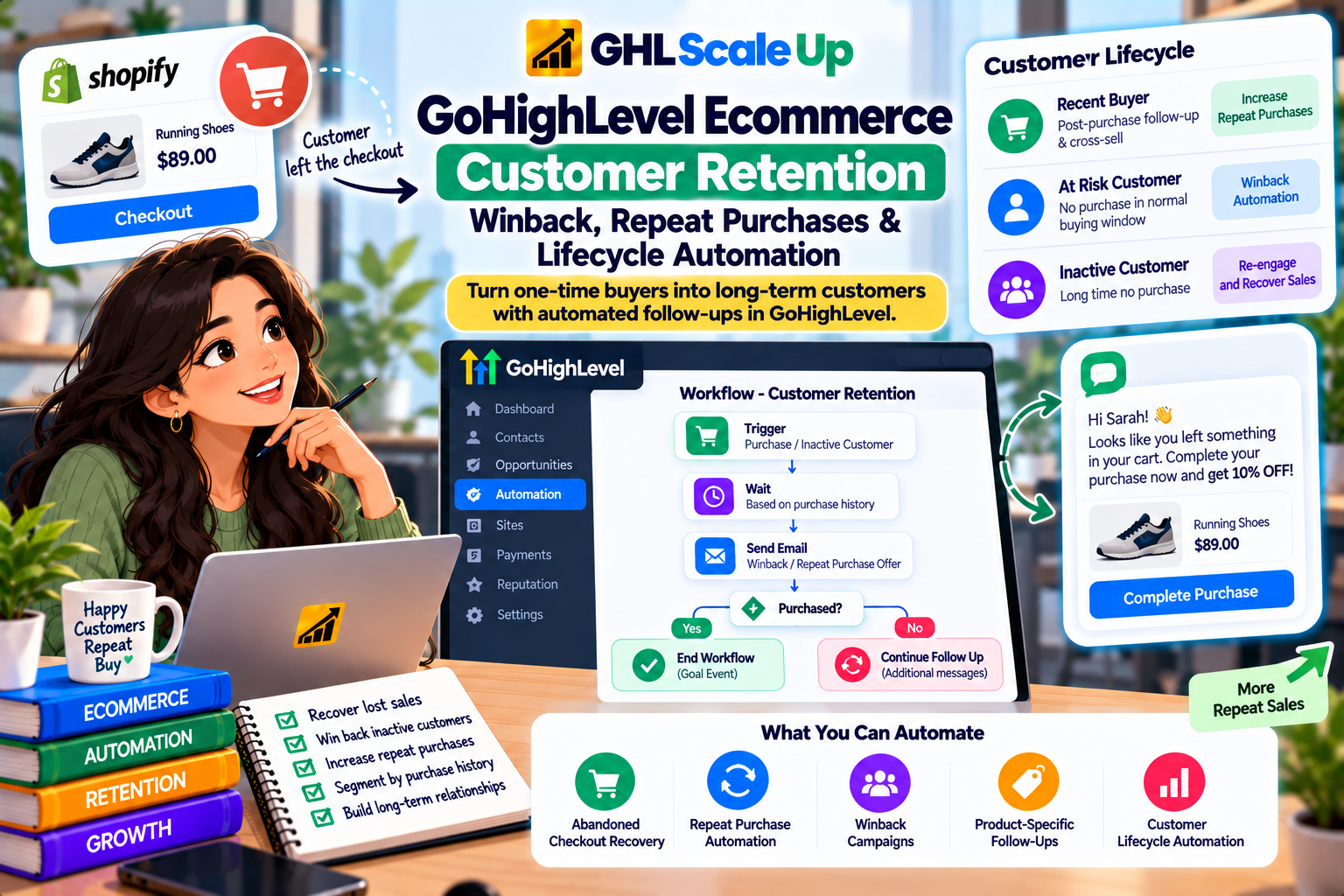
How a GoHighLevel Retention or Winback Workflow Is Actually Structured
In plain terms: customer and order data → a condition checking whether this contact currently qualifies → a wait tied to the right timing → a message → a check for whether they've purchased again → continue, branch, or exit. The condition and the wait are doing the real work here they're what turn a generic broadcast into something that only reaches people it's actually relevant to, at a point where it's actually relevant.
Workflow Examples
Workflow Example: First-Time Customer Entering the Repeat-Purchase Window
A customer's first order is marked fulfilled. A workflow updates their Order Count and Last Purchase Date fields, then waits an interval appropriate to the product's typical repurchase cycle. At that point, an If/Else checks whether a second order has already arrived if yes, exit quietly; if no, send a relevant reminder rather than a generic "come back" message.
Workflow Example: A Repeat Customer's Different Treatment
A contact whose Order Count field is already 2 or more doesn't need the same orientation-style messaging a first-time buyer gets. An If/Else on that field can route repeat customers into a shorter, more direct sequence acknowledging their history rather than repeating a first-purchase welcome they've already seen.
Workflow Example: Product-Specific Replenishment Winback
A customer bought a consumable product with a known 60-day supply. After roughly that period, a workflow checks whether they've reordered. If not, the message references the specific product they bought rather than a generic "we miss you" reminding them what they're likely running low on is a more relevant reason to come back than an unspecific nudge.
Workflow Example: A Customer Who Purchases During a Winback Sequence
This is the scenario most winback workflows get wrong if it isn't designed deliberately. A customer enters a winback sequence, then places a new order on their own, independent of the automation. If the workflow doesn't check for that, they keep receiving "come back" messaging after they've already come back. The fix is the same Goal Event mechanism used to exit pre-purchase sequences after a sale: a Goal Event checking for the relevant purchase event, set to end the winback workflow the moment it's met, so the contact exits into the normal post-purchase journey instead of finishing out a sequence that no longer applies to them.
Workflow Example: A Customer Who Should Not Receive a Winback Message
Not every quiet customer is a winback candidate. A customer who bought a one-time, non-repeatable item (a single custom piece, a one-off service) has no natural reason to be flagged as "overdue" the way a consumable buyer would. A customer currently in an open support conversation shouldn't receive a reactivation offer at the same time. And a customer who's already unsubscribed from the relevant channel shouldn't be re-added to a list just because a date passed. None of these are automation failures to fix they're reasons the automation should recognize "no genuinely relevant reason to contact them" as a valid outcome, not a gap to fill with a message anyway.
Choosing Email or SMS for GoHighLevel Retention and Winback Messages
The choice isn't "email is for X, SMS is for Y" it's about what the specific message needs. A winback message is rarely time-critical in the way an abandoned-checkout reminder is, so the urgency SMS is good for isn't usually the deciding factor here; email's extra space to explain a relevant recommendation or show the product again often serves a reactivation message better. SMS can still make sense for a short, high-relevance nudge to a customer who's engaged with that channel before but it requires the same consent and frequency discipline as any other SMS automation, and sending the identical message on both channels adds noise rather than reach. Don't default to multi-channel simply because both are technically available.
What Can Be Personalized in a GoHighLevel Winback Message
"We miss you" carries no information the customer can act on. What actually improves relevance is built from data you already have once the tracking above is in place: the specific product they bought, how long it's been, a logical next product based on purchase history, and their status as a first-time versus repeat customer. Only build messaging around fields you've actually confirmed are populated correctly a personalization token referencing a custom field that isn't reliably updated will sometimes show blank or wrong data, which reads worse than no personalization at all.
When Not to Send a GoHighLevel Winback Message
- The customer purchased recently your inactivity window logic should prevent this, but it's worth checking directly as a safeguard.
- The customer is already in another active lifecycle workflow overlapping automations are a design problem covered next.
- The product has no predictable repurchase pattern a one-time purchase doesn't need a replenishment-style nudge.
- The customer has opted out of the relevant channel respect that status rather than re-adding them because a date condition was met.
- There's no genuinely relevant offer or reason to reach out a message that exists only because the automation fired, with nothing useful to say, is worse than no message.
- The customer currently has an open support issue a reactivation message landing next to an unresolved complaint reads as tone-deaf at best.
How to Prevent Retention Workflow Conflicts
The underlying principle: a customer should move through one appropriate lifecycle state at a time, not accumulate every automation that happens to match their data. In practice, that means checking for overlap before publishing a new workflow does this contact's data also qualify them for a currently-running post-purchase sequence, an abandoned-checkout recovery, or a different retention workflow built for a different segment? Exit conditions (Goal Events, tags marking "currently in sequence X") are what keep a single contact from being in more than one lifecycle automation that assumes it's the only one talking to them.
How Shopify Data Affects GoHighLevel Customer Retention Automation
For a Shopify-connected store, customer records and order events reach GoHighLevel through the existing integration, and product and order-value data are available as trigger-level conditions the moment an order event fires. What the integration does not do is maintain a running recency/frequency/value profile on its own that's the same custom-field tracking described above, built on top of whatever order data the Shopify connection provides. Shopify remains the system of record for the actual purchase history; GoHighLevel's job is turning each new order event into an updated signal the retention logic can use. For the full picture of what syncs and how the connection works, see GoHighLevel Shopify Integration: What It Syncs, How It Works & What You Can Automate.
How to Test a GoHighLevel Retention or Winback Workflow
A successful test proves the workflow enrolled a contact and executed its steps it does not prove the timing, segmentation or message is right for every real customer. Test deliberately rather than assuming one pass covers every case:
- A new customer, confirming the Order Count and Last Purchase Date fields populate correctly on their first order.
- A repeat customer, confirming the If/Else correctly routes them differently from a first-timer.
- A contact who crosses the inactivity window without reordering, confirming the winback sequence actually starts.
- A contact who purchases during the winback sequence, confirming the Goal Event exits them correctly rather than letting the sequence continue.
- A contact who should not qualify (recently purchased, already unsubscribed, in another active workflow), confirming they're correctly excluded.
- The actual message content, confirming any personalization fields render real data rather than blanks.
Common GoHighLevel Retention and Winback Mistakes
| Problem | Why It Happens | Better Approach |
|---|---|---|
| Using one fixed inactivity window for every product | Treating 30/60/90 days as a universal rule instead of a product-specific estimate | Base the window on that product's or category's actual repurchase cycle |
| Assuming GoHighLevel tracks "last purchase" automatically | No native recency/frequency filter currently exists | Build and maintain a custom field updated by a workflow on each order event |
| Winback workflow keeps messaging a customer who already reordered | No Goal Event checking for the new purchase | Add a Goal Event on the relevant purchase event, set to end the workflow |
| Every customer gets identical post-purchase and winback messaging | No Order Count field or If/Else branching by purchase history | Branch first-time vs. repeat customers using the tracked order count |
| Generic "we miss you" messaging | Not using available product/purchase data | Reference the specific product and realistic timing instead |
| Overlapping workflows message the same contact twice | No exit tags or conditions checked across workflows | Check for active-sequence tags before enrolling a contact in a new one |
A Decision Framework for Ecommerce Customer Lifecycle Stages
| Customer Situation | Possible Lifecycle Approach |
|---|---|
| Recent first purchase | Post-purchase journey |
| Recent repeat purchase | Repeat-customer treatment, not the first-timer sequence |
| Product has a predictable replenishment cycle | Replenishment-timed repeat-purchase logic |
| Customer has passed their normal purchase interval | Consider winback, scaled to that product/segment's cycle |
| Customer purchases during an active winback sequence | Goal Event exits them back into the normal post-purchase journey |
| No genuinely relevant reason to contact the customer | Don't automate a message simply because the contact exists |
When GoHighLevel Should Not Own the Entire Retention Process
GoHighLevel's strength here is CRM, communication and workflow logic deciding who hears from you and when, based on data you control. It isn't built to be a dedicated ecommerce merchandising or loyalty-points engine, and a business with highly specialized needs (sophisticated product-recommendation algorithms, a points-based loyalty program with its own redemption logic, large-scale lifecycle email operations with deep native RFM segmentation) may find a purpose-built ecommerce retention tool handles those specific jobs more natively than a general CRM adapted to them. That's not a reason to avoid GoHighLevel for retention generally it's a reason to be clear about which parts of the job it's actually suited for: the CRM and automation layer, not necessarily every specialized ecommerce retention feature a dedicated platform might offer out of the box.
The Core Principle to Remember
Retention and winback in GoHighLevel aren't a feature you switch on they're logic you build from data you already have: when someone bought, what, how often, and whether they've bought again. The timing should come from the product's actual cycle, not a round number; the exit should come from a Goal Event checking the real purchase event, not a fixed sequence length; and "no message" should be a valid outcome whenever there's no genuinely relevant reason to send one. Where the segmentation and lifecycle logic gets more involved than a single workflow can hold several product cycles, overlapping customer segments, multiple data sources feeding one set of conditions that's an architecture question worth scoping deliberately, which is the kind of work covered in GoHighLevel workflow and automation setup.
Frequently Asked Questions About GoHighLevel Ecommerce Customer Retention
What is customer retention automation in GoHighLevel?
Workflows that use existing customer and order data purchase history, timing, product to encourage continued purchasing, built on GoHighLevel's standard contacts, tags, custom fields and workflow engine rather than a dedicated retention feature.
Does GoHighLevel have an inactive customer trigger?
No. There's no native trigger or Smart List filter for purchase recency GoHighLevel's own public feature-request board confirms this as an open gap, so it has to be built with custom fields and workflow logic instead.
How can I identify customers who haven't purchased recently?
Track a "Last Purchase Date" custom field, updated by a workflow whenever an order event fires, then use a wait-for-condition or scheduled check against that field.
Can GoHighLevel use Shopify purchase history for retention?
Yes, at the point an order event fires product and order value are available as trigger conditions. An ongoing recency/frequency profile still has to be built and maintained with custom fields, since that isn't automatically tracked.
Can I create product-specific winback workflows?
Yes, using product-based tags applied per order and the product filter available on relevant triggers, so a replenishment-style message can reference the specific item purchased.
How do I stop a winback workflow when a customer purchases?
Add a Goal Event checking for the relevant purchase event, set to end the workflow once met this checks continuously, so it catches a purchase made at any point during the sequence.
Should ecommerce winback use email or SMS?
Depends on the message and the customer's channel engagement, not a fixed rule winback is rarely urgent enough to require SMS by default, and sending the same message on both channels adds noise rather than reach.
How long should I wait before a winback campaign?
There's no universal number base it on the specific product's or segment's normal repurchase cycle, not a fixed 30/60/90-day rule applied to everything.
Related Articles in This Series
Need Help Building Retention and Winback Automation?
We help ecommerce businesses build retention and winback workflows in GoHighLevel that actually work.
Book Your Free Assessment
GHL Scale Up is a specialised GoHighLevel implementation and SaaS growth agency. Based in India, we serve agencies and businesses across 6 countries with 200+ GoHighLevel builds delivered. This guide reflects direct experience building retention and winback automation for ecommerce businesses. All product details verified against HighLevel documentation as of September 2026.
ghlscaleup.com