
What Is the GoHighLevel Shopify Integration?
The GoHighLevel Shopify integration is a native connection, set up per sub-account, that lets GoHighLevel receive customer, order and revenue data from a connected Shopify store and use specific Shopify events to trigger workflows. Shopify remains the ecommerce platform of record — the product catalog, checkout, payments and fulfillment stay there. GoHighLevel becomes the CRM and automation layer that acts on what Shopify reports.
Conceptually: Shopify (customer, order, revenue data) → integration → GoHighLevel contact/order records → workflow trigger → condition → email/SMS/task/other action. Nothing about product catalog management, checkout design or payment processing moves to GoHighLevel. The integration exists to give GoHighLevel's workflow engine something to react to.
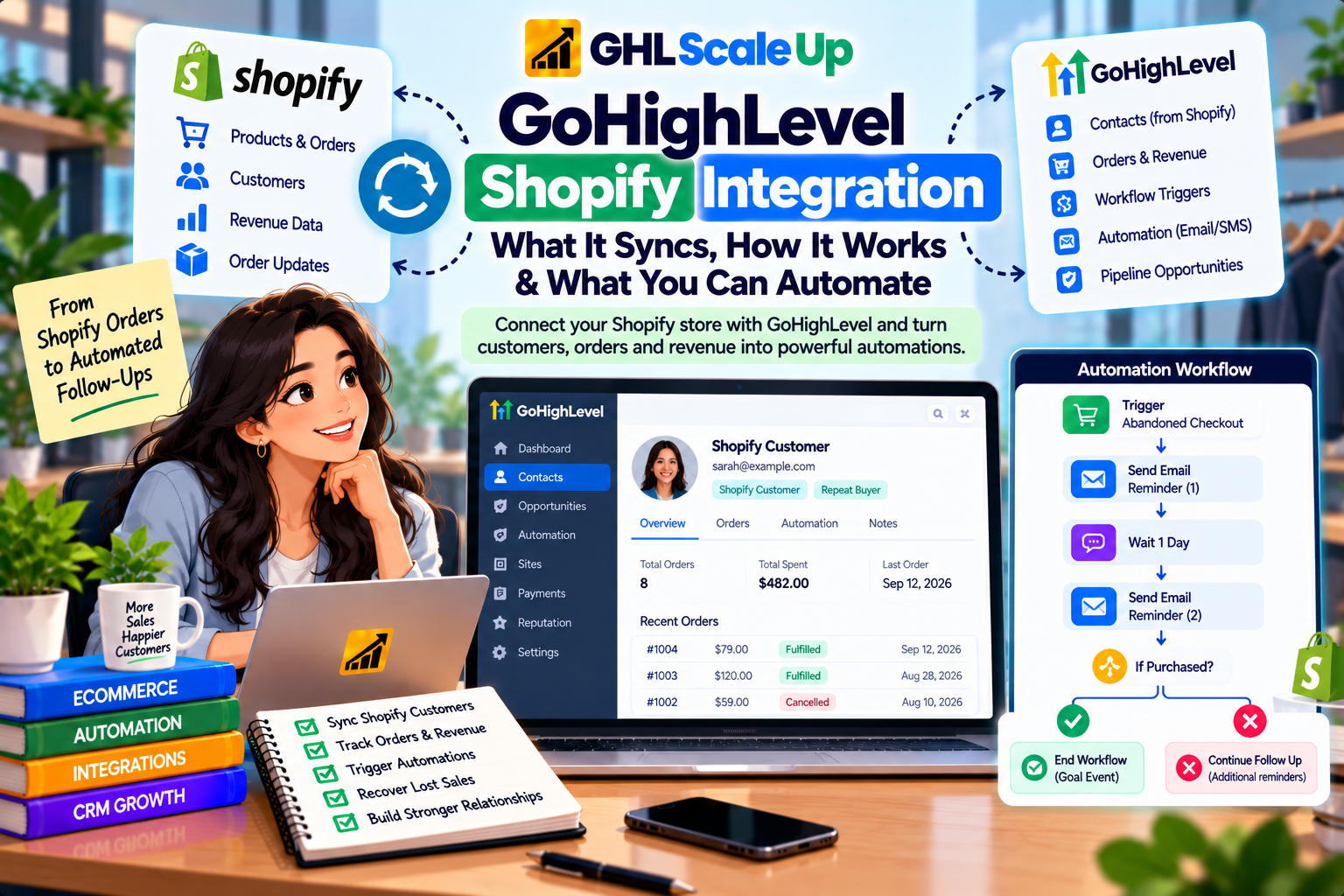
How Shopify Connects to GoHighLevel
Connecting Shopify to GoHighLevel is a sub-account-level setup that uses a Shopify custom app rather than a simple one-click login. In practice this means:
- Create a custom app in your Shopify admin and generate an Admin API access token for it, with the access scopes the integration needs (customers, orders, and related data).
- Open the Shopify integration settings inside the GoHighLevel sub-account and provide the store's connection details and the access token.
- Authorize the connection so GoHighLevel can read the permitted Shopify data.
- Let the initial sync run so existing customers, orders and revenue history populate the sub-account.
- Verify the sync by checking a known customer and a known order against what appears in GoHighLevel.
HighLevel's documentation doesn't publish exact button labels for every step, and Shopify's own admin interface changes independently of GoHighLevel's, so treat the sequence above as the shape of the process rather than a literal click-path. Confirm the current screen labels in your own accounts when you set it up.
What Data the GoHighLevel Shopify Integration Syncs
HighLevel's documentation confirms the Shopify integration syncs customer data, order data and revenue into the sub-account, with an option to map orders onto pipelines and opportunities. Here is what's documented, category by category.
| Shopify Data | Available in GoHighLevel? | What It Can Be Used For | Limitation to Know |
|---|---|---|---|
| Customers | Yes — new and updated Shopify customers sync into Contacts | Building a CRM record, segmentation, workflow entry | Field-by-field mapping isn't published — verify with a real customer |
| Orders | Yes — order details, value and products sync into Orders | Order-triggered workflows, purchase-based segmentation | Documentation doesn't confirm every Shopify order field (e.g., discount codes) syncs |
| Revenue | Yes — mapped into GoHighLevel reporting | Revenue visibility alongside CRM activity | Not the same as Shopify's own analytics depth |
| Order-to-pipeline mapping | Yes — optional, with configurable handling for paid, pending and refunded orders | Giving a sales team a pipeline view of ecommerce orders | Requires deliberate configuration; not automatic |
| Products and collections | Documented in the separate Shopify migration tool, not confirmed as ongoing sync in the standard integration | Product context in the migration path | Don't assume live catalog sync through the standard integration |
| Shopify Variables in messaging | Yes — order/customer details from a Shopify-triggered workflow can populate email/SMS content | Personalized post-purchase messaging | Only populated within a workflow that actually received the Shopify event |
How Shopify Customers Become Contacts in GoHighLevel
A Shopify customer becomes a GoHighLevel contact through the sync, not through any action the shopper takes inside GoHighLevel itself. New and updated Shopify customers create or update a matching contact record, which is what lets a workflow later act on that person. HighLevel doesn't publish the exact matching logic it uses when a customer already exists as a contact from another source (a form submission, a different integration, a manual entry), so if your business already collects leads before they become Shopify customers, confirm with a real test whether the two records merge or duplicate rather than assuming.
How Shopify Orders and Revenue Flow Into GoHighLevel
An order placed in Shopify reaches GoHighLevel as an order record carrying its details, value and products, and the associated revenue is reflected in reporting. This is what makes order-based workflows and revenue-aware segmentation possible without a developer connecting anything custom. The optional order-to-pipeline mapping goes a step further: with it configured, a Shopify order can appear in a sales pipeline as an opportunity, with paid, pending and refunded states handled according to how you set it up — useful if a sales or account team needs to see ecommerce revenue alongside other deals, not just in a separate orders list.
What Shopify Data Does Not Automatically Sync to GoHighLevel
Trusting the integration too broadly is the most common way people get surprised later, so this deserves a direct list of what the documentation reviewed does not confirm:
- Live, ongoing product and collection sync through the standard Shopify integration isn't documented — product/collection import is described for the separate Shopify migration tool, covered below.
- Inventory levels are not described as syncing into GoHighLevel; inventory remains a Shopify concern.
- Two-way sync isn't documented. Treat the flow as Shopify → GoHighLevel; editing a contact in GoHighLevel should not be assumed to update the Shopify customer record.
- Every Shopify order field — discount codes, shipping method chosen, line-item-level metadata — isn't individually confirmed. What's documented is order details, value and products, not an exhaustive field list.
- Abandoned-cart detection before an email is captured. Like GoHighLevel's own store, the Abandoned Checkout trigger needs a captured email address to identify who to follow up with.
Where documentation is silent, the safer assumption is that the data doesn't sync rather than that it probably does.
Historical Import vs Ongoing Shopify Sync
Connecting Shopify to GoHighLevel does two different things, and conflating them is a common source of confusion. The initial connection brings in your existing Shopify customer and order history so the sub-account isn't starting empty. Ongoing sync is the separate, continuing process that brings in new customers and new orders as they happen after the connection is live. Both are part of the standard integration, but they answer different questions: "is my past data here" versus "will tomorrow's orders show up automatically." After connecting, check both — pull up an old order to confirm the historical import worked, then place or wait for a new order to confirm ongoing sync is actually running, rather than assuming one proves the other.
Which Shopify Events Can Trigger GoHighLevel Workflows
GoHighLevel's workflow trigger list includes events built specifically for store activity, some of which explicitly cover Shopify and some of which are being phased out. Getting the right trigger matters more than getting the right filters — using a deprecating trigger, or assuming a trigger covers Shopify when it doesn't, is why an automation can look correctly configured and still never fire.
| Trigger | Covers Shopify? | Current Status | Filters |
|---|---|---|---|
| Shopify Order Placed | Yes — Shopify-specific | Current | Not individually documented beyond the trigger itself |
| Abandoned Checkout | Yes — unified trigger for native Store and external stores including Shopify | Current | Duration (minutes), cart value, country, products, order source (Store/External), sub-source (Shopify), store name |
| Order Fulfilled | Yes — unified trigger for native Store and external sources including Shopify, plus shipping connectors | Current | Cart value, fulfilled products, order source, sub-source, shipping carrier, tracking number |
| Shopify Abandoned Cart | Yes — legacy | Deprecating soon; existing workflows keep working | Same general shape as the unified trigger, but don't build new automations on it |
| Shopify Order Fulfilled | Yes — legacy | Deprecating soon | Same caution as above |
| Payment Received | Not confirmed for Shopify | Current, but its documented sources are Funnel, Invoice, Manual Payment, Memberships and Website — Shopify isn't listed | Use Shopify Order Placed instead for Shopify purchases |
That last row is worth pausing on. It's tempting to assume Payment Received covers any payment anywhere in the account, including Shopify. HighLevel's documented source list for that trigger doesn't include Shopify, so a workflow built on Payment Received to catch Shopify purchases may simply never fire. Shopify Order Placed is the trigger documented for that job.
What You Can Automate With Shopify Data in GoHighLevel
Once Shopify data is flowing into GoHighLevel, the automation itself runs on the same workflow engine used everywhere else in the platform — the value is in connecting real Shopify events to real actions, not in some separate "ecommerce automation" system. A few genuinely supported starting points:
- New order follow-up — Shopify Order Placed, filtered by product or cart value, sends a confirmation or starts onboarding.
- Abandoned checkout recovery — the Abandoned Checkout trigger, filtered to Order Source: External and Sub-Source: Shopify, sends an email or SMS reminder before the cart is lost for good.
- Post-fulfillment communication — Order Fulfilled, filtered by carrier or tracking presence, sends shipping confirmation, then a later review request after a wait.
- Product-specific follow-up — Shopify Order Placed or Order Fulfilled, filtered to a specific product, sends usage guidance or a relevant cross-sell only to buyers of that item.
- Retention and winback — built from standard workflow tools (tags, wait steps, conditions) rather than a dedicated "inactive Shopify customer" trigger, since no such trigger is documented.
Each of these needs the same things any workflow needs: the right trigger, the right filters, a tested condition, and a message that's actually worth sending. Connecting Shopify doesn't create this logic for you — it gives the workflow engine real events to work with. Detailed, step-by-step builds for abandoned checkout recovery and post-purchase sequences are their own topics; this article gives you the trigger-level foundation to build them on.
Shopify + GoHighLevel vs GoHighLevel's Native Ecommerce Store
Connecting Shopify and using GoHighLevel's own Ecommerce Store are two different architectural choices, not two ways of describing the same thing. With Shopify connected, Shopify remains the storefront and GoHighLevel is the CRM/automation layer reacting to Shopify events. With the native Ecommerce Store, GoHighLevel itself is the storefront — products, cart, checkout and orders all live inside HighLevel, with no external platform involved. A business already committed to Shopify's catalog and checkout would connect it; a business that wants one platform end to end, with a simpler catalog, might use the native Store instead. For how the native Store's products, checkout and workflow triggers actually work, see the GoHighLevel Ecommerce Store guide.
The Native Shopify Integration vs the Separate Shopify Migration Tool
HighLevel documents a second, separate Shopify-related feature that's easy to confuse with the standard integration: a Shopify store migration tool, added in late 2025, built for businesses that want to move their Shopify operation onto GoHighLevel's native ecommerce tools rather than keep Shopify as the platform of record. It imports products, collections, contacts, orders and transactions into HighLevel's own Ecommerce Store, and offers configurable ongoing sync control after the initial move. That's a different job from the integration covered in this article, which keeps Shopify as the store and adds GoHighLevel as the automation layer around it. If you're evaluating a full move off Shopify rather than connecting alongside it, that's the feature to look at, and it deserves its own dedicated walkthrough rather than a subsection here.
How to Test the GoHighLevel Shopify Integration
A working connection should be verified stage by stage, because each one proves something different and a green checkmark on the connection screen doesn't confirm any of them on its own.
- Confirm a known existing customer appears correctly as a contact — proves the historical import worked.
- Place or generate a new test order in Shopify and confirm it appears in GoHighLevel — proves ongoing sync is live, not just the initial import.
- Check the order's details, value and product against what actually sold — proves the order data is accurate, not just present.
- Confirm Shopify Order Placed fired for that order — proves the trigger is wired correctly.
- Start a checkout, enter an email, and abandon it, then confirm the Abandoned Checkout trigger fires with Order Source: External after the window elapses — proves the abandonment path works specifically for Shopify.
- Mark the test order fulfilled in Shopify and confirm Order Fulfilled fires in GoHighLevel — proves the fulfillment path is connected.
- Check for a duplicate contact if that customer already existed in GoHighLevel from another source — proves (or disproves) safe matching behavior for your setup.
A successful sync proves the connection works for that one customer and order. It doesn't prove every product type, discount scenario, or fulfillment method behaves the same — repeat the parts that differ in your store before relying on the automation for real customers. To confirm a workflow actually enrolled rather than just assuming the trigger fired, use the guide to Enrollment History and Execution Logs.
Common GoHighLevel Shopify Integration Problems and Fixes
| Symptom | Likely Cause | What to Check |
|---|---|---|
| Shopify won't connect | Missing or incorrect Admin API access token or scopes on the custom app | The custom app's configured scopes in Shopify, and that the token was pasted correctly |
| Customer isn't appearing in GoHighLevel | Sync hasn't run yet, or the customer exists but didn't match/merge as expected | Sync status, and whether a duplicate contact was created instead |
| Order isn't appearing | Order placed before the connection's historical import window, or ongoing sync isn't active | Order date relative to when you connected; confirm with a brand-new test order |
| Workflow isn't triggering on a new Shopify order | Built on Payment Received instead of Shopify Order Placed | Which trigger the workflow actually uses |
| Abandoned Checkout doesn't fire for Shopify carts | Order Source/Sub-Source filter not set to External/Shopify, or no email was captured before abandonment | The trigger's filters and whether the shopper entered an email |
| Duplicate contacts | A contact existed from another source before the Shopify sync ran | Contact history and creation source for the duplicate |
| Product or collection data missing from the workflow | Standard integration doesn't document ongoing catalog sync | Whether you actually need the separate Shopify migration tool instead |
When a Shopify-triggered workflow isn't firing at all, work through why a GoHighLevel workflow isn't triggering for the general diagnostic process. If the contact enrolled but a later step in the workflow failed, see how to find the failed step.
Limitations of the GoHighLevel Shopify Integration to Know
- Not confirmed two-way. Treat GoHighLevel as a downstream consumer of Shopify data, not an editor of it.
- No documented live product/collection sync through the standard integration — that's the separate migration tool's job.
- Payment Received doesn't cover Shopify based on its documented source list; use Shopify Order Placed.
- Abandonment detection depends on a captured email, same as GoHighLevel's native store.
- Exact contact-matching rules aren't published, so duplicate risk exists when a customer already has a contact record from elsewhere.
- Two legacy triggers are deprecating. New builds should use Abandoned Checkout and Order Fulfilled, not the Shopify-specific originals.
None of these make the integration unreliable — they're the boundaries to design around, and GHL Scale Up's own published comparisons are candid that GoHighLevel's ecommerce integrations aren't as deep as a dedicated ecommerce marketing platform's for a Shopify-heavy business.
When Connecting Shopify to GoHighLevel Makes Sense
Connecting Shopify tends to make sense when the CRM and automation side of the business matters as much as the storefront itself: businesses that want customer follow-up, segmentation and a sales pipeline sitting alongside Shopify orders rather than in a separate tool; teams already running their CRM, calendars or other communication through GoHighLevel who don't want a second automation platform just for ecommerce; and stores where a sales-assisted or high-ticket process benefits from GoHighLevel's pipeline and workflow tools reacting to Shopify purchase events.
When You Might Not Need to Connect Shopify to GoHighLevel
The integration may not add much if Shopify's own ecosystem, or a dedicated ecommerce marketing tool already in place, already covers your CRM, segmentation and automation needs — plenty of stores run well on Shopify plus a tool built specifically for ecommerce email and SMS. It's also not worth the setup effort if there's no real follow-up or sales process to automate: if the store is purely transactional with no meaningful post-purchase communication strategy, connecting a second platform adds maintenance without a clear payoff.
The Architecture to Remember
Shopify keeps running the store. GoHighLevel becomes the place customer and order data lands so it can be organized, segmented and acted on. The integration syncs customers, orders and revenue, and a specific set of current Shopify events — Shopify Order Placed, Abandoned Checkout and Order Fulfilled — can start workflows. It doesn't sync products or collections on an ongoing basis, it isn't confirmed two-way, and Payment Received isn't the trigger for Shopify purchases. Connect it when the CRM and automation side of the business genuinely needs to react to what happens in Shopify — not because the two platforms exist and can technically be linked.
Frequently Asked Questions About the GoHighLevel Shopify Integration
Does GoHighLevel integrate with Shopify?
Yes, natively, through a Shopify custom app and Admin API access token connected at the sub-account level.
Can Shopify customers sync to GoHighLevel?
Yes. New and updated Shopify customers sync into GoHighLevel Contacts.
Can Shopify orders sync to GoHighLevel?
Yes. Order details, value and products sync in, with optional mapping onto pipelines and opportunities.
Can GoHighLevel automate actions based on Shopify customers?
Yes, once a Shopify customer exists as a contact, standard GoHighLevel workflows can act on them the same as any other contact.
Can Shopify abandoned checkouts trigger GoHighLevel workflows?
Yes, through the Abandoned Checkout trigger, filtered to Order Source: External and Sub-Source: Shopify. It requires a captured email address to identify the shopper.
Does the integration sync Shopify products and collections?
Not documented as ongoing sync in the standard integration. Product and collection import is described for the separate Shopify migration tool.
Does GoHighLevel replace Shopify?
No. Connecting the two keeps Shopify as the storefront; GoHighLevel's own native Ecommerce Store is a separate, different architectural choice.
Is the GoHighLevel Shopify integration two-way?
Not documented as two-way. Treat it as Shopify data flowing into GoHighLevel, not GoHighLevel edits flowing back to Shopify.
How long does Shopify data take to sync into GoHighLevel?
HighLevel's documentation doesn't publish an exact timing guarantee. Verify with a real test order rather than assuming a specific delay.
Related Articles in This Series
Need Help Connecting Shopify to GoHighLevel?
We help ecommerce businesses connect Shopify to GoHighLevel and set up the right automations.
Book Your Free Assessment
GHL Scale Up is a specialised GoHighLevel implementation and SaaS growth agency. Based in India, we serve agencies and businesses across 6 countries with 200+ GoHighLevel builds delivered. This guide reflects direct experience connecting Shopify to GoHighLevel for ecommerce businesses. All product details verified against HighLevel documentation as of September 2026.
ghlscaleup.com