
Get help fixing your workflow execution issue.
What Does "GoHighLevel Workflow Triggered but Not Working" Actually Mean?
The phrase hides several genuinely different situations, and they don't share a fix:
- The workflow enrolled the contact but is still waiting on an active Wait step not broken, just not there yet.
- The workflow reached an If/Else condition and took the branch you didn't expect.
- A step was skipped deliberately or because of an upstream condition.
- An action failed outright and the log shows an error.
- An action executed successfully inside GoHighLevel, but the external result never happened an SMS that never arrived, a webhook the receiving system silently rejected.
- The workflow reached its final step and shows Completed, but the business outcome you actually wanted still didn't occur.
- The workflow appears stuck because it's genuinely waiting on an external system that hasn't responded yet.
Each of these looks like "the workflow isn't working" from the outside. They are not the same problem, and diagnosing them as if they were is the single most common way people waste time here.
How to Confirm a GoHighLevel Workflow Actually Started Before Troubleshooting Further
Before anything else: has this contact actually entered the workflow? If yes, the trigger did its job. Don't re-open the trigger, don't add or remove filters, and don't touch Allow Re-entry none of that affects what happens after enrollment. If you're not certain enrollment happened, check that first using initial trigger troubleshooting; everything below this point assumes it already has.
How to Find the Last Successful Step in a GoHighLevel Workflow
This is the core method, and it's simpler than auditing the entire workflow from scratch.
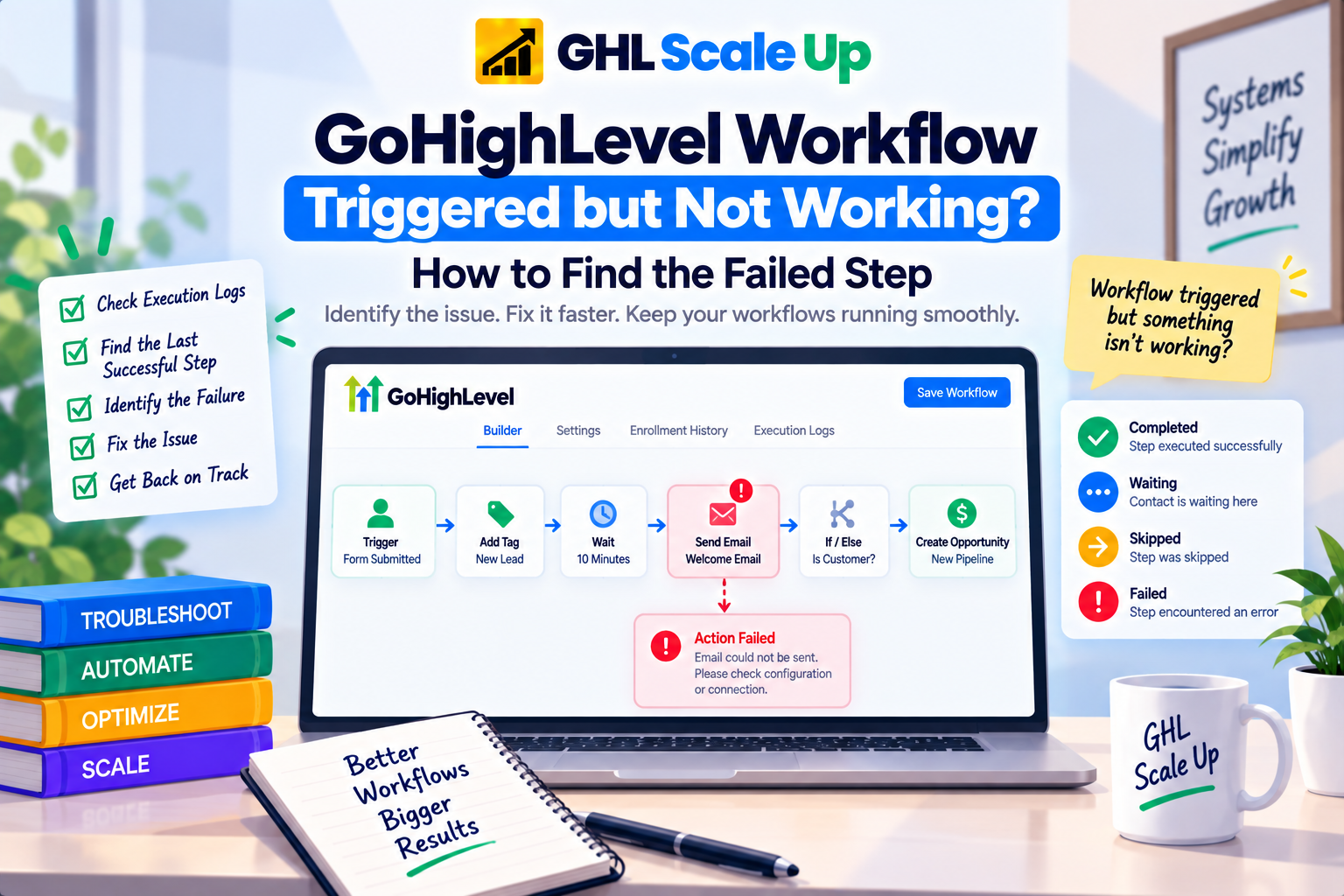
Say a workflow runs: Trigger → Add Tag → Wait 10 Minutes → Send Email → If/Else → Create Opportunity → Internal Notification. The contact enrolled, got the tag, passed the wait and the email never arrived. The investigation doesn't start at the trigger and doesn't touch the opportunity or notification steps. It starts at the boundary: the last confirmed success (the wait completing) and the first point of divergence (the email).
That boundary is the whole diagnosis. Rebuilding the entire workflow, or changing several settings at once "to be safe," destroys the one piece of information you actually have where, specifically, things stopped matching expectation.
How to Read a GoHighLevel Workflow's Execution Path for a Specific Contact
To find that boundary, you need the contact's actual execution path, not a guess based on how long it's been. Open the workflow's Execution Logs, select the affected contact, and read the step-by-step record of what actually happened GoHighLevel's canvas view also highlights this directly on the workflow diagram, marking which nodes errored, which were skipped, and which are still in progress for that contact.
The mechanics of reading that interface where the tabs live, what each column means, how to filter by contact are covered in full in Enrollment History and Execution Logs. This article picks up after that: once you can see the path, the next question is what each state on that path actually means and what to do about it.
Why a GoHighLevel Workflow May Be Waiting Instead of Failing
A Wait step is the single most common thing mistaken for a failure. If the log shows the contact sitting at a wait, that's not evidence anything is broken it's evidence the workflow is doing exactly what it was built to do. Check the wait's configured duration against how much time has actually passed since enrollment, and don't assume the countdown is instant: real-time waits run in real time. Testing can create the opposite illusion GoHighLevel compresses wait timers to seconds during a workflow test, so a wait that behaves one way in test mode and another way live isn't a bug, it's the difference between simulated and real timing. If the wait duration has genuinely elapsed and the contact still hasn't moved, that's when it becomes worth investigating not before.
How GoHighLevel Workflow If/Else Conditions Can Send a Contact Down the Wrong Path
An If/Else condition evaluates at the moment the contact reaches it not at enrollment, and not based on what you expect the data to look like. The model is simple: condition → true → Path A, condition → false → Path B. When the log shows the contact went down the branch you didn't want, the workflow isn't malfunctioning; it evaluated the condition correctly against the data it actually had at that moment.
Inspect exactly what the condition is checking a tag, a custom field, an opportunity value, a pipeline stage and compare it against the contact's actual record state at the time execution reached that step, not the state you assumed. Timing matters here: if a tag gets applied two steps after the condition that checks for it, the condition will evaluate before the tag exists. This is a logic-ordering issue inside the workflow, not a trigger filter problem, and it's a different diagnosis from anything in the initial-trigger article.
What a Skipped GoHighLevel Workflow Step Actually Means
A skipped step isn't automatically an error. GoHighLevel skips disabled nodes automatically, and downstream actions still fire normally past them so if you or a teammate temporarily disabled a step while testing something else and forgot to re-enable it, "skipped" is expected, not broken. A step can also be skipped because a condition attached to it evaluated to false, which is really the same diagnosis as the branching case above, just expressed at the individual-action level rather than an explicit If/Else.
The distinction that matters: was this step skipped on purpose (disabled, or correctly failing a condition), or is it skipped in a way that contradicts what you configured? Open the step and check whether it's marked disabled before assuming its logic is wrong.
How to Troubleshoot a Failed GoHighLevel Workflow Action
A failed action is different from a skipped one the log will typically show an error rather than a clean bypass. Failures tend to fall into a small number of categories:
| Symptom | Likely Cause | What to Check |
|---|---|---|
| Action failed, missing-data error | A required field the action depends on is empty for this contact | The field the action reads, and whether it was populated before this step ran |
| Action failed, connection/auth error | An integration's API key or OAuth token expired or was revoked | The integration's connection status outside the workflow |
| Action failed, invalid value | Data in an unexpected format (e.g., a field expecting a number holds text) | The actual value on the contact record at execution time |
| Webhook/custom action shows an error | The receiving endpoint rejected the request or timed out | The endpoint's own logs, independent of GoHighLevel |
Every one of these needs its own check don't assume a single global cause. A permissions problem and a missing-field problem look identical from the outside ("the action failed") but require completely different fixes.
When a GoHighLevel Workflow Action Succeeds but the External System Fails
This is the distinction that trips up the most people, and it's worth being explicit about: a workflow step showing as executed inside GoHighLevel is not the same claim as the external system having successfully processed it. A webhook can fire, receive a 200 response, and still fail to produce the outcome you wanted on the other end if the receiving system silently discards the payload or errors after accepting it.
The same boundary applies to native integrations. If a workflow step hands off to Zapier or another connected platform, a failure on the receiving side looks identical, from inside GoHighLevel, to success the GHL step completed its job the moment it sent the request. Our Zapier connection guide covers this exact handoff in more detail: a failure in the GoHighLevel step is a GoHighLevel problem, a failure in what happens after the handoff is a problem on the other platform, and treating them as the same diagnostic space is how people burn hours debugging the wrong system.
Why a GoHighLevel Workflow Email or SMS Action Can Execute Without Being Delivered
The identical logic applies to messaging actions. A Send SMS step executing successfully inside the workflow confirms GoHighLevel attempted to send it it does not confirm the recipient received it. Unregistered or non-compliant A2P 10DLC numbers are a documented case where this exact gap shows up: the automation fires correctly inside the workflow builder, but the carrier blocks the message before it reaches the recipient, with no error visible in the workflow itself. If SMS actions are executing without errors but messages aren't arriving, check the sending number's A2P registration status before assuming the workflow logic is at fault our A2P 10DLC guide covers what that failure looks like and how to confirm it. The same execution-versus-delivery gap applies to email sending domains, though that's outside this article's scope.
How GoHighLevel Workflow Opportunity and Pipeline Actions Can Execute but Miss the Expected Result
A workflow action that creates or updates an opportunity can execute cleanly while the pipeline still doesn't reflect what you expected because the action targeted the wrong pipeline, the wrong stage, or because the contact already had an existing opportunity that the action updated instead of the new one you expected it to create. If the workflow has Allow Multiple Opportunity enabled, each opportunity tied to the contact runs its own separate execution, which changes what "the workflow" even means for that contact. This is a downstream-configuration question specific to opportunity actions, and it's out of scope for a full breakdown here treat it as one more instance of the same principle: the action executing and the resulting business state matching your expectation are two different things to verify separately.
Why a GoHighLevel Workflow Marked "Completed" May Not Have Produced the Expected Outcome
This deserves its own section because it's the most deceptive failure state. Completed means the workflow reached its last configured step for that contact. It does not mean every action along the way produced its intended real-world result.
Ask these four questions separately, in order, rather than treating "completed" as a single pass/fail signal:
- Did the workflow execute did every step run in sequence?
- Did each action execute did it complete without an internal error?
- Did the external system accept and process it for anything that hands off outside GoHighLevel?
- Did the intended business outcome actually occur did the lead get the email, did the opportunity land in the right pipeline, did the team member get notified?
A "completed" status only confirms the first one. The other three need to be checked against the actual outside-world result, not inferred from the workflow's own status label.
How to Troubleshoot a GoHighLevel Workflow Step by Step After It Has Already Triggered
- Reproduce the issue with a specific, identifiable contact rather than a vague "it's not working."
- Confirm enrollment happened for that contact.
- Open the execution path in Execution Logs for that contact.
- Find the last successful step the anchor point for everything else.
- Identify the first unexpected step immediately after it.
- Classify what happened there: waiting, skipped, branched, failed, or executed-but-wrong-external-result.
- Inspect only the relevant configuration for that classification the condition, the field, the integration connection, the sending number.
- Make the smallest change that addresses the actual cause. Don't adjust three settings at once; you'll lose the ability to tell which one fixed it.
- Retest under controlled, reproducible conditions same trigger event, same test contact profile, so the result is comparable.
- Verify the actual business outcome, not just the workflow's status label.
Common Mistakes When Debugging a GoHighLevel Workflow That Triggered but Didn't Finish
- Reopening the trigger after confirming enrollment. If the contact is in, the trigger already worked changing it now only risks breaking something that wasn't broken.
- Rebuilding the whole workflow instead of isolating the divergence point. This destroys the diagnostic signal the last-successful-step method depends on.
- Assuming "in progress" means stuck. Check the actual elapsed time against configured wait durations before concluding anything's wrong.
- Treating "completed" as proof the business outcome happened. It only proves the workflow reached its last step.
- Changing multiple settings in one pass. If two things change and the result improves, you don't know which one mattered or whether it will hold up under different conditions.
- Not reproducing the exact same conditions on retest. A different trigger event, a different contact state, or leftover test data can make a real fix look like it didn't work, or a non-fix look like it did.
- Blaming GoHighLevel for an external system's failure, and the reverse blaming the integration when the GoHighLevel action never actually ran. Both directions require checking evidence on both sides of the handoff, not assuming based on which platform is more familiar.
When a GoHighLevel Workflow Problem Isn't About Execution After Triggering
- The workflow never enrolled the contact at all → GoHighLevel Workflow Not Triggering? Find the Fix
- The workflow worked before, but this same contact won't go through it again → GoHighLevel Workflow Re-Entry Explained
- You need the detailed mechanics of the Execution Logs and Enrollment History interface itself → Enrollment History and Execution Logs
- The problem is specific to a form trigger's own behavior, an appointment trigger's status handling, or opportunity/pipeline trigger logic those deserve dedicated treatment beyond what this article can cover; use the general method above in the meantime.
The Core Diagnostic Principle for a GoHighLevel Workflow That Triggers but Doesn't Complete
Enrollment tells you the trigger worked. Everything after that is a separate question with its own evidence: the last successful step, the first point of divergence, and whether that divergence was waiting, branching, skipping, failing, or executing without producing the result you wanted outside GoHighLevel. Work that boundary specifically, verify the actual business outcome rather than the status label, and you'll find the fix faster than auditing the whole workflow ever will.
Frequently Asked Questions About a GoHighLevel Workflow That Triggers but Doesn't Complete
Why did my GoHighLevel workflow trigger but not complete?
Most often because it's genuinely still waiting on a Wait step, took an If/Else branch you didn't expect, or an action failed or was skipped partway through. Check the contact's execution path rather than guessing.
How do I know which GoHighLevel workflow step failed?
Confirm enrollment, open the contact's execution path in Execution Logs, find the last step that shows success, then inspect the very next step that boundary is almost always where the answer is.
What does it mean if a GoHighLevel workflow is still "in progress"?
The contact is actively moving through the workflow and hasn't reached a wait, an error, or the end. Compare elapsed time against any configured wait durations before assuming something's wrong.
Why is my GoHighLevel workflow stuck on a wait step?
It may not be stuck waits run for their full configured duration in live conditions, unlike in test mode where GoHighLevel compresses timers to seconds. Confirm the actual wait length before troubleshooting further.
Why did my GoHighLevel workflow take the wrong If/Else path?
The condition evaluated correctly against the contact's data at the exact moment execution reached it. Check the field, tag, or value the condition actually reads, and confirm it had the value you expected at that point in the sequence not just at enrollment.
What does a skipped GoHighLevel workflow step mean?
Either the step is disabled, or an attached condition evaluated to false. Neither is automatically an error check whether the skip matches what you configured.
Can a webhook execute successfully in GoHighLevel while the external system still fails?
Yes. GoHighLevel confirms the request was sent, not that the receiving system processed it correctly. Failures on the receiving end need to be checked in that system's own logs.
Why does a GoHighLevel workflow say "completed" when the expected result didn't happen?
Completed confirms the workflow reached its final step it doesn't confirm every action produced its intended real-world result. Verify the actual outcome (delivery, pipeline state, notification) separately.
How do I troubleshoot a failed GoHighLevel workflow action?
Identify the specific failure category missing data, expired integration connection, invalid value, or a rejected webhook since each needs a different fix, then check the relevant configuration for that category specifically rather than the workflow as a whole.
Related Articles in This Series
Need Help Fixing a Workflow That Triggered but Didn't Complete?
We diagnose and fix GoHighLevel workflow execution issues for agencies and businesses.
Book Your Free Troubleshooting Session
GHL Scale Up is a specialised GoHighLevel implementation and SaaS growth agency. Based in India, we serve agencies and businesses across 6 countries with 200+ GoHighLevel builds delivered. This guide reflects direct experience troubleshooting workflow execution issues across hundreds of GHL accounts. All troubleshooting details verified against official documentation as of September 2026.
ghlscaleup.com