
What Is the GoHighLevel Ecommerce Store?
The GoHighLevel Ecommerce Store is HighLevel's native storefront module. Customers browse products, review product details, manage a cart, complete checkout and receive an order confirmation. The business creates products under Payments → Products, builds the storefront in Sites → Stores using the website builder, connects a payment provider, and reviews orders and transactions under Payments.
HighLevel documents four requirements for a complete Store: products, Store pages, a domain, and a connected payment provider. An Ask AI setup assistant can guide supported onboarding tasks and help connect an existing domain, but setting up a new domain and connecting a payment provider remain manual. A sub-account can hold more than one Store.
Because the store sits in the same sub-account as contacts, conversations and workflows, orders and payments live beside the customer records and automations rather than in a separate system. That is the product's main design idea, and also the source of its boundaries, covered later.
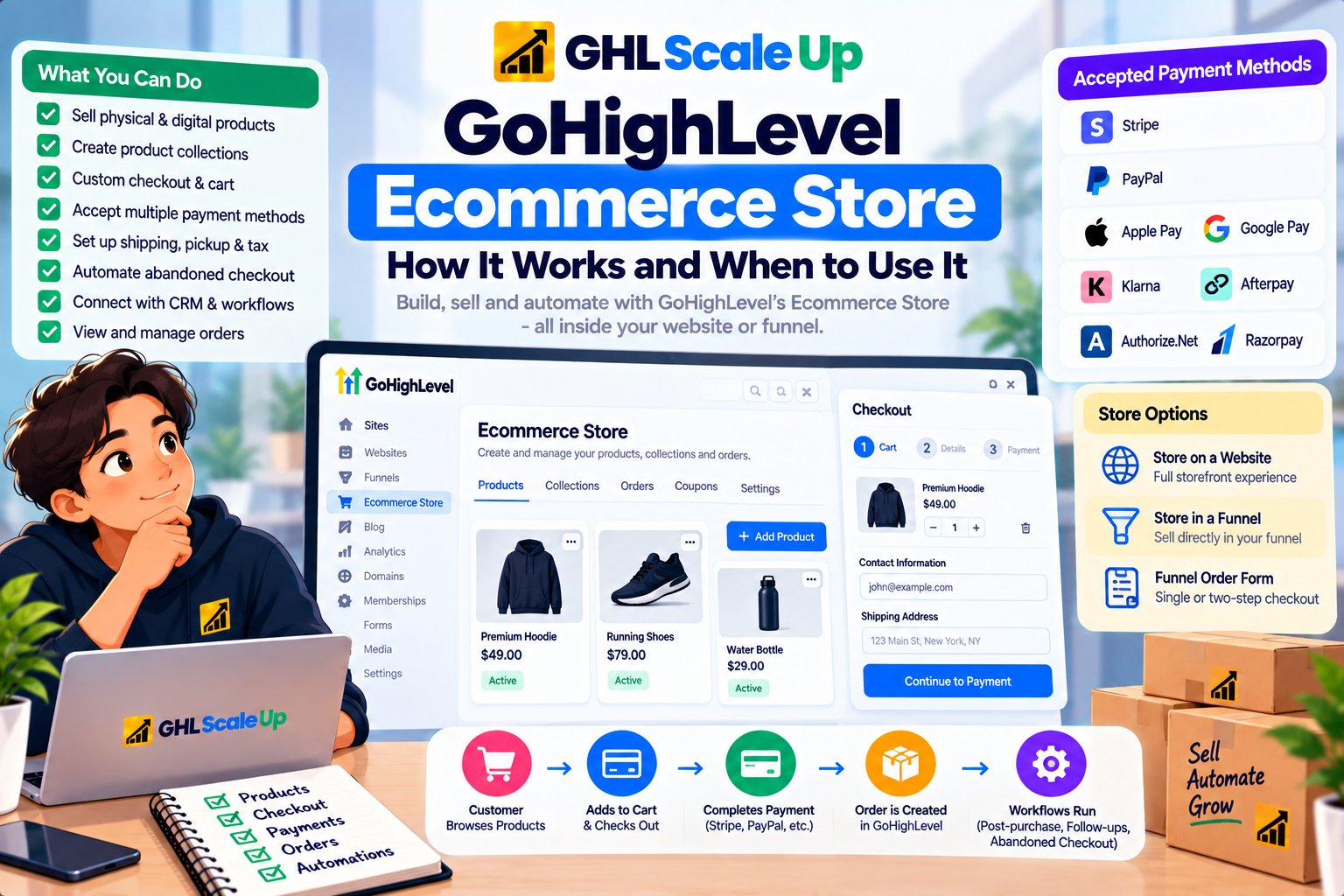
How the GoHighLevel Ecommerce Store Works From Product to Follow-Up
The store follows one linear path: Product → Products List → Product Details → Cart → Checkout → Payment → Order → Contact → Workflow → Follow-up. Each stage is native to HighLevel except the payment provider, which is external and connected by the business.
| Stage | What Happens | Where It Is Managed |
|---|---|---|
| Product | Created with pricing, variants, media and the Include in Online Store setting | Payments → Products |
| Products List | Customers browse products and collections | Store page in the website or funnel builder |
| Product Details | Media, price, description and variants for one product | Store page |
| Cart | Customers review and adjust the items they intend to buy | Store page |
| Checkout | Contact and address details, fulfillment options, eligible coupons, payment | Store page plus Payments settings |
| Thank You | Order confirmation after successful purchase | Store page |
| Order | Order and transaction records, refunds, fulfillment details | Payments → Orders and Transactions |
| Follow-up | Workflows respond to payment, fulfillment, abandonment and other events | Automation → Workflows |
The five Store pages (Products List, Product Details, Cart, Checkout, Thank You) are generated together and stay in that fixed sequence. They cannot be reordered relative to one another, and regular pages cannot be placed between them.
Where the GoHighLevel Ecommerce Store Lives: Website, Funnel or Order Form
A GoHighLevel Ecommerce Store can be added to a website or embedded in a funnel, and both differ from selling a product through a funnel order form. Choosing among them shapes the customer journey, so the distinction is worth settling first.
| Option | What Customers Get | Documented Constraints |
|---|---|---|
| Store on a website | Full storefront with the five Store pages | Manually deleting a Store page can remove the Store's pages |
| Store-embedded funnel | Regular funnel steps plus the five Store steps; Store elements such as Featured Product, Upsell, Collection List and Search Bar | One Store per funnel; Store steps can't be A/B split tested or cloned individually; deleting one Store step removes all five |
| Funnel product with order form | One-step or two-step order form selling products on a checkout page | No product browsing or cart journey; the Store's automatic abandoned checkout email does not apply |
Older guides often say the store exists only on websites. HighLevel's current documentation covers funnel embedding, so treat that older claim as outdated. For how the underlying builders work, see the GoHighLevel website builder guide and the GoHighLevel funnel builder guide.
How the GoHighLevel Ecommerce Store, CRM and Workflows Fit Together
The store, the CRM and the workflow engine are three separate layers inside GoHighLevel. The Ecommerce Store is the customer-facing transaction environment: products, cart, checkout, payment, orders. The CRM holds contacts, conversations and segmentation. Workflows connect events to actions. A store event (a payment, a fulfilled order, an abandoned checkout) starts a workflow, and the workflow acts on the customer through email, SMS, tags, tasks and other actions.
Be precise about the data link. HighLevel's store documentation says checkout collects the customer's contact and address information and that orders and transactions are reviewed under Payments. It does not publish a field-by-field map of which order details become contact fields, so confirm what lands on the contact with a test order rather than assuming. How the store's customer and order data supports a wider CRM and automation strategy, including Shopify and WooCommerce setups, is covered in GoHighLevel CRM for Ecommerce.
How Products, Variants, Collections and Inventory Work
Products are the catalog layer of the GoHighLevel Ecommerce Store, and they are created once under Payments → Products and reused across selling methods. The same product can be sold through the Store, a funnel, a payment link, an invoice or a form's payment element.
How Products and Variants Are Set Up
A product carries a title, rich-text description, images or video (HighLevel recommends 1024×1024 files under 10MB), an optional product label, a collection, tax settings and SEO fields including a URL handle. Pricing can be one-time or recurring, with a compare-at price and a currency. The Include in Online Store toggle decides whether the product appears in the Store.
Variants add options such as size or plan. Each variant can have its own price, compare-at price and available quantity, and product images can be mapped to specific variant combinations so the right image shows when a customer selects an option. Physical products collect shipping information at checkout. Digital products do not, and the download button appears only when a file is uploaded to the product or variant. The currency of an existing product cannot be changed. One-time products are listed in the Store by default, and HighLevel publishes a separate guide for selling recurring products in a Store.
How Collections Work in the Store
Collections group products for browsing and are managed under Payments → Products → Collections. A Manual Collection is hand-picked and drag-ordered. A Smart Collection uses saved rules on title, variant title, price or inventory, updates automatically within a few minutes, and disables manual edits so the rule stays accurate. The Collections List and Search Bar elements help customers find products, and a Store-embedded funnel can exclude products or change their display priority from its Store Products tab.
What Inventory Tracking Covers
Inventory tracking is a Track Inventory setting on a product's pricing or variant, with an available quantity for each. When stock reaches zero the product shows as unavailable, and the abandoned checkout link is inventory-aware: an out-of-stock item shows a Remove item prompt. The documentation reviewed for this guide describes quantity tracking per product or variant. It does not describe multi-location stock, purchase orders or stock transfers, which matters for fit later in this guide.
How Browsing, Cart and Checkout Work
Customers move through the GoHighLevel Ecommerce Store in four visible steps: the Products List page shows what is available, the Product Details page shows media, price and variants, the Cart page lets them adjust quantities and items, and the Checkout page collects everything needed to place the order. The Thank You page then confirms it.
At checkout, customers enter contact and address information, choose available fulfillment options, apply eligible coupon codes and pay. The coupon field appears only when a valid coupon exists. Coupons work on one-time and recurring products, recurring discounts can have a set duration, and 100% discounts are supported by most providers except PayPal.
How Shipping, Pickup and Tax Are Handled at Checkout
Shipping is configured under Payments → Settings → Shipping & Delivery. Merchants define shipping zones by country and state or province, with flat rates or conditional rates based on order price or item weight, and can restrict a zone to specific ZIP or postcode patterns. Free shipping is applied at the zone or condition level, not per product, and a buyer whose address falls in no zone sees no rate, so a fallback zone is recommended. Pickup in Store hides the shipping section and uses the chosen pickup location as the address. HighLevel also documents connections for Shippo, ShipStation, Printful and Printify.
For tax, a product tax code supports automatic tax calculation at checkout, prices can be tax-inclusive or tax-exclusive following the global setting or a per-product choice, and tax rates can be attached manually. Tax rules vary by seller and buyer location, so verify your setup with an accountant instead of relying on defaults.
Which Payment Methods the Store Accepts
The GoHighLevel Ecommerce Store processes payments through a provider the business connects manually, and HighLevel publishes a matrix of which methods work in which product area. For the Ecommerce Store, the documented picture is below.
| Payment Provider or Method | Available in the Ecommerce Store |
|---|---|
| Stripe cards | Yes |
| Apple Pay and Google Pay (via Stripe) | Yes |
| Affirm, Klarna, Afterpay (via Stripe) | Yes |
| Stripe iDEAL/Bancontact, SEPA, Link, Amazon Pay/Revolut Pay | Yes |
| PayPal | Yes |
| Authorize.Net, NMI and Square cards | Yes |
| Razorpay | Yes |
| ACH Direct Debit | No (invoices only) |
| Card readers | No (POS only) |
Some methods work only for one-time payments, and wallet buttons appear only on supported devices, so test subscriptions and mobile checkout before launch. Processing fees are set by the payment provider, not by HighLevel.
What Happens After Checkout: Orders, Fulfillment and Customer Access
After a customer pays in the GoHighLevel Ecommerce Store, the order appears under Payments → Orders and the payment under Payments → Transactions. Orders start in an unfulfilled state. Refunds are processed from the same area, and marking an order fulfilled lets the business attach a tracking number, provider and tracking URL, which stay on the order afterward.
Customers can follow their order through a Customer Access Center: the order confirmation email carries a View Order button, and customers log in with the email used at checkout to see current and past orders, including fulfillment status, carrier and tracking details. The confirmation email itself is configured under Payments → Settings → Notifications.
Which Workflow Triggers Respond to Store Activity
GoHighLevel workflows respond to store activity through triggers in the Ecommerce Stores and Payments categories, and the coverage differs by trigger. The table separates what HighLevel documents for native Store activity from what it documents elsewhere.
| Trigger | Fires When | Store Coverage and Filters |
|---|---|---|
| Abandoned Checkout | A shopper adds items, enters a valid email and doesn't finish paying within the window you set | Native Store and external stores such as Shopify. Filters: duration in minutes, cart value, country, products, order source, sub-source, store name |
| Order Fulfilled | An order's status changes to Fulfilled | Native Store and external sources such as Shopify, Shippo and ShipStation. Filters: cart value, fulfilled products, order source, sub-source, carrier, tracking number |
| Payment Received | A payment is successfully captured | Source options include the Website storefront (products or subscriptions). Filters: product, payment status, source |
| Product Review Submitted | A product review is submitted | Listed under Ecommerce Stores |
| Refund; coupon applied, redeemed, expired or limit reached | The named payment event occurs | Listed under Payments |
| Order Submitted | An order is submitted at checkout | Documented for order forms, upsells and payment links. Confirm behavior for Store orders with a test order |
| Shopify Abandoned Cart, Shopify Order Fulfilled | Legacy Shopify events | Marked as deprecating soon; new automations should use the unified triggers above |
Two points deserve care. First, Order Fulfilled fires when the order status changes, which is a status change the business controls, not proof that the parcel arrived. Second, HighLevel documents no dedicated trigger for an "inactive customer," so winback logic is built from standard workflow tools such as waits, conditions and tags.
How Abandoned Checkout Works
Abandoned checkout in the GoHighLevel Ecommerce Store is handled by two separate mechanisms, and confusing them causes most of the surprises.
The automatic abandoned checkout email is on by default. It sends when a shopper adds items, begins checkout, enters an email address and doesn't complete the purchase. The default delay is 10 hours and can be changed in Payments → Settings → Notifications. HighLevel sends one automatic email per abandonment. The link works across devices, opens a view-only cart and reflects current prices and stock. It applies only to Store checkouts, not to funnel or website order forms, and it sends nothing if no email was captured. SMS is not part of the default email.
The Abandoned Checkout workflow trigger is the customizable route. You set the abandonment window in minutes, filter by cart value, country, products, source or store, and then use any workflow action: email, SMS, call or task. The Shopping Cart element in the email builder can list the exact items left behind. The trigger also works for connected Shopify stores.
HighLevel's term is abandoned checkout, not abandoned cart, and the distinction is real: detection requires a valid email address, so a visitor who leaves the cart before entering one is not captured. If you send SMS to US numbers, registration requirements apply; see what A2P 10DLC is and why it matters. Because both mechanisms react to the same abandonment, decide deliberately whether the automatic email should stay on when you build a workflow sequence, so shoppers don't get overlapping reminders.
How the Store Supports the Customer Lifecycle
The store supports the customer lifecycle by turning each documented store event into a workflow entry point. The table maps what is documented to what a business can do.
| Lifecycle Stage | Store Event | Documented Entry Point | Notes |
|---|---|---|---|
| Checkout abandoned | Shopper leaves after entering email | Abandoned Checkout trigger or automatic email | Native |
| First purchase | Payment captured | Payment Received (Website source) | Native |
| Order shipped | Order marked fulfilled | Order Fulfilled | Status change, not delivery confirmation |
| Review stage | Review submitted | Product Review Submitted | Request itself is a workflow email or SMS after a wait |
| Refund | Refund issued | Refund trigger | Listed under Payments |
| Repeat and inactive customers | Later order, or no order | Standard workflow tools | No dedicated store trigger documented |
Five Hypothetical GoHighLevel Ecommerce Store Automation Examples
These five hypothetical examples use only triggers and filters documented above. Names and thresholds are illustrative.
Example A: a D2C brand sells five products through a campaign funnel.
The brand builds a Store-embedded funnel: landing page, then the five Store steps. A Payment Received workflow, filtered to successful payments and the relevant products, tags the buyer and sends a confirmation and onboarding email. Verify with a test order that the contact, tag and email all appear.
Example B: recovering high-value abandoned checkouts.
An Abandoned Checkout trigger uses a 30-minute window and a cart value filter. A condition sends higher-value carts an email containing the Shopping Cart element and, if SMS is registered, a text. Test that a shopper who completes the purchase stops receiving reminders.
Example C: order fulfilled, then a review request.
Order Fulfilled starts a workflow that waits a set number of days, then asks for a review by email or SMS. A separate Product Review Submitted workflow can thank the customer and tag them.
Example D: product-specific education.
Order Fulfilled, filtered to a specific fulfilled product, sends the care or usage guide for that product only.
Example E: VIP handling for large orders.
Order Fulfilled with a cart value filter adds a VIP tag and creates an internal task so the owner can follow up personally.
Native, Integration-Based and Third-Party Capabilities
Each capability of the GoHighLevel Ecommerce Store falls into one of four types, and readers should not blur them.
| Capability | Type | Note |
|---|---|---|
| Storefront pages, products, collections, cart, checkout, coupons, shipping zones, tax settings, orders | Native | Configured inside HighLevel |
| Payment processing | Native checkout, external provider | Stripe, PayPal, Authorize.Net, NMI, Square, Razorpay; provider fees apply |
| Shipping and fulfillment connectors | Integration | Shippo, ShipStation, Printful, Printify are documented |
| Abandoned Checkout and Order Fulfilled for Shopify orders | Integration | Requires Shopify connected to HighLevel |
| Sending order data to other tools | API, webhook or third-party connector | Requires custom or connector-based setup |
Which Ecommerce Businesses Are a Good Fit?
The GoHighLevel Ecommerce Store may fit when the customer relationship and automation layer matters as much as the storefront. These are fit characteristics, not rankings.
| Business Type | Why the Store May Fit | Check First |
|---|---|---|
| Funnel-driven sellers | Store steps sit inside the same funnel as landing and promotional pages | One Store per funnel; no A/B testing on Store steps |
| Product plus service businesses | Physical, digital and recurring products can sit alongside services and programs in one sub-account | How recurring products list in the Store |
| Small to mid-sized catalogs with automation at the center | Orders, contacts and workflows share one platform | Variant, inventory and shipping needs against the documented limits |
| Businesses already on GoHighLevel | No second system for storefront, CRM and follow-up | Payment provider, domain and shipping setup effort |
| High-ticket or consultative sellers | The store handles checkout while the CRM pipeline handles qualification | Store checkout is transactional; sales steps live in the CRM |
What the GoHighLevel Ecommerce Store Does Not Replace
The GoHighLevel Ecommerce Store does not replace a dedicated ecommerce platform for demanding catalog, inventory or merchandising needs. This is consistent with GHL Scale Up's earlier guidance in its website builder guide. The limits below are documented; the second list is what the documentation reviewed for this guide does not describe.
- The five Store pages keep a fixed order, Store steps can't be A/B split tested, and Clone Step is unsupported.
- Connecting a payment provider and setting up a new domain are manual.
- The automatic abandoned checkout email is one per abandonment, email-only by default, and Store-checkout-only.
- ACH Direct Debit and card readers are not available in the Store. Readers work only in POS.
- Free shipping is set at zone or condition level, not per product.
Not described in the Store documentation reviewed: multi-location inventory, purchase orders and stock transfers, marketplace or multichannel selling, a comparable app ecosystem, and depth of built-in storefront analytics. Confirm each against your requirements before committing.
GoHighLevel Ecommerce Store vs Shopify: When Each Architecture Fits
Shopify is a useful reference point for architecture, not a scorecard opponent. The table describes roles using documented capabilities.
| Requirement | GoHighLevel Ecommerce Store | Shopify |
|---|---|---|
| Storefront and checkout | Built in the website or funnel builder; five fixed Store pages | Dedicated ecommerce platform storefront and checkout |
| Inventory | Quantity tracking per product or variant | Inventory by location, purchase orders, transfers and inventory reports |
| CRM and messaging | Native CRM, workflows, email and SMS in the same sub-account | Store operations; marketing and CRM usually via apps or connected tools |
| Automation | Workflow engine with store triggers | Shopify Flow automates store tasks; App Store extends functionality |
| Ecosystem | HighLevel's documented connectors (Shippo, ShipStation, Printful, Printify) | Shopify App Store |
| Analytics | Orders and Transactions in Payments; workflow analytics; storefront analytics not documented | Built-in inventory and store reports |
The two are not mutually exclusive: HighLevel's abandoned checkout and order-fulfilled triggers accept Shopify as an external source, and HighLevel documents a path for importing Shopify products, collections, contacts, orders and transactions. Fit depends on where you want the storefront to live.
How to Decide Whether the GoHighLevel Ecommerce Store Fits Your Business
The GoHighLevel Ecommerce Store may be relevant when:
- You already use GoHighLevel for CRM, funnels or automation.
- Your catalog and shipping rules are relatively simple.
- Funnels are central to how you sell.
- You sell products alongside services, consultations, memberships or programs.
- You want orders and customer workflows in one ecosystem.
A dedicated ecommerce platform may be more appropriate when:
- Catalog, variant or inventory needs are complex, or stock is held in several locations.
- Merchandising and ecommerce analytics are major requirements.
- Marketplace or multichannel selling matters.
- You depend on a large ecommerce app ecosystem.
What You Need Before Building a GoHighLevel Ecommerce Store
A GoHighLevel Ecommerce Store needs a few things in place before it can take orders.
- A sub-account with a website or funnel to host the Store.
- Products under Payments → Products with Include in Online Store enabled.
- A domain, and a payment provider connected manually.
- Shipping zones and tax settings if you sell physical products.
- Workflows for the events you care about, and a test plan.
How to Test a GoHighLevel Ecommerce Store Before Launch
Testing a GoHighLevel Ecommerce Store means following one order all the way through, not just checking that pages load. Use a test product or your provider's test tools where available, and avoid live customer data.
- Open the Products List and Product Details pages and check media, price and variants.
- Add a product to the cart and confirm quantities and totals.
- Complete checkout with a test payment and confirm the Thank You page.
- Confirm the order under Payments → Orders and the payment under Transactions.
- Open the customer's contact record and note what was created.
- Check Enrollment History to confirm the expected workflow started.
- Mark the order fulfilled with tracking details and confirm Order Fulfilled fires.
- Start a checkout, enter a test email and leave, then confirm the abandoned checkout email or workflow after the delay.
A completed test order proves the path works for that product, address and payment method. It does not prove other variants, shipping zones, tax locations, wallet methods or devices behave the same, so repeat the parts that differ. To read workflow evidence properly, use the guide to Enrollment History and Execution Logs.
Common Problems and Fixes for a GoHighLevel Ecommerce Store
Most GoHighLevel Ecommerce Store problems trace to a setting rather than a fault. The table lists the common ones.
| Symptom | Likely Cause | What to Check |
|---|---|---|
| Product doesn't appear in the Store | Include in Online Store is off, stock is zero, or a collection rule excludes it | The product setting, inventory quantity, Smart Collection rules |
| No shipping rate at checkout | The buyer's address falls in no shipping zone | Payments → Settings → Shipping & Delivery; add a fallback zone |
| Download button missing after a digital purchase | No file uploaded to the product or variant | Product and variant files |
| Abandoned checkout doesn't fire | No email captured, window not elapsed, order-form checkout, or filters exclude the cart | Trigger window and filters, automatic email setting, checkout type |
| Order Fulfilled doesn't fire | Order not marked Fulfilled, or filters exclude it | Order status, carrier, tracking, product and source filters |
| Payment method missing | Wallet unsupported on the device, or method unavailable for the Store | The provider matrix and device |
When a store event should have started a workflow but didn't, work through why a GoHighLevel workflow isn't triggering. If the contact entered but a later step failed, see how to find the failed step. If a returning customer's second order doesn't start the workflow again, that is a re-entry question. Common mistakes include treating a funnel order form as a Store, assuming Shopify features exist natively, skipping the fulfillment test, and reading Order Fulfilled as delivery confirmation.
Security, Data and Cost Considerations
Payment credentials are handled through the connected provider; HighLevel's setup assistant does not collect or configure them. Customer and order data live in the sub-account, so review who on your team can access Payments, orders and contacts, and review any third-party connector that moves order data out of HighLevel.
On cost, HighLevel's documentation reviewed for this guide describes no separate Ecommerce Store fee, but confirm plan inclusion on HighLevel's official pricing page before committing. Payment processing fees belong to your provider, and email and SMS follow HighLevel's usage-based messaging charges. GHL Scale Up's GoHighLevel pricing guide covers plans and usage costs.
Choosing the GoHighLevel Ecommerce Store: The Core Decision
The GoHighLevel Ecommerce Store is a native storefront that connects products, cart, checkout, payments and orders to the CRM and workflows in the same sub-account. It fits businesses where that connection matters more than deep catalog and inventory tooling. If your requirements center on complex inventory, merchandising or a large app ecosystem, a dedicated ecommerce platform remains the more suitable foundation, and GoHighLevel can still work alongside it.
Frequently Asked Questions About the GoHighLevel Ecommerce Store
What is the GoHighLevel Ecommerce Store?
HighLevel's native storefront for displaying products, accepting payments, managing orders and customizing the shopping experience from a website or funnel.
Can you build an online store with GoHighLevel?
Yes. A complete Store needs products, Store pages, a domain and a connected payment provider.
Does GoHighLevel have a shopping cart?
Yes. The Cart page is one of the five Store pages and lets customers review and adjust items before checkout.
Does GoHighLevel have checkout?
Yes. Checkout collects contact and address details, fulfillment options, eligible coupons and payment.
Can GoHighLevel sell products?
Yes. It supports physical, digital, one-time and recurring products, sold through the Store, funnels, payment links, invoices or forms.
Does GoHighLevel support product collections?
Yes. Collections can be manual or rule-based Smart Collections.
Can GoHighLevel process ecommerce payments?
Yes, through a connected provider such as Stripe, PayPal, Authorize.Net, NMI, Square or Razorpay.
Can GoHighLevel automate abandoned checkout?
Yes, through an automatic email and a customizable Abandoned Checkout workflow trigger. Both require a captured email address.
Can GoHighLevel trigger workflows from orders?
Yes. Payment Received, Order Fulfilled and Abandoned Checkout are documented for store activity. Confirm Order Submitted behavior for Store orders with a test.
Can GoHighLevel replace Shopify?
For simple catalogs it can host the storefront, but it does not document Shopify-level inventory, merchandising or app-ecosystem depth.
Is GoHighLevel suitable for a large ecommerce store?
HighLevel publishes no catalog-size limit in the documentation reviewed, but complex inventory, variants and merchandising needs point toward a dedicated platform.
Related Articles in This Series
Need Help Evaluating the GoHighLevel Ecommerce Store?
We help businesses decide if the GoHighLevel Ecommerce Store fits their stack and set it up correctly.
Book Your Free Assessment
GHL Scale Up is a specialised GoHighLevel implementation and SaaS growth agency. Based in India, we serve agencies and businesses across 6 countries with 200+ GoHighLevel builds delivered. This guide reflects direct experience evaluating and setting up the GoHighLevel Ecommerce Store. All product details verified against HighLevel documentation as of September 2026.
ghlscaleup.com