
What Is Ecommerce Post Purchase Automation in GoHighLevel?
A workflow is just a set of instructions GoHighLevel follows after something happens a purchase can be the starting event, and from there the workflow can wait, send a message, check a condition, and decide what to do next based on what's actually true at that moment. Post purchase automation is simply a series of these workflows, each one tied to a different stage of what happens after someone buys.
It's easy to think of post purchase automation as "the confirmation email," but confirmation is only the first stage. A customer who just bought is at the very start of a journey that includes getting the product, knowing what to do with it, being asked how it went, and if the business handles it well coming back. Each of those stages is a different workflow, often started by a different event, not one long sequence running on a timer.
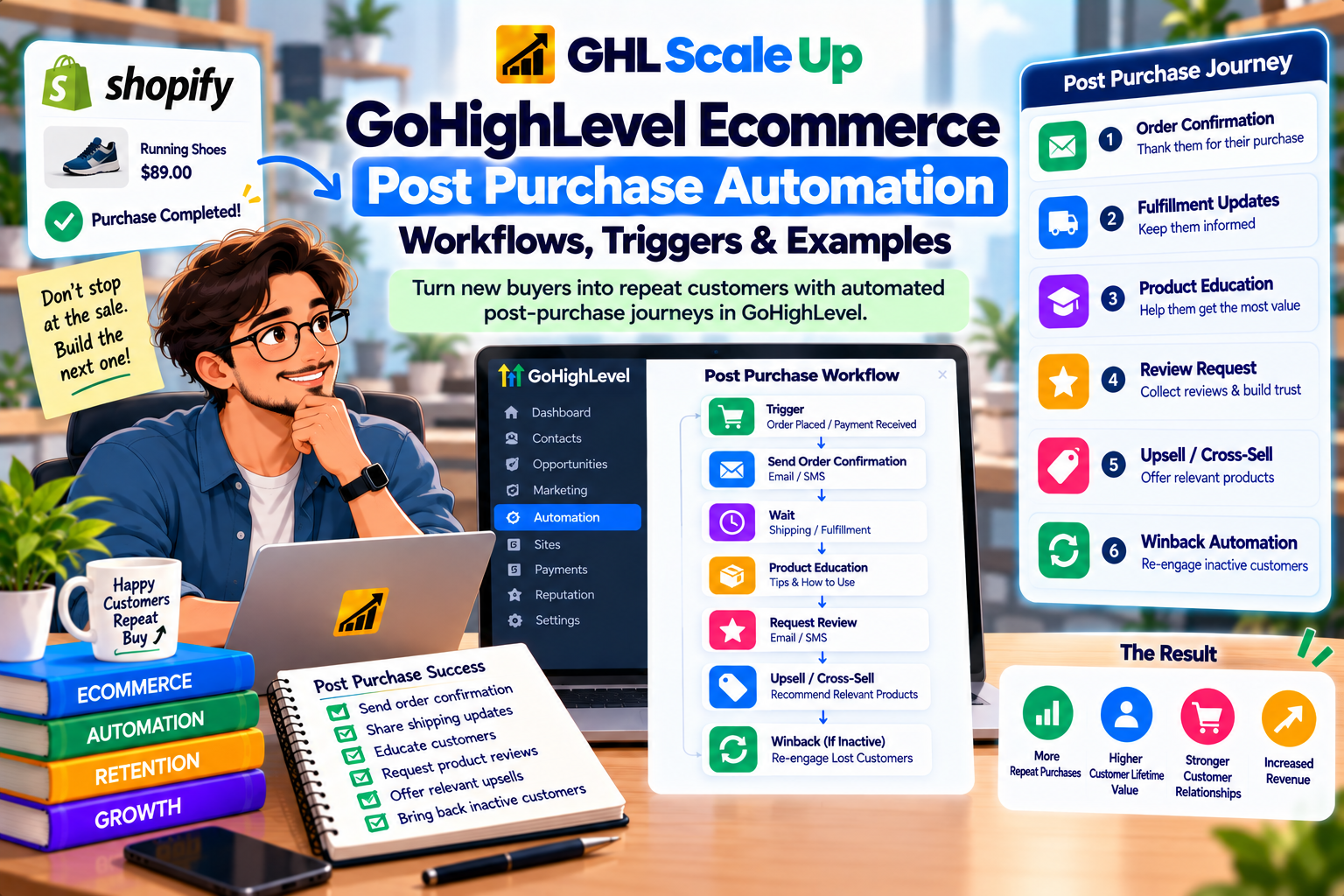
What Should Happen After an Ecommerce Purchase? The Customer Journey
The reasoning behind sequencing matters more than the sequence itself, so it's worth laying out before any workflow-building: purchase → confirmation → fulfillment → product use → review → relevant next purchase. Each arrow is a decision point, not an automatic timer. Confirmation should happen because the purchase is confirmed, not because a certain number of minutes have passed. A review request should happen because the customer has plausibly had time to use the product, not because three days feels like a round number. Getting this sequencing right is what separates a workflow that helps the customer from one that just sends messages on a schedule.
Which GoHighLevel Trigger Should Start a Post Purchase Workflow?
Different stages of the post purchase journey need different triggers, because they're reacting to genuinely different events a payment succeeding is not the same event as an order being marked fulfilled. Getting the trigger wrong is the single most common reason a post purchase workflow looks correctly built but never fires, or fires at the wrong moment.
| Stage | What Actually Happened | Relevant Trigger | Source |
|---|---|---|---|
| Purchase confirmed | Payment succeeded | Payment Received (native Store/Website source) or Shopify Order Placed | Native Store uses Payment Received; Shopify orders use Shopify Order Placed Payment Received's documented sources don't include Shopify |
| Order fulfilled | Order status changed to fulfilled | Order Fulfilled | Covers native Store and external sources including Shopify, plus shipping connectors |
| Review eligible | A review was actually submitted | Product Review Submitted | Fires on submission, not on eligibility the business decides when to ask |
Notice that nothing in this table starts a workflow just because "some time has passed since purchase." Every stage here is tied to something that actually happened, which is the design principle the rest of this article builds on. The mechanics of each trigger's filters are covered in more depth in the GoHighLevel Ecommerce Store guide; this article focuses on how to sequence them into a journey.
Post Purchase Workflow #1: Immediate Purchase Confirmation
The confirmation workflow's only job is to confirm the purchase went through and tell the customer what to expect next order details, an estimated timeline if you have one, and how to get support. It shouldn't include an upsell, a review request, or anything that competes with that one job. Firing this off Payment Received (native Store) or Shopify Order Placed (Shopify) makes sense because the purchase has definitively happened at that point there's no ambiguity to wait out.
Hypothetical example: A first-time skincare customer buys a cleanser from a Shopify store. Shopify Order Placed fires, the workflow confirms the order and estimated shipping window by email, and critically a Goal Event checking for that same purchase removes the customer from any pre-purchase nurture or abandoned-checkout sequence they were previously in, so they don't keep getting messages trying to sell them something they already bought.
Post Purchase Workflow #2: Fulfillment and Delivery Communication
Payment Received and Order Fulfilled are not the same event, and conflating them causes real problems. Payment Received (or Shopify Order Placed) tells you the money changed hands. Order Fulfilled tells you the order's status was changed to fulfilled which in practice usually means a label was printed or an item was marked as shipped. Current documentation does not establish that Order Fulfilled means the customer has physically received the package; it's a status change the business controls, not a delivery confirmation from a carrier.
That distinction decides what you can safely say in the message. "Your order has shipped" is accurate when triggered by Order Fulfilled. "We hope you're enjoying your new product" is not that message belongs later, once there's been realistic time for delivery and use, not immediately when the status flips.
Post Purchase Workflow #3: Product Education
Not every post purchase message needs to sell something the next useful message is often just useful, not promotional, and that's deliberate. A product that requires setup, care, or correct use benefits from a message that helps the customer succeed with what they already bought, which also reduces support requests and returns.
Hypothetical example: A customer buys a product that requires assembly or calibration before first use. After Order Fulfilled (or after enough time has passed for likely delivery, if fulfillment data isn't reliable for timing), a workflow sends a plain setup guide not a cross-sell, not a review request, just the information that makes the purchase actually work. This is also a natural place to surface support contact information, since a confused customer who can't find help is more likely to request a refund than a happy one who got the product working.
Post Purchase Workflow #4: Review Requests
A review request should happen once the customer has plausibly used the product not immediately on purchase, and not so late that the experience has faded from memory. What "plausibly used" means depends entirely on the product: a digital download might be usable within minutes, while a physical product needs delivery time plus a reasonable period of actual use. HighLevel's Product Review Submitted trigger fires when a review is submitted, which tells you a review happened it's the trigger for reacting to a review (a thank-you, an internal alert for a negative one), not the mechanism that decides when to ask for one in the first place. The timing of the ask is a wait-step and business-judgment decision layered on top of fulfillment or delivery timing, not something the trigger itself handles.
Hypothetical example: A customer's order is marked fulfilled. The workflow waits a period appropriate to the product and expected delivery time, then sends a review request. If Product Review Submitted later fires for that contact, a separate short workflow thanks them and that Goal Event also stops any further review reminders for that order, so they don't get asked twice.
Post Purchase Workflow #5: Cross-Sell and Upsell Timing
A cross-sell or upsell workflow follows the logic of "bought Product A → might reasonably want Product B," but the timing is where most of the judgment is required not three days, not a fixed number, but context-dependent. The message is premature if the customer hasn't received the first product yet, pointless if they've already bought the recommended item, and tone-deaf if it lands at the same time as a support or fulfillment message about the original order. None of that is solved by picking a universal delay; it's solved by sequencing the offer after confirmation that the first purchase is actually settled fulfilled, ideally used and checking that the customer doesn't already own the thing you're about to recommend.
Hypothetical example: A customer buys a coffee grinder. Product B compatible filters is a reasonable follow-up, but only after enough time has passed that the customer has likely received and started using the grinder, and only if their order history doesn't already show a filter purchase. A workflow built on Order Fulfilled, with a wait tied to realistic delivery time and a condition checking prior purchases, avoids sending the offer while the first box is still in transit.
Treating First-Time Buyers Differently From Repeat Customers
A first-time buyer and a fifth-time buyer arguably shouldn't get an identical post purchase sequence the second doesn't need the same orientation and trust-building as the first, and the first probably shouldn't skip straight into VIP-style treatment meant for someone with purchase history. GoHighLevel doesn't have a dedicated "repeat customer" trigger; this is a design pattern built from standard tools, not a special feature. The common approach is a tag applied after a customer's first completed purchase, checked with an If/Else condition on subsequent purchase workflows if the tag is present, route into a shorter, more direct sequence; if not, route into the fuller first-time journey. The same pattern extends to high-value orders, using the order/cart value data available at the trigger.
How Shopify and the Native GoHighLevel Ecommerce Store Differ for Post Purchase Automation
The customer journey logic in this article confirm, fulfill, educate, review, offer applies the same way regardless of ecommerce source. What differs is the trigger wiring underneath it: a native Store purchase fires Payment Received, while a Shopify purchase fires Shopify Order Placed, and a workflow built on the wrong one of the two will simply never catch the other platform's orders. Order Fulfilled, by contrast, is documented to cover both native Store and external sources including Shopify, so that part of the journey doesn't need separate workflows by source only the purchase-confirmation stage does.
For the full mechanics of what Shopify data reaches GoHighLevel and how the connection itself works, see GoHighLevel Shopify Integration: What It Syncs, How It Works & What You Can Automate. For the native Store's own product, checkout and order behavior, see GoHighLevel Ecommerce Store: How It Works & Who It Fits.
How to Stop Pre-Purchase Campaigns Once a Customer Buys
Once someone completes a purchase, they should leave whatever pre-purchase automation they were in most importantly, abandoned checkout recovery and move into the appropriate post purchase journey instead. A customer who keeps receiving "complete your purchase" reminders after they've already paid is the fastest way to make automation feel broken.
The documented mechanism for this is a Goal Event checking for Payment Received (or the equivalent purchase event for the relevant source), set to end the pre-purchase workflow the moment that goal is met. Goal Events check continuously across the whole workflow, not just at one step, which matters because a customer can complete the purchase at any point while sitting in a wait step elsewhere in the sequence. This same mechanism is what the abandoned checkout article recommends for exiting recovery sequences the post purchase side of that same transition is simply making sure the customer lands somewhere useful afterward, rather than nowhere at all.
How to Prevent Post Purchase Workflow Conflicts
This is where a technically correct set of workflows can still deliver a bad customer experience, and it's worth designing against deliberately rather than discovering it from a customer complaint.
- A customer gets a sales email right after buying. This happens when the purchase doesn't trigger an exit from pre-purchase nurture or promotional sequences add the Goal Event exit described above wherever a customer could plausibly already be enrolled.
- A review request arrives before the product could have arrived. This happens when the review workflow's wait is tied to a fixed number of days rather than to Order Fulfilled plus a realistic delivery allowance.
- An upsell lands at the same time as a fulfillment or support message. Stagger workflows deliberately, or add a condition checking whether another message already went out recently, rather than letting independent workflows fire without awareness of each other.
- A repeat buyer gets first-time-buyer messaging. Covered above this needs the first-purchase tag and an If/Else check before routing.
- The same event enrolls a contact in more than one workflow that does the same job. Common when a workflow is duplicated for testing and never retired audit which workflows actually listen for the same trigger before publishing a new one.
How to Test a GoHighLevel Post Purchase Workflow
A completed test proves the trigger fired and the workflow executed it does not prove the complete customer experience is actually right, which is a broader question than whether the automation technically works.
- Place a real test purchase (or the lowest-cost real transaction your payment setup allows) rather than manually creating a contact a manually added contact doesn't prove the trigger's actual detection path works.
- Confirm the confirmation workflow fires and check its content and timing.
- Confirm the test purchase exits any pre-purchase sequence the test contact was previously in.
- Mark the test order fulfilled and confirm the fulfillment communication fires check wording doesn't overclaim delivery.
- Let the review-request wait elapse (or use workflow test mode's compressed timers to check logic quickly) and confirm the message and timing.
- Submit a test review if applicable, and confirm the thank-you workflow fires and the reminder sequence stops.
- Check whether a cross-sell workflow would fire appropriately does it correctly skip if the "recommended" product is already in the order history?
- Repeat the purchase as the same test contact and confirm the first-time-buyer tag correctly routes the second purchase differently.
Common Post Purchase Automation Mistakes
| Problem | Why It Happens | Better Approach |
|---|---|---|
| Workflow never fires for Shopify orders | Built on Payment Received, which doesn't cover Shopify | Use Shopify Order Placed for Shopify purchase confirmation |
| Review request arrives before the product does | Timing tied to a fixed delay from purchase, not from fulfillment | Trigger off Order Fulfilled, then wait a realistic delivery period |
| Customer keeps getting sales emails after buying | No exit condition from pre-purchase sequences | Add a Goal Event on the purchase event to end those workflows |
| Everyone gets the same "welcome" sequence regardless of purchase history | No first-purchase tag or If/Else check | Tag on first purchase, branch repeat buyers into a shorter sequence |
| "Order Fulfilled" message implies the customer has received the item | Treating a status change as a delivery confirmation | Match message language to what the event actually confirms |
| Upsell offered for a product the customer already owns | No purchase-history condition before sending the offer | Check order history before enrolling in the cross-sell workflow |
| Duplicate post purchase messages | More than one workflow listens for the same trigger | Audit existing workflows for the same trigger before publishing a new one |
A Decision Framework for Post Purchase Automation
| Situation | Appropriate Approach |
|---|---|
| Customer just completed payment | Confirmation, plus exit from any pre-purchase sequence |
| Order has been marked fulfilled | Fulfillment/shipping communication, worded as a status update |
| Customer likely needs help using the product | Product education, not promotional content |
| Customer has had realistic time with the product | Review request |
| Customer bought Product A with a logical Product B | Cross-sell, after confirming they don't already own B |
| Customer is a repeat buyer | Shorter, different sequence than the first-time journey |
| Customer hasn't purchased again after a reasonable window | Retention/winback logic, built from tags and wait-for-condition rather than a dedicated trigger |
| A new workflow might overlap with an existing one | Review entry triggers and exit conditions on both before publishing |
When GoHighLevel Should Not Own the Entire Post Purchase Journey
GoHighLevel doesn't need to be the system of record for every part of the ecommerce operation, and treating it that way creates unnecessary risk. The commerce system Shopify or the native Store should generally remain the source of truth for inventory, shipping status, transaction processing and product data. GoHighLevel's role is the CRM and communication layer: deciding who gets messaged, when, and with what, based on the commerce events it receives. If a planned automation needs commerce data that isn't actually exposed to GoHighLevel's workflows a specific inventory count, a carrier's real-time delivery confirmation that's a sign the capability belongs to the commerce platform, not something to approximate inside a workflow.
The Core Principle to Remember
Post purchase automation isn't one workflow it's a sequence of decisions, each one tied to something that actually happened: a payment, a fulfillment status change, a review submission, a prior purchase. Build each stage off the event that actually represents it, let a Goal Event handle the exit from whatever came before, and let real purchase history not a fixed number of days decide what a given customer sees next. Where that logic gets more involved than a single workflow can comfortably hold, GoHighLevel workflow and automation setup is the kind of implementation work worth scoping deliberately rather than bolting together one condition at a time.
Frequently Asked Questions About GoHighLevel Post Purchase Automation
What is post purchase automation in GoHighLevel?
The set of automated workflows that respond to what happens after a purchase confirmation, fulfillment communication, product education, review requests and relevant follow-up offers each started by a different, specific event rather than one long timed sequence.
Can GoHighLevel automate post purchase emails and SMS?
Yes, through standard workflow actions once the relevant purchase or fulfillment trigger has fired, using whichever channels the contact has valid information and consent for.
What trigger should I use after an ecommerce purchase?
Payment Received for native Store purchases, or Shopify Order Placed for Shopify purchases Payment Received's documented sources don't include Shopify, so using it there means the workflow won't fire.
Can GoHighLevel automate Shopify post purchase workflows?
Yes. Shopify Order Placed starts the confirmation stage, and Order Fulfilled is documented to cover Shopify alongside the native Store for the fulfillment stage.
When should I send a review request?
After Order Fulfilled, with a wait long enough for realistic delivery and product use the exact timing depends on the product, not a universal number of days.
How do I stop sales emails after someone purchases?
Add a Goal Event checking for the purchase event (Payment Received or Shopify Order Placed), set to end the pre-purchase workflow this checks continuously, so it catches a purchase completed at any point in the sequence.
How do I avoid sending duplicate post purchase messages?
Audit whether more than one workflow listens for the same trigger, and use tags or If/Else conditions so a contact who already received a message doesn't qualify for an equivalent one from a different workflow.
Related Articles in This Series
Need Help Building Post Purchase Automation?
We help ecommerce businesses build post purchase workflows in GoHighLevel that actually work.
Book Your Free Assessment
GHL Scale Up is a specialised GoHighLevel implementation and SaaS growth agency. Based in India, we serve agencies and businesses across 6 countries with 200+ GoHighLevel builds delivered. This guide reflects direct experience building post purchase automation for ecommerce businesses. All product details verified against HighLevel documentation as of September 2026.
ghlscaleup.com