
What A2P Registration Means for an Agency
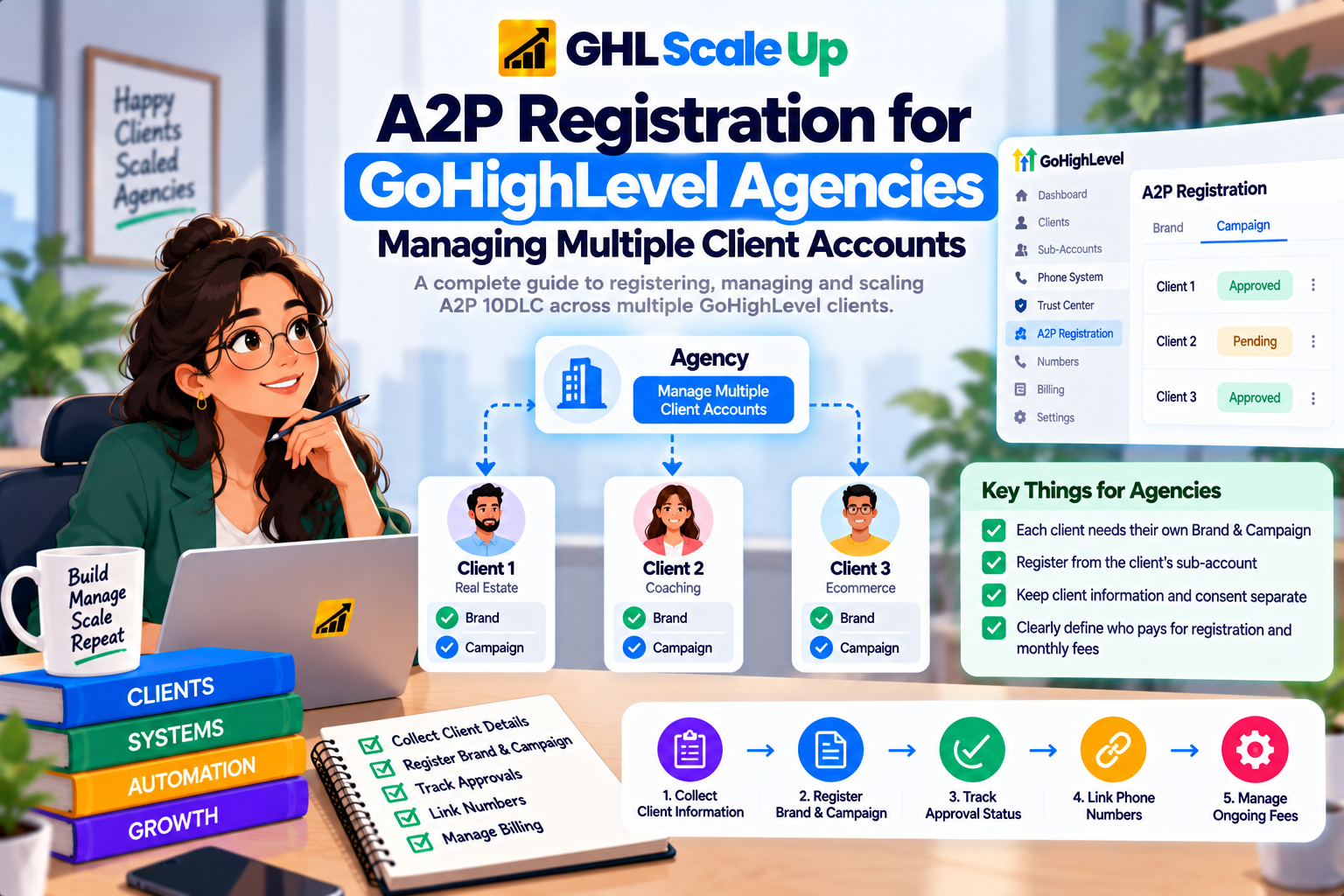
A2P 10DLC is the carrier registration framework for business texts sent to US recipients from standard 10 digit local numbers. If the background is new, start with what A2P 10DLC is. At agency scale the useful question is which entity owns what:
| Entity | Role in A2P registration |
|---|---|
| Agency | Manages the HighLevel environment, phone system settings and billing. Coordinates registrations but is not the sender of a client's messages |
| Client business | The legal business whose messages are being sent. Its identity is what the Brand represents |
| Sub-account | Where registration is completed and tracked, in Settings, Phone System, Trust Center |
| Brand | The verified business identity: legal name, registration number, address, contact |
| Campaign | The registered messaging use case, sample messages, website and consent process |
| Phone number | Must be linked to an approved Campaign before A2P messages are sent |
Does Each Client Need a Separate A2P Registration?
Yes, for separate businesses. HighLevel describes a Brand as the legal business entity sending the messages, and registration is submitted from the sub-account where that business operates. Registering your own agency and sending clients' messages under it would misstate who is sending them, which is what registration exists to prevent.
Two related points are less obvious.
- One client, several Campaigns. A single sub-account can hold more than one Campaign under an approved Brand, each with its own use case, and different numbers can be linked to different Campaigns. HighLevel introduced this in its multi Brand and Campaign update. Extra Campaigns follow the pricing in the fees guide.
- One business, several sub-accounts. Agencies often ask whether sub-accounts belonging to the same company, such as one per sales rep, can share a registration. I found no HighLevel documentation describing a way to share one Brand and Campaign across sub-accounts, and users have posted feature requests for it. Until HighLevel documents otherwise, plan on registering in each sub-account, and check your Trust Center before promising a client anything different.
What Belongs to the Client and What Belongs to the Agency
| Client provides or confirms | Agency handles |
|---|---|
| Exact legal business name and registration number | Intake, validation against official records, and data entry |
| Registered business address and authorized contact | Trust Center submission for each sub-account |
| A live website that identifies the business | Checking that the site, Brand and Campaign tell the same story |
| The real messaging purpose and how contacts opt in | Drafting the description and sample messages from what the client actually sends |
| Approval of what is submitted in their name | Status tracking, number linking and post approval testing |
| Payment responsibility, as agreed in your contract | Billing setup and clear separation of registration fees from your service fee |
This split is a recommended operating model, not a HighLevel rule. What HighLevel does require is that the submitted details match the real business, so the client has to be the source of truth for identity and consent.
What to Collect From Each Client Before You Register
HighLevel's own preparation list groups what reviewers compare into five areas. Collect all of it before opening the sub-account, because a missing item mid registration usually means a repeat submission:
- Business identity: exact legal name, accepted registration number or Tax ID, business type and industry, registered address and region.
- Authorized contact: name, reachable phone, monitored email, job title and position. This should be someone who can answer questions about the business if carriers verify it.
- Website: live, public and matching the Brand, with a visible business name and contact details.
- Messaging purpose: the use case, a plain description of what is sent, and realistic sample messages.
- Consent: the actual opt in method, consent language, frequency disclosure, HELP and STOP information, Privacy Policy and Terms and Conditions.
For US Standard Brands, ask for the complete CP 575 or 147C letter rather than a typed name, because the legal name must match official records. Field level detail is in the Brand Registration guide, and consent wording is covered in A2P opt in language and requirements. Do not submit guessed or incomplete information, and do not copy one client's consent wording or policy pages to another. Each business's website and consent flow must describe that business.
Limits That Affect Agencies Registering Many Clients
These come from HighLevel's current Brand registration documentation unless stated. The first two are guidance rather than hard blocks, but they matter once you register many businesses.
| Limit | What it says | Scope |
|---|---|---|
| Contact email | Each business should have its own unique contact person. Avoid using the same email address for more than five Brands | HighLevel guidance |
| Contact phone | Do not use the same number for more than five Brands, and it must be reachable | HighLevel guidance |
| Sole Proprietor OTP number | One US or Canada mobile number can verify up to three Sole Proprietor Brands. VoIP, LeadConnector and other CPaaS numbers are not accepted | Carrier limit, per HighLevel |
| Sole Proprietor numbers | One phone number per Campaign. Standard Brands support multiple numbers | Brand type |
| Brands per EIN | Registering more Brands than allowed against one EIN returns error 30898. HighLevel does not publish the ceiling in the articles I reviewed | TCR level, surfaced in HighLevel |
| Identity verification | Persona verification is generally completed once per sub-account. Email OTP allows three attempts and two resends | HighLevel workflow |
Two practical consequences follow. Use the client's own authorized representative and contact details wherever you can, instead of rotating agency email addresses or aliases to stay under a limit, because the contact must be verifiable for that business. And if a limit really does block a legitimate registration, ask HighLevel Support rather than working around it.
A Repeatable Workflow for Registering Multiple Clients
Confirm A2P applies.
It applies to US bound messages from standard local numbers. Toll Free numbers use a separate verification, compared in Toll Free vs A2P 10DLC, and Canadian scenarios are in A2P 10DLC for Canadian numbers.
Run your intake.
Use one standard form for every client so no registration starts with gaps.
Validate before submitting.
Compare legal name, registration number and address against official records, confirm the website is live, and check that the use case, description and samples describe the real messaging.
Prepare the sub-account.
Confirm the phone system is connected and the client's numbers are in place. If your sub-accounts have re-billing off, note that HighLevel's default phone preferences let you control whether sub-account users can submit A2P registration in that case.
Register the Brand
in Settings, Phone System, Trust Center. The process is in the Brand Registration guide.
Register the Campaign
once the Brand is eligible. HighLevel has you run its compliance review and then submit, so do not assume approval of the Brand submits the Campaign for you. See A2P Campaign Registration in GoHighLevel.
Monitor the review.
A Campaign stays Pending while under review. Do not create another Campaign just because it is slow.
Link and verify numbers.
After approval, each number must be linked to the approved Campaign and show the green A2P Verified label. HighLevel's error 30034 guide covers the linking.
Test.
Send a test message, confirm opt out behavior works, and keep the client's consent evidence on file.
Record everything
in your tracker, described next.
How to Manage A2P Registrations at Scale
Registration status and rejection details are shown inside each sub-account's Trust Center. I found no documented agency wide view that lists every sub-account's registration, so keep your own tracker and update it whenever a status changes. A workable version has one row per client sub-account:
| Field | What to record |
|---|---|
| Client and sub-account | Business name and sub-account name or location ID |
| Brand type and status | Standard or Sole Proprietor, plus current status |
| Campaign, use case and status | Pending, Rejected or Approved, matching what Trust Center shows |
| Numbers and link status | Which numbers exist and whether each shows A2P Verified |
| Authorized contact | Who it is, so contact reuse stays within HighLevel's guidance |
| Consent and website evidence | Opt in URL, policy page URLs and screenshots |
| Submission and approval dates | For follow up and reporting |
| Billing status | Who is paying, and whether re-billing is on |
| Issues and owner | Rejection reason, error code, who is fixing it |
Review anything Pending or Rejected on a regular schedule so registrations do not sit forgotten. The cadence is your call, since HighLevel publishes no fixed review time. Throughput and Trust Score matter once clients scale sending, and are covered in how Trust Score and MPS work.
A2P Registration and GoHighLevel SaaS Mode
If clients sign up through SaaS Mode and get sub-accounts automatically, A2P registration is still completed per sub-account in Trust Center. Provisioning can connect the phone system to new sub-accounts automatically, and that is a setting you control, but connecting a phone system is not the same as registering a Brand and Campaign.
Snapshots copy configuration such as funnels, forms and workflows. HighLevel's documentation does not describe a snapshot as carrying an approved registration, so treat every new client as needing their own Brand, Campaign and consent evidence. Build registration into onboarding, decide whether you run it for clients or guide them through it, and make the client's legal business details a required onboarding step. For the SaaS configuration itself, see our SaaS Mode setup guide and GoHighLevel SaaS Mode service.
A2P Billing and Client Rebilling for Agencies
The exact amounts live in our A2P 10DLC fees guide. What agencies need here is who charges what, and what stays yours.
- Registration and messaging charges: HighLevel's fee reference describes A2P registration, vetting and monthly Campaign fees as pass through charges from TCR, Twilio and carriers, with no HighLevel markup.
- The re-billing 5% markup: HighLevel's LC Phone billing guide separately describes a fixed 5% markup on pass through categories, including A2P registration fees and SMS and MMS carrier fees, applied at the sub-account level when re-billing is enabled. Your own configured re-billing amount is then applied on top of that. Configure it under Agency View, Reselling, Core Services. The two pages describe billing differently, so check what your agency account actually shows before quoting clients.
- Fees start on submission: the same guide says submitting a Campaign starts the one time and monthly fees regardless of the review outcome, and that deleting a Campaign stops future monthly charges. Resubmitting a rejected Campaign has been free since February 1, 2026.
- Your own service fee: anything you charge for handling registration is an agency service charge. It is not a TCR, carrier or HighLevel fee and should never be presented as one.
Agency Mistakes That Cause Registration Problems
- Registering the agency instead of the client. The Brand must be the business actually sending.
- Choosing Sole Proprietor for a business with a Tax ID. That path is only for businesses without one.
- Reusing contact details beyond HighLevel's guidance, or submitting an agency contact who cannot speak for the client's business.
- Submitting before the website and consent flow are ready. Reviewers compare all of it.
- Copying consent wording or policy pages between clients. Each must reflect that business's own flow.
- Assuming Campaign approval means numbers work. Each number must still be linked to the approved Campaign.
- Assuming A2P moves with a phone number or a snapshot. It does not, as the next sections show.
- Skipping tracking, so rejected or pending registrations go unnoticed until a client complains.
What to Do When a Client Registration Is Rejected
First establish what failed. A Brand problem is an identity problem, and a Campaign problem concerns the messaging program, so the two use different guides. Open every rejection reason under View required fixes and note the code before anyone edits anything.
- Brand identity failures: A2P Brand Rejected in GoHighLevel.
- Use case, description, sample message, consent or website failures: A2P Campaign Rejected in GoHighLevel.
- A specific numbered code: A2P error codes.
If you need HighLevel Support, gather the Brand and Campaign names and statuses, the exact rejection reason and error code, screenshots of the required fixes, the website and opt in URL, the use case and samples, the affected number, and the sub-account details. Tell the client what happened and get their confirmation before resubmitting anything in their name.
What Happens When a Client Changes Phone Systems or Sub-Accounts
A2P registration is tied to the sub-account, not to the phone number, so moves need a plan.
- Moving numbers between sub-accounts in the same agency: HighLevel's Move Numbers guide says A2P status is at the sub-account level and does not move with the number, so reattach the correct Brand and Campaign afterward.
- Moving from your own Twilio account to LC Phone: an A2P registration made through your own Twilio account does not migrate. The sub-account must register again in HighLevel Trust Center, and applicable fees apply again, per HighLevel's LC Phone migration guide.
- Transferring a sub-account to another agency: HighLevel's sub-account transfer guide says eligible A2P registration stays with the numbers, while numbers on your own Twilio account do not transfer automatically. Our sub-account transfer article covers the wider process.
Agency A2P Registration Checklist
Client confirmed as a separate legal business, with US bound local number messaging
Legal name, registration number and address verified against official records
Brand type chosen correctly (Standard or Sole Proprietor)
Authorized contact is the client's own, within HighLevel's reuse guidance
Website live, public and matching the Brand
Use case, description and samples describe the real messaging
Opt in flow, Privacy Policy and Terms are client specific and reachable
Client approved the submission and understands who pays what
Brand approved, then Campaign submitted and monitored
Every sending number linked and showing A2P Verified
Test message sent and opt out checked
Tracker row completed
A2P Registration for Agencies FAQ
Can one A2P Brand cover multiple clients?
No. A Brand represents one legal business, so separate clients need separate Brands, each registered in its own sub-account.
Is A2P registration at the agency level or sub-account level?
Sub-account level. Registration and status appear in each sub-account's Trust Center, and A2P status does not travel with a phone number.
Can sub-accounts for the same business share a registration?
I found no HighLevel documentation describing that. Sharing has been requested as a feature, so confirm in your Trust Center before assuming it works.
Does A2P registration happen automatically in SaaS Mode?
No. Provisioning can connect the phone system, but the Brand and Campaign still have to be registered for each sub-account.
Can I mark up A2P fees for clients?
HighLevel's billing guide describes a fixed 5% markup on A2P pass through charges when re-billing is enabled, with your configured re-billing amount applied on top. Your own service fee is separate. Check your agency billing before quoting.
Does an approved registration move with a phone number?
No. Within an agency, reattach the Brand and Campaign after moving a number. Between Twilio and LC Phone the registration has to be redone.
Do new numbers need a new registration?
New numbers need to be linked to the approved Campaign and show A2P Verified before sending. Check the label whenever numbers are added.
Related Articles in This Series
Managing A2P registration across multiple clients?
GHL Scale Up handles A2P registration for your entire client base. Client intake process, EIN verification, brand registration, campaign submission, rejection troubleshooting managed per sub-account for every client.
Book Your Free Strategy Call
This guide was checked against HighLevel's Registering Your A2P Brand, A2P registration overview, Phone System Pricing and Billing Guide, and its number move and sub-account transfer documentation, current as of September 2026. Requirements, fees and features change, so confirm what you see in your own Trust Center and agency billing before acting.
ghlscaleup.com