
Why Opt In Language Matters for A2P Registration
Campaign review is really a consistency check. HighLevel describes it as comparing who is sending messages, what is being sent, why recipients receive them and how they consented. Your opt in language is the evidence for the last part. If it says something different from your Campaign description or sample messages, a reviewer cannot verify the program. The background on why registration exists is in what A2P 10DLC is, and the field by field submission is covered in A2P Campaign Registration in GoHighLevel. This page covers how the consent experience itself should be built.
A2P Registration Is Not the Same as Consent
- A phone number is not consent. HighLevel states that collecting a phone number does not by itself establish consent to receive SMS. The phone field and the consent choice are separate decisions, even when the number is required.
- Approval is not permission. A2P registration tells carriers who you are and what you plan to send. It does not authorize you to text every contact in your CRM. HighLevel's messaging guidance is to message only recipients who have valid consent and to honor opt outs.
- Platform rules are not law. The requirements below come from HighLevel's registration workflow and carrier review. Whether your practices meet broader legal obligations is a separate question for your own counsel.
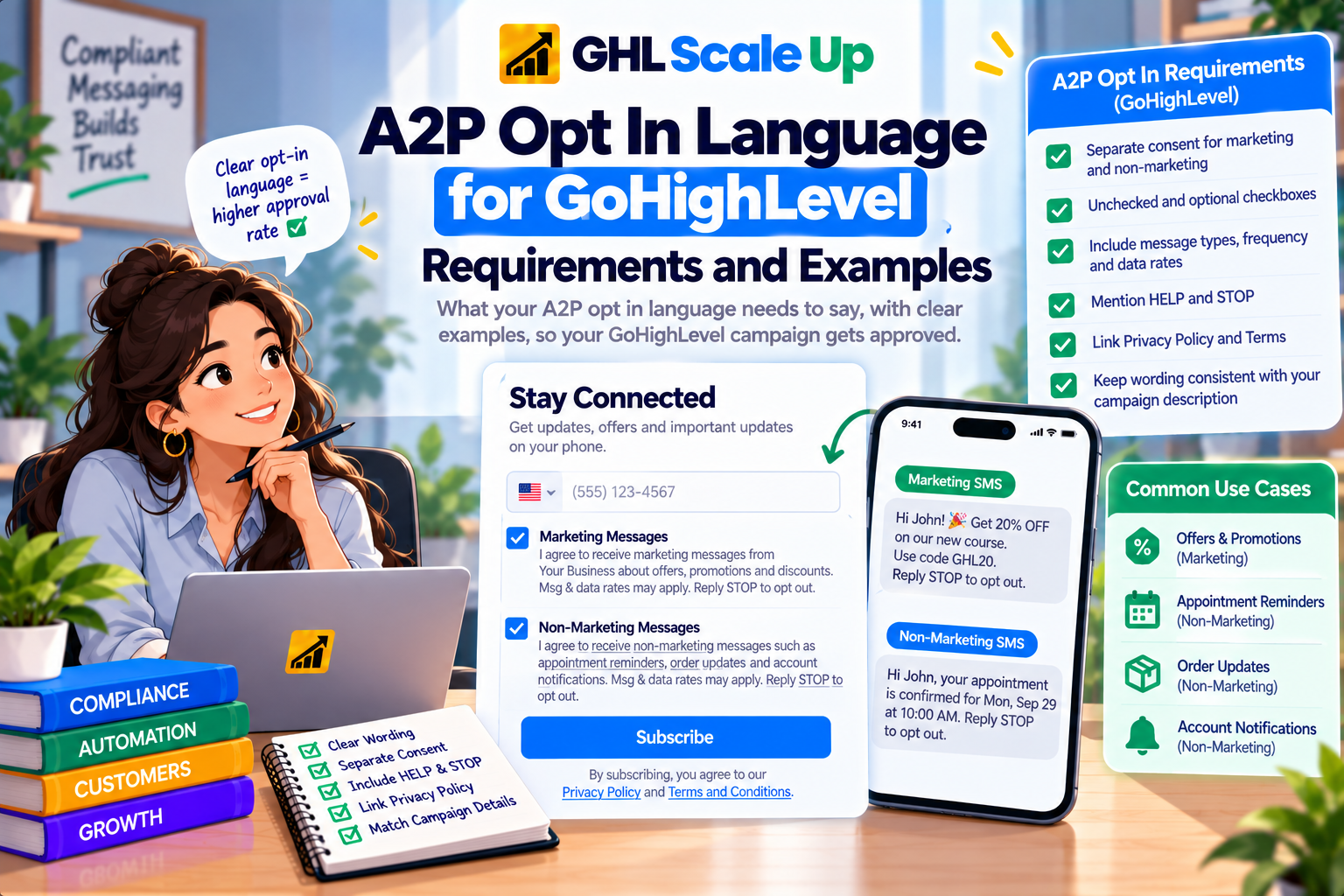
Current GoHighLevel A2P Opt In Requirements
These points come from HighLevel's opt in guidance (updated July 30, 2026) and Campaign approval best practices (updated September 2, 2026):
| Requirement | What HighLevel says | Type |
|---|---|---|
| Separate consent by message type | Marketing and non marketing consent are distinct choices so a contact can opt into one, both or neither | HighLevel and carrier review |
| No pre selected checkboxes | Consent boxes must be unchecked. The contact takes an affirmative action | HighLevel and carrier review |
| Consent stays optional | Even when the phone number is required, checking the consent box cannot be required to submit the form. This applies to forms, surveys, quizzes, chat widgets and calendar bookings | HighLevel and carrier review |
| Act on the choices made | After submission, communicate only through the channels the contact selected | HighLevel |
| Policy links in the footer | Privacy Policy and Terms and Conditions links must be visible in the footer of every opt in form, accessible without extra steps and not obscured by pop ups | HighLevel and carrier review |
| Consistent contact details | Contact information in the policies should match what you submitted in Brand registration | HighLevel |
Marketing vs Non Marketing SMS Consent
Marketing messages promote something: offers, discounts, sales. Non marketing (informational) messages serve an existing relationship: appointment reminders, order updates, service notifications. HighLevel wants these consented to separately because they are different programs.
Specificity matters. HighLevel's guidance is that the checkbox should reference the same message types named in your Campaign description. If your description says appointment reminders and order updates, a checkbox that only says "non marketing messages" is too generic. Likewise a marketing checkbox should reference the promotions you actually send, such as offers or discounts, not just "marketing messages".
Mixed programs need both consents. HighLevel's Chat Widget flow supports a Mixed message type that sets the Campaign use case to Low Volume Mixed and generates a widget with two independent, unchecked consent choices, described in its Mixed use case guide. Choose Mixed only when you genuinely send both kinds of message, and include a sample of each in your Campaign.
Adapted Opt In Language Examples
Each example below is an adapted example that contains the elements HighLevel expects. HighLevel publishes its own exact checkbox wording in its opt in compliance guide. Compare against it and substitute your legal business name (or declared DBA) and your real message types. Do not copy these examples word for word without checking them against your own Campaign.
Marketing checkbox (adapted example)
I agree to receive marketing text messages from [Business Name] about special offers and discounts at the phone number I provided. Message frequency varies. Message and data rates may apply. Reply HELP for help or STOP to opt out.
Non marketing checkbox (adapted example)
I agree to receive text messages from [Business Name] about my appointments and service updates at the phone number I provided. Message frequency varies. Message and data rates may apply. Reply HELP for help or STOP to opt out.
Keyword opt in call to action (illustrative)
Text JOIN to [number] to receive appointment reminders and service updates from [Business Name]. Message frequency varies. Message and data rates may apply. Reply HELP for help or STOP to opt out. Privacy Policy and Terms: [URL].
Verbal consent script (illustrative)
May we text you appointment reminders and service updates from [Business Name] at this number? Messages vary in frequency, message and data rates may apply, and you can reply STOP at any time to opt out or HELP for help. Our Privacy Policy and Terms are at [URL].
Notice what each contains: the business name, the type of messages, frequency, the rates disclosure, HELP and STOP, and where to find the policies. Keep marketing and non marketing consent in separate checkboxes, and keep policy acceptance out of the consent text.
What an A2P Opt In Form Should Include
- The business sending the messages, matching your Brand or declared DBA
- The type of messages the contact agrees to receive
- Message frequency information and a message and data rates disclosure
- HELP and STOP instructions
- Separate, unchecked and optional consent choices for marketing and non marketing
- Privacy Policy and Terms and Conditions links in the footer
Can the checkbox be required or pre checked? Neither. HighLevel says consent boxes cannot be pre selected and must stay optional.
Can one checkbox cover email and SMS, or policy acceptance and SMS? HighLevel's Campaign guidance says the SMS opt in checkbox should be separate from Privacy Policy and Terms acceptance, and its rejection codes flag consent folded into mandatory terms.
A2P Opt In Methods Compared
HighLevel supports several ways of collecting consent. Whatever you choose, describe every method you use during Campaign registration and give reviewers a way to verify each one.
| Method | How consent happens | Evidence reviewers need | Common failure |
|---|---|---|---|
| Website form | Contact ticks an unchecked SMS consent box next to the form | A public URL showing the form | Form behind a login, or unpublished |
| HighLevel Chat Widget | Consent choices inside a HighLevel generated widget with locked disclosures | The widget live on your public page | Widget not installed or page not public |
| Text keyword | Contact texts a keyword to a number after seeing a call to action | The call to action with program name, keyword, message types, frequency, rates, HELP and STOP | Call to action missing required disclosures |
| QR code or offline material | Contact scans or reads printed material with the disclosures | Hosted image of what the contact sees | No accessible proof |
| Paper form | Contact signs a printed form with the consent language | Hosted image of the form | Proof not provided or not viewable |
| Verbal consent | Agent reads a consent script | Documented script and how the process is recorded | Script lacks disclosures or is not documented |
| Lead form or other third party form | Contact opts in inside another platform's form | Evidence of what the contact sees before consenting | Consent language not visible or not specific |
For paper forms, forms behind a login, unpublished forms, QR flows and other offline methods, HighLevel says to provide accessible proof of what the contact sees before consenting, such as a screenshot uploaded to HighLevel Media Storage with a shareable link, and not a link that requires the reviewer to sign in.
How to Describe Your Opt In Flow During Campaign Registration
In the Campaign, you explain how contacts opt in, and HighLevel says this must match your use case and your opt in message. Think of the whole submission as one chain:
opt in method, then consent language, then Campaign description, then sample messages, then the messages you really send.
Every link should describe the same program.
- Say where the contact meets the opt in, what they see, and what they do.
- Reference the same message types in the description, the checkbox wording and the samples.
- If you use more than one method, describe each one, since one form screenshot does not prove every path.
The field by field walkthrough is in A2P Campaign Registration in GoHighLevel.
Chat Widget Setup vs Manual Setup
Chat Widget Setup opens by default. HighLevel generates the widget, the consent language with STOP, HELP, frequency and rate disclosures, the sample messages and the opt in description, and many of those fields are locked so the live widget matches the application. You still need to read what it generated against your real business, install the widget on a live public page, and confirm the website checklist. See HighLevel's Chat Widget guide. HighLevel's documentation differs on whether every Brand type and use case is available in this flow, so check what your Trust Center offers.
Manual Setup is for consent collected another way: an existing website form, paper form, lead form, QR code, kiosk or verbal process. You write the opt in description and message yourself, so this is where mismatches usually creep in.
Privacy Policy and Terms and Conditions Requirements
HighLevel treats both pages as mandatory in the footer of every opt in form. Its guidance covers these points, and its opt in compliance guide contains the exact required text, so check your policies against it rather than against a paraphrase:
- Privacy Policy: it should include the mobile data non sharing statement HighLevel specifies, meaning mobile opt in information is not shared with third parties or affiliates for marketing or promotional purposes, with support subcontractors permitted. It should not mention affiliation, or the selling or buying of leads.
- Terms and Conditions: they should identify your business and describe the messages, explain how to opt out and get help, disclose message frequency and the message and data rates notice, include a carrier liability statement, and link to your Privacy Policy.
- Consistency: contact details in both pages should match your Brand registration.
HighLevel offers sample Privacy Policy and Terms pages, and says they are not comprehensive and should be reviewed by your own legal counsel. A short SMS paragraph does not make a Privacy Policy legally complete.
Opt In Confirmation, STOP and HELP
Consent language shown before opt in and messages sent after opt in are separate things. Before opt in, the disclosures above appear with the consent choice. After opt in and in response to keywords, HighLevel's guidance for review is:
- STOP response: acknowledge the request, identify your business, and confirm no more messages will be sent.
- HELP response: identify your business and provide a valid support method, such as a phone number or email address.
- The HELP and STOP behavior you describe in the Campaign must match what actually happens.
- Include opt out language such as Reply STOP to unsubscribe in your sample messages.
Setting Up the Consent Experience in GoHighLevel
HighLevel does not lay out one universal click path for building consent into every form, survey and calendar, so this section stays at the level HighLevel's documentation supports. On any surface that collects a phone number, whether a form, survey, quiz, chat widget or calendar booking:
Place the phone field and the consent choices as separate decisions, with the consent statement next to the checkbox.
Keep marketing and non marketing consent as separate, unchecked, optional boxes.
Put visible Privacy Policy and Terms links in the footer, not hidden behind pop ups.
Make sure your automations respect what each contact chose. HighLevel says to communicate only through the channels selected.
Keep a record of the consent you collected: the submission, the checkbox selections, the source page and date, and a copy of the wording in use. HighLevel does not prescribe a record format, so treat this as good operating practice.
If your Campaign includes automated follow up, our Email, SMS and WhatsApp automation service covers building those flows around consent.
DBA and Subdomain Considerations
- DBA: if you message under a different name than your legal entity, HighLevel says to state that in the Campaign description and keep the website, policies and the business name in the checkboxes consistent with it. The DBA should also be clear in the site header or footer.
- Subdomain opt in pages: subdomains are allowed, but reviewers need to see how the subdomain relates to your main brand and how contacts find the opt in page. Without a visible path, it can look like a compliance page that no real customer ever sees.
Common Opt In Mistakes That Cause Rejection
These reflect the opt in related problems HighLevel documents. For the full troubleshooting process, see A2P Campaign Rejected in GoHighLevel and the A2P error codes guide.
- Pre selected consent checkbox, or consent required to submit
- Marketing and non marketing consent combined in one box
- Generic wording that does not match the Campaign description
- Missing business name, frequency, rates disclosure, HELP or STOP
- A call to action or opt in flow the reviewer cannot verify, such as a form behind a login
- Only one of several opt in methods described
- Privacy Policy or Terms missing, not linked in the form footer, or containing lead sharing language
- Website, DBA or contact details that do not match the Brand
Can You Text Existing Contacts After A2P Approval?
Approval of your Campaign does not turn every CRM contact into an opted in recipient. Contacts imported from lists, previous customers who never agreed to text messages, and people who simply submitted a form without an SMS consent choice are not covered by your registration. Text only people who gave valid consent for the type of message you are sending, and honor opt outs. Whether older contacts meet legal consent standards is a question for your own counsel.
A2P Opt In Checklist
Business name in the consent text matches your Brand or declared DBA
Message types in the checkbox match your Campaign description and samples
Marketing and non marketing consent are separate
Checkboxes are unchecked by default and optional
Frequency and message and data rates disclosures are present
HELP and STOP instructions are present
Privacy Policy and Terms links are visible in the form footer
Privacy Policy includes the required mobile data statement and no lead sharing language
Terms cover business identity, opt out, support, frequency, rates, carrier liability and the Privacy Policy link
Opt in is publicly viewable, or accessible proof is hosted without a login
Every opt in method used is described in the Campaign
Sample messages include your business name and opt out language
Automations respect each contact's consent choices
A2P Opt In Language FAQ
Do I need a checkbox for A2P consent?
For web opt in, HighLevel's guidance expects separate, unchecked and optional consent checkboxes. Keyword, paper and other methods need a clear call to action with the same disclosures.
Can I pre check the box or require consent?
No. HighLevel says checkboxes cannot be pre selected and consent cannot be required to submit the form, even if the phone number is required.
Do I need separate marketing and non marketing consent?
Yes when you send both. Contacts must be able to opt into one, both or neither.
Is entering a phone number enough?
No. HighLevel states that collecting a phone number does not by itself establish consent to receive SMS.
Can I use verbal consent, a paper form or a QR code?
HighLevel lists these as consent methods you can register through Manual Setup. Each still needs the disclosures and accessible proof of what the contact saw or heard.
What if my opt in form is behind a login?
Reviewers cannot sign in. Provide accessible proof, such as a screenshot uploaded to HighLevel Media Storage with a shareable link.
Does my Privacy Policy need SMS language?
Yes. HighLevel specifies a mobile data non sharing statement and says the policy should not mention lead selling or affiliation.
Can I text existing customers once my Campaign is approved?
Only those who gave valid consent for that type of message. Registration is separate from consent.
What if I change my consent wording after approval?
HighLevel says your Campaign details, consent flow and live messaging should stay aligned. I found no documented rule for post approval changes, so if your wording or flow changes materially, contact HighLevel Support before relying on the existing approval.
How do agencies handle this for clients?
Each client business needs its own consent flow and evidence. See A2P registration for GoHighLevel agencies.
Related Articles in This Series
Need your A2P forms and registration set up correctly?
GHL Scale Up handles A2P registration end to end. Form opt in language, Privacy Policy update, campaign registration, and rejection troubleshooting all managed for agencies and their clients.
Book Your Free Strategy Call
This guide was checked against HighLevel's opt in compliance guide, Campaign Approval Best Practices, Campaign Registration guide, Chat Widget guide and A2P overview, current as of September 2026. It is not legal advice. Requirements change, so confirm against your Trust Center.
ghlscaleup.com