
What A2P Campaign Registration Is and How It Differs From Brand Registration
A Campaign is the registered description of one messaging program sent from a Brand. It sits on top of the wider A2P 10DLC framework, which we explain in what A2P 10DLC is. This guide assumes you already know why registration exists and focuses on completing the Campaign.
| Brand Registration | Campaign Registration | |
|---|---|---|
| Question it answers | Who is sending the messages? | What are you sending, why, and how did recipients consent? |
| What you submit | Legal business identity, registration number, address, contact details | Use case, description, sample messages, opt in method, policy pages, website |
| Comes first? | Yes. It must be approved or eligible to continue | Follows the Brand |
| Where to learn it | A2P Brand Registration in GoHighLevel | This guide |
The sequence in HighLevel is: Brand registration, Brand approval, Campaign registration, Campaign review, then messaging through a number that is linked to the approved Campaign. If your Brand is not ready, Campaign registration cannot proceed. If it was rejected, start with the A2P brand rejection guide instead.
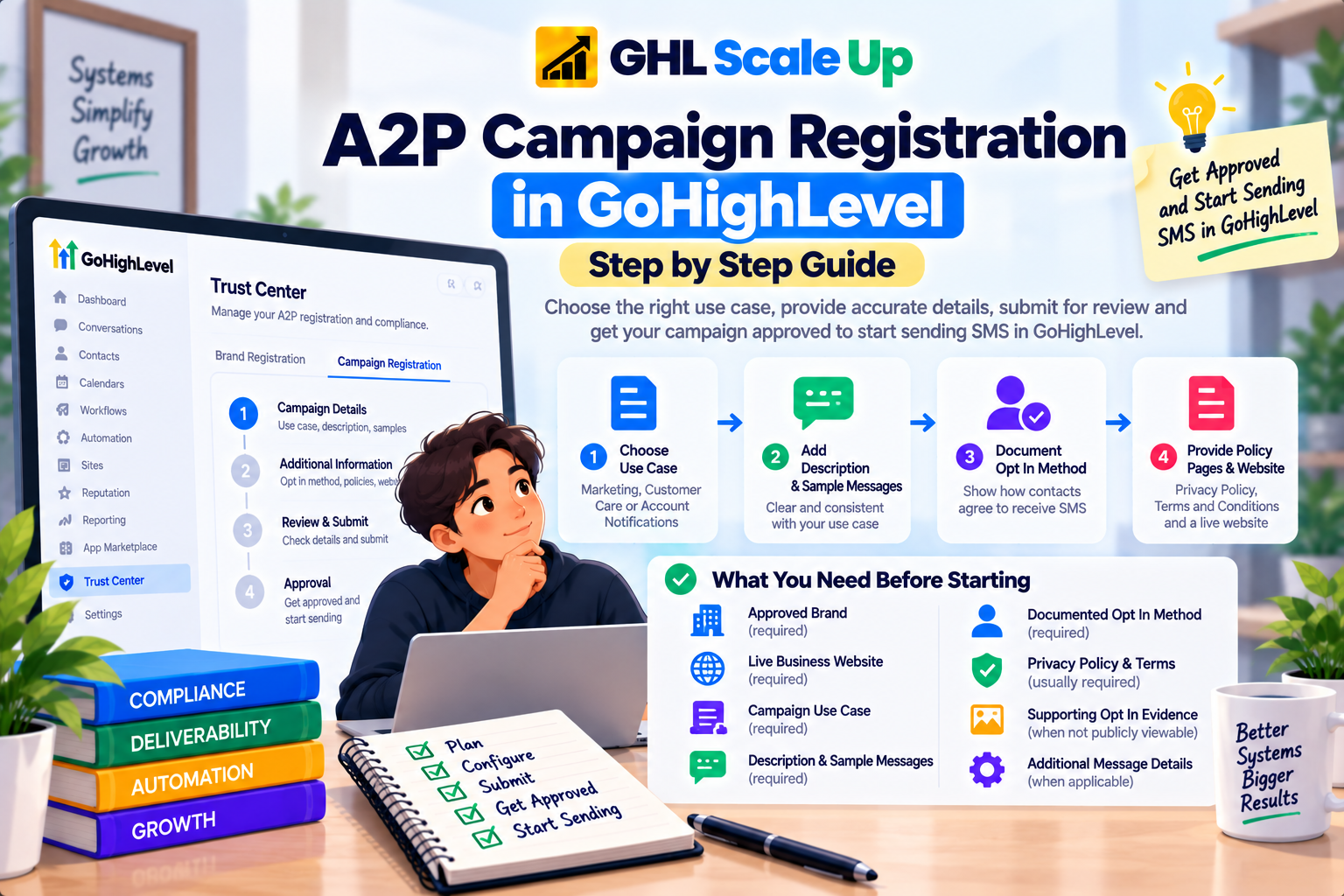
What You Need Before Starting A2P Campaign Registration
Gather these items first. Reviewers compare them against each other, so it is easier to align them before you open the form than to correct them after a rejection.
| Item | When required | What to check |
|---|---|---|
| An approved Brand | Always | The Brand should represent the business that will actually send the messages |
| A live business website | Always | Publicly accessible, matches your Brand or declared DBA, and clearly shows the business name and contact details |
| Campaign use case | Always | Matches the messages you really send |
| Description and sample messages | Always | Consistent with the use case and with each other |
| A documented opt in method | Always | A reviewer can verify what a contact sees before agreeing |
| Privacy Policy and Terms and Conditions URLs | Requested in Manual Setup; the Chat Widget path runs website compliance checks | Publicly accessible pages that support SMS messaging |
| Supporting opt in evidence | When opt in is not publicly viewable | Needed for paper forms, forms behind a login, unpublished forms, QR flows and similar |
| Additional message details | Depends on your messages | Flags for links, phone numbers, age gated content or financial content can change what is required |
A use case also does not make restricted content acceptable. HighLevel keeps a forbidden message categories list, covering areas such as debt collection, high risk financial services and third party lead generation, so check it if you are unsure.
How to Choose the Right Campaign Use Case
Registration is about documenting what you actually send. Pick the use case that best describes your real messaging, not the one that looks easiest to approve. A mismatch between the declared use case and your live traffic can lead to rejection, lower throughput, extra carrier filtering or enforcement action.
| Use case | Fits | Watch out for |
|---|---|---|
| Marketing | Promotions, offers, launches and other marketing sent to people who opted in | Requires documented consent for marketing |
| Customer Care | Support conversations, service updates and issue resolution | Not a home for promotions |
| Account Notifications | Non promotional updates about an account, status or activity | Keep offers out of the messages |
| Delivery Notifications | Fulfilment and delivery status | Only for actual delivery events |
| 2FA | Verification codes and login security | Must not contain marketing language |
| Mixed | One messaging program that genuinely combines purposes, such as offers plus account updates | Not a fallback when you are unsure |
| Low Volume Mixed | Lighter Mixed programs that do not need high throughput | Limited to the lowest throughput tier regardless of Trust Score |
If you send appointment reminders, note that HighLevel's current list has no dedicated appointment category. Read the definitions in HighLevel's Campaign Use Cases guide and choose the closest fit for your real messages. If your programs are materially different, such as authentication codes and unrelated promotions, register separate Campaigns rather than forcing them into one. Use case and opt in details can be locked after submission, so a wrong choice may mean creating a new Campaign. For how volume options relate to speed, see how throughput and Trust Score work.
How to Register an A2P Campaign in GoHighLevel
These steps follow HighLevel's current documentation. Fields change with your Brand type and setup path, so treat what appears on screen as the final authority.
Open Campaign registration
If you are registering for the first time, HighLevel guides you into Campaign Details once the Brand section is ready. To add a Campaign to an existing approved Brand, go to Settings, then Phone System, then Trust Center. In the A2P Messaging (SMS) card, select Brand & Campaigns, open the Campaigns tab and choose Create Campaign, then select the Brand.
Complete the registration steps
Select your messaging volume.
With a Tax ID you choose between the Low Volume Standard Brand and High Volume Standard Brand options, which differ in daily throughput and cost. Without a Tax ID, the only option is Single-number registration, which links one number that you can change later.
Choose your setup path.
Campaign registration opens in Chat Widget Setup by default. If you collect consent another way, choose Switch to manual setup. You can return to the widget path later from the Campaign details panel.
Complete the path you chose.
The two paths are described below.
Review the website compliance checklist.
Confirm the checklist items, then select Review Application.
Run the compliance review and submit.
If a check fails, fix it and select Review Again. You cannot submit until all required checks pass, and passing them prepares your Campaign for carrier review without guaranteeing approval.
Chat Widget Setup
This guided path uses a HighLevel generated opt in widget and pre fills much of the Campaign. You choose Marketing / Promotional, Informational / Non-Marketing or Mixed. Selecting Mixed sets the Campaign Use Case to Low Volume Mixed and generates two separate, unchecked consent boxes. You then enter your live website URL, tick the age gated option only if it applies, copy the widget code and install it on your site.
The widget should be the only form on the submitted page that collects SMS consent. HighLevel then fills in the use case description, both sample messages, the opt in flow description and the opt in message. Read all of it and edit anything that does not match your real business.
Manual Setup
Use this when consent comes from an existing website form, paper form, lead form, QR code, kiosk or verbal process. You provide the Campaign use case, website URL, description, sample messages and any additional message details, followed by the opt in method, the opt in form URL, a description of the opt in flow, the opt in message, and your Privacy Policy and Terms and Conditions URLs. If you operate under a DBA, state that in the description and keep the website, policies and consent wording consistent with it.
How to Write a Campaign Description
The description is your plain language summary of the program. Answer five questions in it, and answer them specifically:
- Who sends the messages? Your business name, and your DBA if you use one.
- Who receives them? The type of contact, such as existing customers or people who booked online.
- What do the messages contain? The real message types.
- Why are they sent? The purpose the recipient would recognise.
- How did recipients agree? The actual opt in method and where it happens.
Brightside Cleaning sends booking confirmations, arrival reminders and follow up service messages to customers who book through the form at brightsidecleaning.example/book and choose to receive text updates by ticking an unchecked consent box. Customers can reply STOP to opt out or HELP for support.
It is written for demonstration and is not approved wording.
A description such as "this campaign sends messages to customers" fails because a reviewer cannot tell who receives what, or how consent was given. Write your own rather than copying example text.
How to Write Sample Messages
Sample messages show reviewers what recipients will really receive, so they should match your use case, your description and your consent language. Identify the sender, use realistic content, and include opt out language such as "Reply STOP to unsubscribe". For variable content use plain bracketed placeholders like [First Name] rather than pasting live merge fields, and avoid public URL shorteners in favour of full HTTPS links.
If your program includes promotional and informational messages, include a sample of each. Promotional messages should read like offers and rely on marketing consent, while transactional ones confirm, remind or update. Generic or misleading samples are risky because reviewers compare them with your website and consent flow. Illustrative examples:
Brightside Cleaning: Hi [First Name], your cleaning is booked for [Date] at [Time]. Reply STOP to unsubscribe, HELP for help.
Brightside Cleaning: Hi [First Name], book a deep clean this month and get a free oven clean: https://brightsidecleaning.example/offer. Reply STOP to opt out.
Opt In and Consent Requirements for Campaign Registration
Collecting a phone number does not by itself establish consent. Registration is trying to confirm that a contact knowingly agreed to receive the specific kind of messages you described, and that a reviewer can verify it. A vague claim such as "customers opted in" is not enough, because the reviewer needs to see the actual experience.
For a web form, HighLevel's guidance is that the consent language should:
- Identify the business sending the messages
- Describe the types of messages the contact will receive, in terms that match your Campaign description
- Include message frequency and a message and data rates disclosure
- Include HELP and STOP instructions and link to your Privacy Policy and Terms and Conditions
The consent box must not be preselected, and SMS consent must not be required to submit the form. Marketing and non marketing consent should be kept separate. If the opt in cannot be viewed publicly, provide accessible proof such as a hosted screenshot, never a link that needs a login. Your STOP response should acknowledge the request and confirm no more messages, and your HELP response should identify the business and give a working support contact.
This is only the outline. For example wording and form setup, see A2P opt in language and requirements.
Privacy Policy and Terms and Conditions Requirements
In HighLevel's Manual Setup, you provide a public URL for each page. Reviewers use them to confirm the messaging program is documented, so both pages should open without a login and be linked from the footer of every opt in form, not hidden behind pop ups or design elements. HighLevel's policy guidelines set out the detail.
- Privacy Policy: it should address SMS opt in data and state that mobile opt in information is not shared with third parties or affiliates for marketing or promotional purposes. Language about selling or sharing lead information can cause problems.
- Terms and Conditions: they should name the program, describe the messages, explain opt out and help, mention message and data rates, and link to the Privacy Policy.
A page is inadequate when it is missing, blocked, generic, or contradicts what you told reviewers. This is general guidance, not legal advice, and requirements can change, so have counsel review policies if your situation is complex.
What Happens After You Submit an A2P Campaign
A newly submitted Campaign stays in Pending until vetting finishes. HighLevel says to wait rather than creating another Campaign. HighLevel does not publish a fixed review time, and reviews can vary with volume, use case and how clean the submission is. For context, Twilio's documentation on the underlying vetting process notes that manual vetting can take several weeks during high volume. Do not plan around a specific number of days.
- Pending: wait for the review to finish.
- Approved: confirm each sending number is linked to the Campaign.
- Rejected: open the required fixes and correct the submission.
How Campaigns Connect to Phone Numbers
An approved Campaign only works for a number that is associated with it. Go to Settings, then Phone System, then Phone Numbers, and check that the number shows the green A2P Verified label. If it does not, link it to the approved Campaign using HighLevel's guide to error 30034 and linking numbers. Repeat the check whenever you add a number, and allow several business days for carrier systems to fully receive updated registration data.
What to Do If Your Campaign Is Rejected
A Campaign rejection is different from a Brand rejection. It means reviewers found a problem with your use case, description, sample messages, opt in flow, website, policies or content. In Trust Center, open every rejection reason and select View required fixes, which shows the error code, category and the correction needed. Then review the whole Campaign before resubmitting, because fixing one field can expose another. Some fields may be locked, which can mean creating a new Campaign. Our A2P campaign rejection guide covers troubleshooting in depth.
Fees, Agencies and Number Types Outside This Guide
- Fees: HighLevel passes registration, vetting, monthly Campaign and carrier fees through without markup, and your volume choice affects cost. Check the price shown in Trust Center and see current A2P 10DLC fees.
- Agencies: a Campaign belongs to the business and messaging program being registered, not to the agency managing the account. For multiple clients and workflow at scale, see A2P registration for GoHighLevel agencies.
- Other number types: this guide covers US standard 10 digit local numbers. Toll Free numbers use a separate verification process, compared in Toll Free vs A2P 10DLC in GoHighLevel, and Canadian scenarios are in A2P 10DLC for Canadian numbers.
A2P Campaign Registration FAQs
Do I need to register a Campaign after my Brand is approved?
Yes. HighLevel says Campaign registration is required after Brand approval before you send SMS from standard 10 digit local numbers to US recipients.
Can I register a Campaign before my Brand is approved?
No. The Brand must be approved or eligible to continue first. In a first time registration, HighLevel takes you into Campaign Details once the Brand section is ready.
Do I submit the Campaign manually?
Yes. In HighLevel's current flow you run the compliance review and then submit the Campaign once the required checks pass.
How long does Campaign approval take?
It varies, and HighLevel does not publish a fixed timeline. Your Campaign stays Pending until vetting finishes, so avoid resubmitting or creating duplicates.
Does approval guarantee my texts will be delivered?
No. Carriers and registration partners make the final decision, and the sending number must be linked to the approved Campaign.
What to Build After Your Campaign Is Approved
Once the Campaign is approved and your numbers show A2P Verified, the next task is building the messaging flows themselves. That is the work covered by our Email, SMS and WhatsApp automation service.
Related Articles in This Series
Need your A2P Campaign registration done right the first time?
GHL Scale Up handles A2P registration for agencies and their clients. Use case selection, campaign description, sample messages, opt in documentation, policy guidance, and full Trust Center walkthrough managed end to end.
Book Your Free Strategy Call
This guide was checked against HighLevel's A2P Campaign Registration guide, Campaign Approval Best Practices, Campaign Use Cases and policy guidelines in September 2026. Fields, requirements and pricing change, so confirm what you see in Trust Center before submitting.
ghlscaleup.com