
What Is an A2P Trust Score?
The Trust Score comes from secondary vetting, an extra review HighLevel submits for Standard Brands after The Campaign Registry (TCR) completes primary vetting. It uses a reputation algorithm on details about your company and returns a score from 0 to 100. A higher score gives access to higher default throughput and higher message limits toward US carriers.
HighLevel lists the inputs that can influence it: legal business name accuracy, EIN or Tax ID match, business address consistency, website quality, Privacy Policy and Terms availability, brand footprint, and consistency between what you submit and public business information. HighLevel states that it does not assign or manually change Trust Scores. The algorithm itself belongs to TCR and its vetting vendors, so no source publishes a scoring formula.
For how registration itself works, see A2P Brand Registration in GoHighLevel. For the foundation behind all of this, see what A2P 10DLC is.
Who Gets a Trust Score?
| Brand type | Trust Score? | What HighLevel and Twilio document |
|---|---|---|
| Standard Brand | Yes | Goes through secondary vetting. Score of 0 to 100. Throughput depends on Campaign type and score |
| Low Volume Standard Brand | No | Skips secondary vetting, so it is treated as score 0 in the throughput tables, with fixed lower throughput |
| Sole Proprietor Brand | No | No Trust Score. Fixed throughput limits for lower volume messaging |
Not every registered Brand has a score. If you are unsure which type you have, check the Brand in your Trust Center, and see the Brand Registration guide for how the types differ.
What Is MPS, and What Is a Message Segment?
MPS measures message segments per second, not visible messages. A standard SMS segment holds up to 160 characters in GSM-7 encoding. A longer message, or one with emojis or special characters, can use more than one segment. HighLevel's guide says most short messages count as one segment while longer messages, emojis or special characters may use several.
A plain text message of 200 characters does not fit in one 160 character segment, so it uses at least two. Sending it to 1,000 contacts means at least 2,000 segments, and MPS counts every one of them.
How Trust Score, Brand Type and Campaign Type Set Your MPS
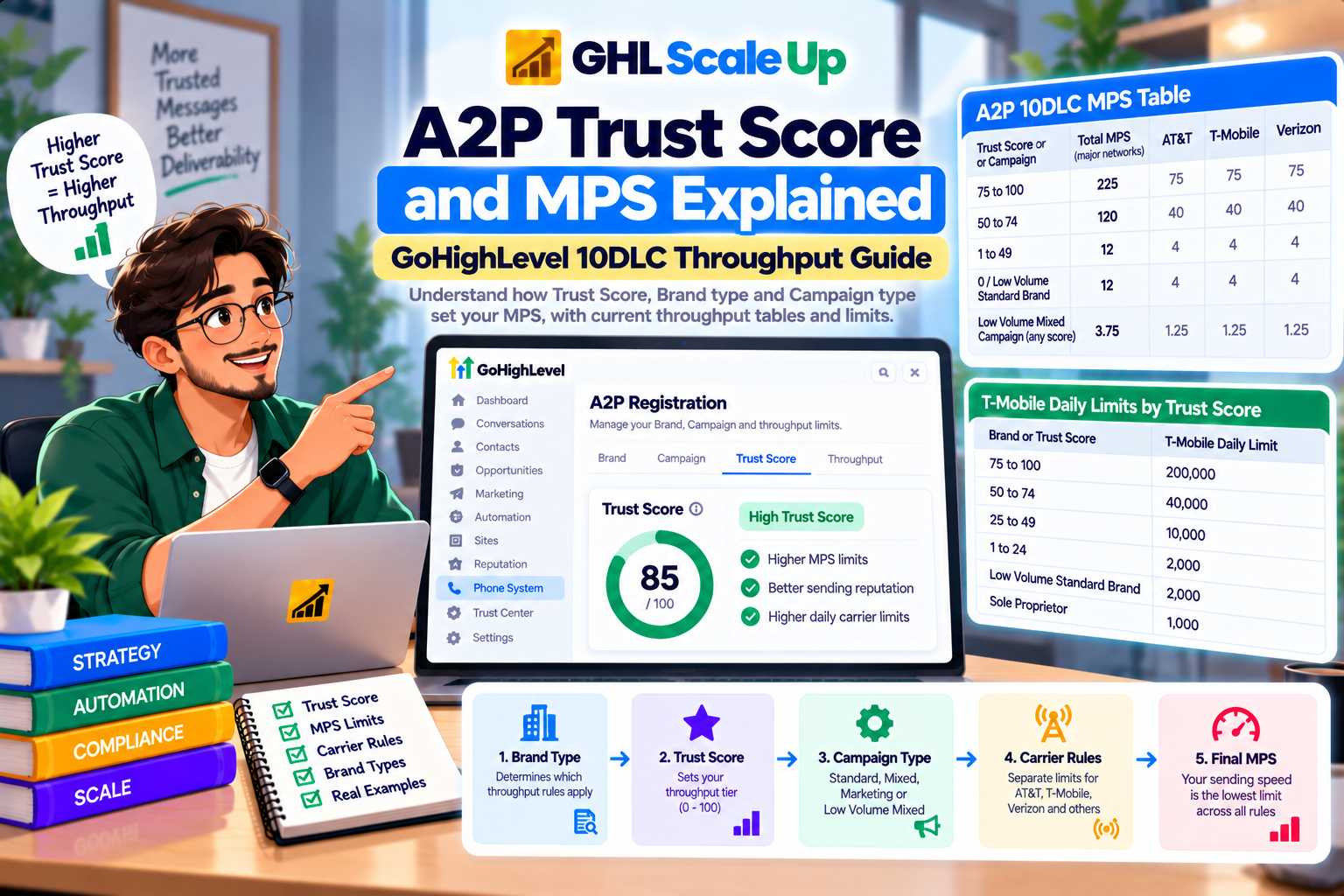
Think of it as a chain, and check each step in order:
Brand type decides which throughput rules apply.
Trust Score, for Standard Brands only, sets the tier.
Campaign type decides which table applies, and Low Volume Mixed overrides the score entirely.
Carrier rules split the total across AT&T, T-Mobile and Verizon, with separate handling for US Cellular and small carriers.
Account level rate limits can cap the total across all your Campaigns.
Actual sending speed is whatever is lowest across those steps, and it says nothing about delivery.
Current A2P 10DLC MPS Tables in HighLevel
These are the maximum approved SMS throughput values in HighLevel's throughput guide, updated July 30, 2026, and they match HighLevel's help center version updated August 31, 2026. Values are maximums, not guaranteed speeds.
Standard, Mixed and Marketing Campaigns
| Trust Score or Campaign | Total MPS, major networks | AT&T | T-Mobile | Verizon |
|---|---|---|---|---|
| 75 to 100 | 225 | 75 | 75 | 75 |
| 50 to 74 | 120 | 40 | 40 | 40 |
| 1 to 49 | 12 | 4 | 4 | 4 |
| 0 / Low Volume Standard Brand | 12 | 4 | 4 | 4 |
| Low Volume Mixed Campaign, any score | 3.75 | 1.25 | 1.25 | 1.25 |
Messages to US Cellular follow your major network throughput, up to 8 MPS. Messages to other minor US carriers are 1 MPS per phone number.
Sole Proprietor Brands
| Total MPS, major networks | AT&T | T-Mobile | Verizon | |
|---|---|---|---|---|
| Sole Proprietor | 2.25 | 0.25 | 1 per number | 1 per number |
Sole Proprietor Brands have no Trust Score and use fixed limits. HighLevel's help center adds that they are limited to one Campaign and one phone number per Campaign.
HighLevel's text says specific ("declared") use cases may get higher MPS for the same score than Mixed or Marketing. In the current tables, the Standard and Mixed and Marketing rows are identical, and the only documented difference is the Low Volume Mixed row. Do not pick a use case to chase throughput. HighLevel itself says to choose the accurate use case, not the highest throughput option. How to choose is in A2P Campaign Registration in GoHighLevel.
Trust Score vs MPS vs Daily Carrier Limits
| What it controls | Key point | |
|---|---|---|
| Trust Score | A vetting score that sets your throughput tier and T-Mobile daily cap | Standard Brands only. Not a delivery rating |
| MPS | How fast segments may be sent | A rate, not a volume. 225 MPS does not mean 225 segments every second all day |
| Daily carrier limit | How many segments a Brand may send toward one carrier per day | T-Mobile applies a brand level daily cap based on Trust Score |
Twilio's documentation gives these T-Mobile daily limits by Trust Score, counted in outbound SMS segments plus MMS:
| Brand or Trust Score | T-Mobile daily limit | Notes |
|---|---|---|
| 75 to 100 | 200,000 | Higher cap needs T-Mobile Special Business Review |
| 50 to 74 | 40,000 | |
| 25 to 49 | 10,000 | |
| 1 to 24 | 2,000 | |
| Low Volume Standard Brand | 2,000 | 200,000 for Russell 3000 companies |
| Sole Proprietor | 1,000 |
Per Twilio, the cap applies at the EIN level, is shared across every Brand and every platform registered under that EIN, and resets at midnight Pacific. Exceeding it leaves messages undelivered with Twilio error 30023. These figures come from Twilio, the underlying provider, so verify current values before relying on them. Separately, HighLevel's fee reference lists a daily segment allowance for each registration tier, 3,000 for Sole Proprietor, 6,000 for Low Volume Standard and 600,000 for High Volume Standard, and a Low Volume Mixed Campaign supports up to 2,000 segments a day to T-Mobile. Treat all of these as different limits that can each bind.
Do More Phone Numbers Increase MPS?
Not automatically. HighLevel says throughput is generally assigned at the Campaign level. Twilio's documentation adds that the Campaign's MPS is shared across all US and Canada long code numbers on the Campaign and across all carriers, so splitting traffic over more numbers does not raise the ceiling. The documented exceptions are small carriers, which get 1 MPS per phone number, and Sole Proprietor Campaigns, which get 1 MPS per number to T-Mobile and Verizon but are limited to one number. Number rental is a separate cost covered in the fees guide.
SMS vs MMS Throughput
HighLevel says MMS may be handled differently because media size, carrier handling and formatting can affect processing. I found no published MMS MPS values in the current HighLevel documents, so this guide does not give any and you should not assume MMS matches SMS. MMS does count toward T-Mobile's daily cap alongside SMS segments.
What Happens If You Send Faster Than Your MPS?
According to HighLevel, messages above your allowed rate may queue. HighLevel's guidance and Twilio's both describe the account level version: if an account limit is 100 MPS and three Campaigns are each approved for 75 MPS, the account still tops out at 100 MPS combined, and each segment over that rate waits in a queue. Keep three failure modes apart:
| Problem | What it is | Where to look |
|---|---|---|
| Queue delay | Segments waiting because you exceeded MPS or an account limit | Sending speed and pacing |
| Daily cap reached | T-Mobile Brand level limit hit | Daily T-Mobile volume across all Brands on the EIN |
| Carrier filtering or failure | The carrier blocked or filtered the message | Content, consent, opt outs. See A2P error codes. |
Does a Higher Trust Score Mean Better Deliverability?
No. HighLevel is explicit that a higher score does not guarantee delivery, and that delivery also depends on consent, content, filtering, DND, opt outs and recipient status. The score can raise how fast you may send. Whether a message reaches a phone is a separate decision made by carriers using other signals. Consent evidence matters here, and A2P opt in language and requirements covers it.
Can You Improve or Appeal a Trust Score?
- HighLevel does not change scores. Its guidance says it does not assign or manually change Trust Scores.
- Low scores have documented causes. HighLevel's help center points to data discrepancies, such as an address that differs from your official business registration, and a small brand footprint.
- Scores are described as static. HighLevel's earlier throughput guidance and Twilio's say scores do not change automatically over time.
- Support can guide you. HighLevel says it will try to offer guidance on possible causes if you receive a low score.
- I found no formal Trust Score appeal process in HighLevel's documentation. Some other messaging platforms publish their own appeal terms, including fees, but those are theirs, not HighLevel's.
The practical lesson is to get the identity data right before you register. Correcting a failed Brand is covered in A2P Brand Rejected in GoHighLevel.
What If Your Trust Score Is Missing or Unavailable?
HighLevel's Brand approval guidance covers the message "We are unable to retrieve your TCR Trust Score." It says the secondary vetting score is delayed while the vetting review completes, which can take up to 7 business days, and to contact support if the Brand is still not approved after that. Do not confuse it with other states:
| State | Meaning | Go to |
|---|---|---|
| Brand pending | Registration still under review | Wait |
| Trust Score unavailable | Secondary vetting has not returned a score yet | Wait, then contact support |
| Brand failed | Identity could not be verified | Brand Rejected guide |
| Campaign rejected | The messaging program failed review | Campaign Rejected guide |
| Approved but not sending | SMS Number may not be linked to the Campaign | Check A2P Verified on the number |
Where to Check Your A2P Status in HighLevel
HighLevel's guide says to go to Settings, then Phone System, then Trust Center, review your A2P registration details, and open Brands and Campaigns to check Brand status, Campaign status, use case and any required fixes. The guide does not describe a screen showing your numeric Trust Score, so if you cannot find yours there, ask HighLevel Support rather than guessing.
Scope: Toll Free, Canada and Other Routes
Everything here is about US A2P 10DLC long code messaging. Toll Free numbers use a separate verification and throughput model, which HighLevel's help center says gives a US Toll Free number a default of 3 MPS toward US and Canada carriers, with higher throughput available on request. See Toll Free vs A2P 10DLC. Canadian messaging follows its own rules, covered in A2P 10DLC for Canadian numbers, and international routes differ again.
Worked Example: A 50,000 Segment Send
Assumptions, not averages:a Standard Brand with a Trust Score of 60, one Standard Campaign, and 50,000 segments split 40% to T-Mobile, 35% to AT&T and 25% to Verizon.
| Carrier | Segments | MPS allowed | Minimum time | Daily cap |
|---|---|---|---|---|
| T-Mobile | 20,000 | 40 | 500 sec, about 8.3 min | 40,000 (Twilio) |
| AT&T | 17,500 | 40 | 438 sec, about 7.3 min | n/a here |
| Verizon | 12,500 | 40 | 313 sec, about 5.2 min | n/a here |
The theoretical minimum is set by the slowest carrier lane, about 8.3 minutes, which is segments divided by MPS. Real sending will be slower if an account limit applies, and it says nothing about delivery. T-Mobile's 40,000 daily cap is not exceeded at 20,000 segments, but the same send to a Low Volume Mixed Campaign would be limited to 1.25 MPS per carrier and up to 2,000 T-Mobile segments a day, which would spread the T-Mobile portion over about ten days. If each message is two segments, the same audience is 25,000 messages, not 50,000.
If you build sends like this in workflows, pace them to your approved throughput. Our Email, SMS and WhatsApp automation service covers building sending flows around limits like these.
A Decision Framework for Diagnosing Throughput
Identify the Brand type in Trust Center.
Check whether a Trust Score applies. Only Standard Brands have one.
Identify the Campaign type. A Low Volume Mixed Campaign overrides the score.
Find the matching row in the tables above.
Check the carrier split, then US Cellular and small carrier handling.
Check for an account level rate limit that caps your total.
Count segments, not messages.
Check the T-Mobile daily cap for the EIN, across every platform.
Watch real behavior: queue delay, daily cap errors, and filtering are different problems.
Common Trust Score and MPS Mistakes
- Assuming every Brand has a Trust Score
- Treating a higher score as a delivery guarantee
- Reading MPS as a daily volume
- Counting messages instead of segments
- Adding numbers to raise MPS
- Choosing a use case for throughput instead of accuracy
- Forgetting the T-Mobile cap is shared across every platform on the EIN
- Sending a large list through a Low Volume Mixed Campaign
Trust Score and MPS Checklist
Brand type confirmed
Trust Score status known, or confirmed as not applicable
Campaign type and matching throughput row identified
Carrier split estimated
Segments per message counted
Account level limits checked
T-Mobile daily cap checked
Sends paced below approved MPS
Consent and opt outs reviewed, because delivery is separate from throughput
A2P Trust Score and MPS FAQ
What is a good A2P Trust Score?
In HighLevel's tables the top tier is 75 to 100, which carries the highest documented throughput. No source defines a score as good in a delivery sense.
Does every A2P Brand get a Trust Score?
No. Sole Proprietor and Low Volume Standard Brands do not go through secondary vetting.
Does Trust Score affect MPS?
For Standard Brands, yes. A higher score qualifies for higher throughput, subject to Campaign type and carrier rules.
What is the MPS for a Trust Score of 75?
Up to 225 MPS toward AT&T, T-Mobile and Verizon combined, 75 to each, as a maximum in HighLevel's tables. A score of 50 to 74 is up to 120, and 1 to 49 is 12.
Does Campaign type affect MPS?
Yes. A Low Volume Mixed Campaign is fixed at 3.75 MPS regardless of score.
Is MPS per number or per Campaign?
Generally per Campaign, shared across its numbers and carriers, with 1 MPS per number toward small carriers.
What is the difference between MPS and daily message limits?
MPS is a speed limit. A daily limit caps volume toward a carrier over a day.
Does a high Trust Score guarantee delivery?
No. Delivery depends on consent, content, filtering and recipient status.
Can I appeal a Trust Score?
HighLevel says it does not change scores, and I found no formal appeal process in its documentation. Contact support for guidance on causes.
Why is my Trust Score unavailable?
Secondary vetting may still be running, which HighLevel says can take up to 7 business days.
Does Trust Score apply to Toll Free or Canadian messaging?
This guide covers US 10DLC only. Toll Free uses a separate model, and Canada has its own rules.
Why are messages delayed when my MPS is high?
Check for an account level rate limit, segment counts higher than expected, and carrier or daily cap issues. Each is separate from your Campaign MPS.
Still have questions about A2P Trust Score or MPS?
Talk to our A2P specialists directly. We've handled 200+ A2P registrations and fixed every issue in this guide.
Related Articles in This Series
Need help with A2P registration or a Trust Score appeal?
GHL Scale Up manages A2P registration for agencies and their clients. Brand registration, Trust Score optimisation, campaign submission, rejection troubleshooting, and resubmission end to end.
Book Your Free Strategy Call
This guide was checked against HighLevel's MPS and Trust Score guide, its help center throughput article, Brand Approval Best Practices, the fee reference, and Twilio's T-Mobile daily limits article, current as of September 2026. Throughput values, daily caps and carrier rules change, so confirm against your Trust Center and provider documentation.
ghlscaleup.com