
What Is A2P Brand Registration in GoHighLevel?
An A2P brand is the verified identity of the business or individual responsible for the messages you send. Carriers use it to confirm who is behind the traffic and to judge trust and long term deliverability. HighLevel provides the registration workflow and submits your details to The Campaign Registry (TCR), while carriers and their registration partners make the final decision.
If you want the wider background on why this system exists, read our explainer on what A2P 10DLC means. This guide starts at the point where you are ready to register.
Where Brand Registration Fits in the A2P Process
A2P registration separates identity from behavior. The Brand answers who is sending. The Campaign answers what you are sending, why, and how recipients agreed to receive it.
In HighLevel both live inside the same Trust Center flow, split into Business Details (your Brand) and Campaign Details. This article covers Business Details. Once your brand is approved, the next stage is A2P Campaign Registration in GoHighLevel, where you describe your use case, sample messages and consent process. Registering a brand does not by itself let you send a single message.
Who Needs A2P Brand Registration?
You need an A2P brand if your business sends SMS or MMS to US recipients from standard 10 digit local numbers through HighLevel. Toll Free numbers follow a separate verification process instead, which we compare in Toll Free vs A2P 10DLC in GoHighLevel.
Each business needs its own brand. If you are an agency registering a client sub-account, the brand belongs to your client's legal entity, not to your agency. The multi client side of that is covered in A2P registration for GoHighLevel agencies.
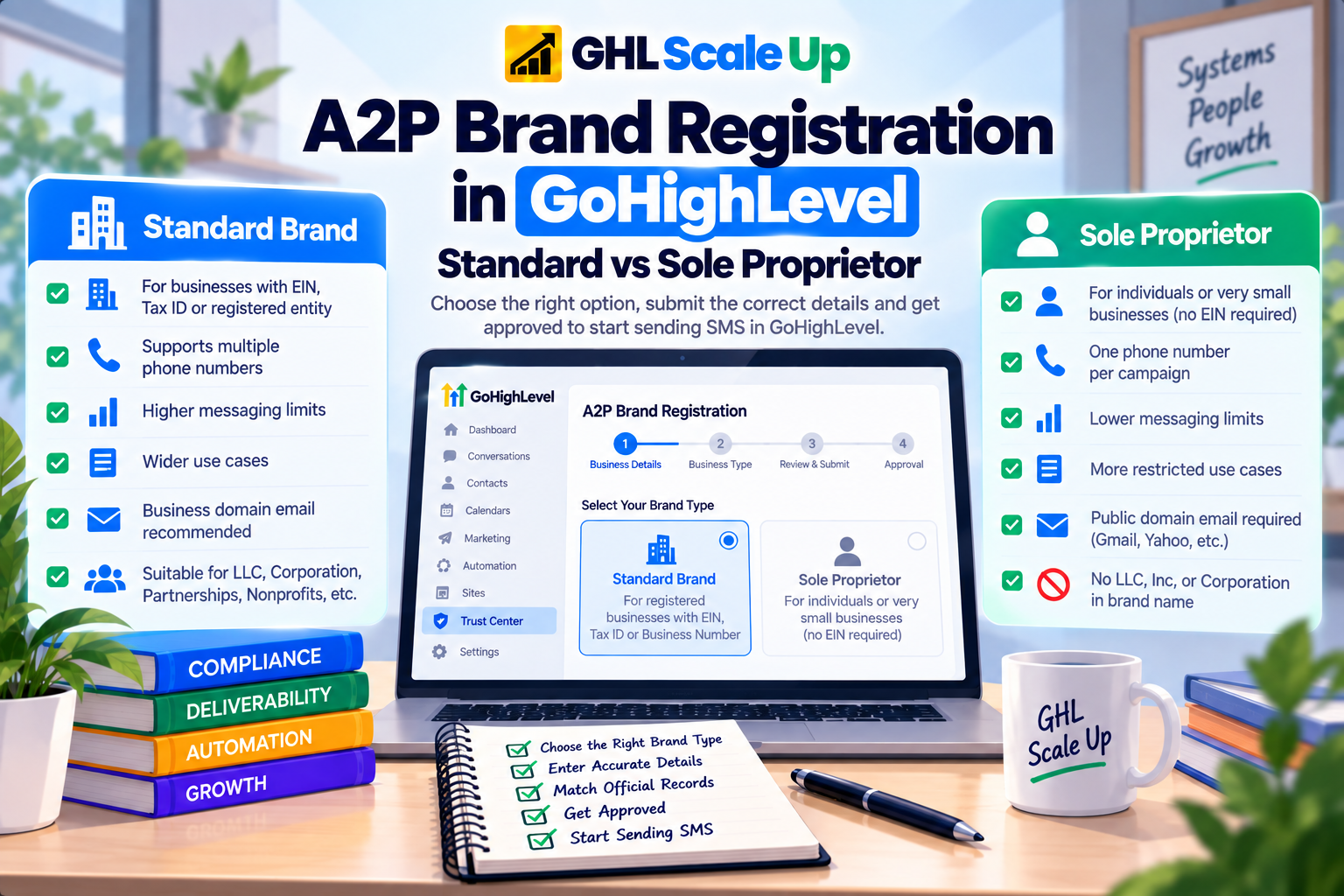
Standard Brand vs Sole Proprietor
This is the decision that shapes everything else, so it is worth getting right before you open Trust Center.
| Standard Brand | Sole Proprietor Brand | |
|---|---|---|
| Who it is for | Businesses with an EIN, Tax ID, Business Number or other accepted registration number, such as LLCs, corporations, partnerships, nonprofits and government organizations | Individuals or very small businesses with only one employee and no EIN, Tax ID, Business Number or registered business entity |
| Registration number | Required. Must match official records | None |
| Phone numbers | Supports multiple numbers | One number per Campaign |
| Throughput and use cases | Greater throughput and a wider range of Campaign use cases | Lower messaging limits and stricter sending restrictions |
| Contact email | A business domain email is recommended. Gmail and similar are accepted but may slow approval | A public domain email such as Gmail, Hotmail or Yahoo is required. Business domain emails are not eligible |
| Identity checks | HighLevel may ask for Persona identity verification or an email OTP | A US or Canada mobile number that can receive an OTP. VoIP, LeadConnector and other CPaaS numbers are not accepted |
| Brand name | Exact legal business name | Individual or unregistered business name. No LLC, Inc, Corporation or similar suffix |
Standard Brand is the default for any registered business. When you reach messaging volume in Campaign Details, Standard Brands choose between the Low Volume and High Volume options that suit their sending needs.
Sole Proprietor is intentionally narrow. It exists for individuals and very small businesses that have no registration number at all, and it is available to people in the United States and Canada. A Tax ID rules it out regardless of company size. A one person US LLC still has an EIN, so under TCR rules it registers as a Standard Brand, not a Sole Proprietor. Not every business without an EIN qualifies either, so check the one employee and no registered entity conditions before you choose it.
Because it supports a single phone number per Campaign, a business that expects to add numbers as it grows should think twice before starting there.
How to Choose the Right Brand Type
- Do you have an EIN, Tax ID, Business Number or another accepted registration number? If yes, register as a Standard Brand.
- If not, are you an individual or a business with one employee and no registered entity, located in the US or Canada? If yes, Sole Proprietor is the intended path.
- If neither describes you, check the table below for the number your country uses, or ask HighLevel Support before submitting. Registering under the wrong type is the mistake that costs the most time.
Registration Numbers by Country
For a Standard Brand, HighLevel accepts the registration number that matches where the business is registered:
| Region | Number to use | Notes |
|---|---|---|
| United States | EIN | Use the legal name and EIN shown on your CP 575 or 147C letter. A DUNS number is not accepted |
| Canada | BN-9 | Enter only the first 9 digits of the Business Number, for example 123456789 from 123456789RT0001 |
| Europe | VAT number | Use the numeric portion. The VIES lookup helps confirm your details before you submit |
| Australia | ABN | Confirm with the official ABN lookup tool |
| New Zealand | NZBN | Confirm with the official NZBN lookup tool |
| Hong Kong | Companies Registry (CN) number | Confirm with the Companies Registry lookup |
| Other countries | VAT ID, or your primary corporate registration or tax ID | Use the numeric portion of the VAT ID where you have one |
Never enter a Social Security number in the EIN field. If you have no EIN, the Sole Proprietor path is the intended route.
What Information Do You Need Before Registering?
Most rejections and repeat submissions trace back to details that were assembled while the form was already open. Gather these first:
- Exact legal business name. For a US business, copy it from your CP 575 EIN Confirmation Letter or a 147C letter, using only the first line of the name. Do not use the name on a W-2 or W-9, a DBA, a trade name or the name of your messaging provider.
- Registration number. Your EIN, BN-9 or the equivalent number for your country, checked against official records.
- Business type and industry. These should describe how the business is actually registered and what it does.
- Registered address. A physical street address that matches your official registration. A PO box will not work, and a branch or mailing address that differs from your registered address can produce a mismatch.
- Website. If you provide one, it should be live, publicly accessible and clearly match your business name and services.
- An authorized representative. Someone who can answer questions about the business if carriers need to verify it, with a monitored email and a reachable phone number. The mobile number and email need to match carrier records for verification to succeed.
- For Sole Proprietors: a personal US or Canada mobile number for the OTP and a public domain email address.
Uploading your CP 575 is optional but useful. HighLevel can use it to fill in the legal name, EIN and registered address for you, which reduces typing errors. Keep in mind that each business should have its own contact person, and HighLevel advises against reusing the same email address across more than five brands. A single mobile number can validate up to three Sole Proprietor brands.
HighLevel notes that an EIN issued within the last 15 days may be rejected because the record has not yet reached the systems used for verification. If your EIN is recent, that is worth knowing before you submit.
How to Register an A2P Brand in GoHighLevel
These steps follow HighLevel's current documentation. The exact fields change depending on your answers, so treat the screen in front of you as the final authority.
Open Trust Center.
In the sub-account, go to Settings, then Phone System under Business Services, then the Trust Center tab.
Start registration.
Select Start Registration under the A2P Messaging (SMS) tab.
Answer the Get Started questions.
Tell HighLevel where your business is registered and whether it has a Tax ID. This answer decides whether you follow the Standard or Sole Proprietor path.
Enter your business details.
With a Tax ID, you provide the legal business name, business type, industry, registration ID type, registration number, business email and region of operations. Without one, you provide the business name or your full name, your industry and your phone number.
Add the business address.
Enter the country, state or province, street address, city and postal code. Leave the PO box out of the street field.
Add contact information.
Enter the authorized representative's first and last name, email, phone number, job position and job title.
Complete verification if prompted.
Depending on the account and your details, HighLevel may ask for Persona identity verification or an email OTP. For the email OTP you get three attempts to enter the code and two chances to resend it, and after three failed attempts you restart the verification.
Continue to Campaign Details.
Once the brand section is complete, the flow moves on to your messaging use case and consent details.
What Happens After You Submit
HighLevel submits your brand to TCR for review. TCR runs the primary vetting, and HighLevel also submits the brand for secondary vetting, which feeds into the Trust Score that influences throughput. If you want to understand how that score works, see our guide to how Trust Score and MPS work.
HighLevel does not publish a fixed approval time. Standard Brand reviews can take several business days, Sole Proprietor reviews are often quicker, and any extra verification can add time. If a brand stays pending longer than you expect, contact HighLevel Support rather than submitting again.
Approval is also worth treating as a commitment. Once a brand is approved, its details cannot be edited from your account, so a change to your registered business information has to go through Support. Getting the details right the first time saves that detour.
What Happens After Brand Approval
Brand approval does not approve your messaging. The next section of the flow is Campaign Details, where you set your messaging volume, use case, sample messages and consent information. Our walkthrough of A2P Campaign Registration in GoHighLevel covers that stage in full, so we will not repeat it here.
Common Brand Registration Problems
A brand can be rejected when TCR cannot verify the business information you submitted. The causes HighLevel points to most often are:
- A legal business name that does not match official records
- An EIN, Tax ID or registration number that is incorrect
- An address that does not match the registration records
- A Sole Proprietor registration for a business that has a Tax ID
- A recently issued EIN that has not reached verification systems yet
A mismatch in any of these can prevent verification or contribute to a rejection. If your registration has already failed, start with the specific reason shown in Trust Center and follow our guide on how to fix an A2P brand rejection.
Does Brand Registration Give You Permission to Send SMS?
No. Registration tells carriers who you are and what you plan to send, but it does not replace consent from the people you text. You still need a legitimate opt in process, and the consent details you describe in Campaign Details need to match how contacts really sign up. For the wording and implementation side, see A2P opt in language and requirements.
How Much Does Brand Registration Cost?
HighLevel presents brand registration and first Campaign vetting as one bundled one time charge at registration, and the amount depends on the brand tier you choose. These are passthrough charges from TCR, Twilio and carriers, HighLevel adds no markup, and providers can change them, so trust the price shown in Trust Center over any published figure. For the full breakdown, see current A2P 10DLC fees.
Frequently Asked Questions
Do I need an EIN for A2P brand registration?
If your business has an EIN, Tax ID, Business Number or another accepted registration number, you register as a Standard Brand and enter that number exactly as it appears in official records. The Sole Proprietor path is only for individuals or very small businesses with only one employee that have no such number.
How long does A2P brand registration take?
It varies. HighLevel says Standard Brand reviews can take several business days, Sole Proprietor reviews are often quicker, and extra verification can lengthen either one. No timeline is guaranteed.
Can I use a Gmail address?
For a Sole Proprietor Brand, you must use a public domain address such as Gmail, Hotmail or Yahoo. For a Standard Brand, Gmail is accepted, but a business domain email is recommended because free email services can slow approval.
Can I submit my Campaign before my brand is approved?
HighLevel's guidance is that the brand comes first and must be approved before you can register the Campaign and start sending. The Campaign Details section follows the brand section once the brand is eligible to continue.
Can an agency register a client's brand?
Yes, provided the brand is built from the client's own legal business details, because each business needs its own registration. The practical limits and workflow for doing this at scale are in our guide to A2P registration for GoHighLevel agencies.
What is the difference between brand and Campaign registration?
Brand registration identifies the business sending the messages. Campaign registration describes the messaging use case, sample messages and consent process. Both must be approved before you send.
Next Step
Once your brand is approved and your Campaign follows, the practical work shifts to building the messages themselves. If you want that part designed and tested properly, that is what our Email, SMS and WhatsApp automation service covers.
Related Articles in This Series
Need A2P brand registration done right the first time?
GHL Scale Up handles A2P registration for agencies and their clients. EIN verification before submission, correct brand type selection, full registration walkthrough, and resubmission if needed.
Book Your Free Strategy Call
This guide was checked against HighLevel's Registering Your A2P Brand, Brand Approval Best Practices and A2P registration overview documentation, along with Twilio's A2P 10DLC business information guide, in September 2026. Requirements, fields and pricing can change, so confirm what you see in Trust Center before you submit.
ghlscaleup.com