

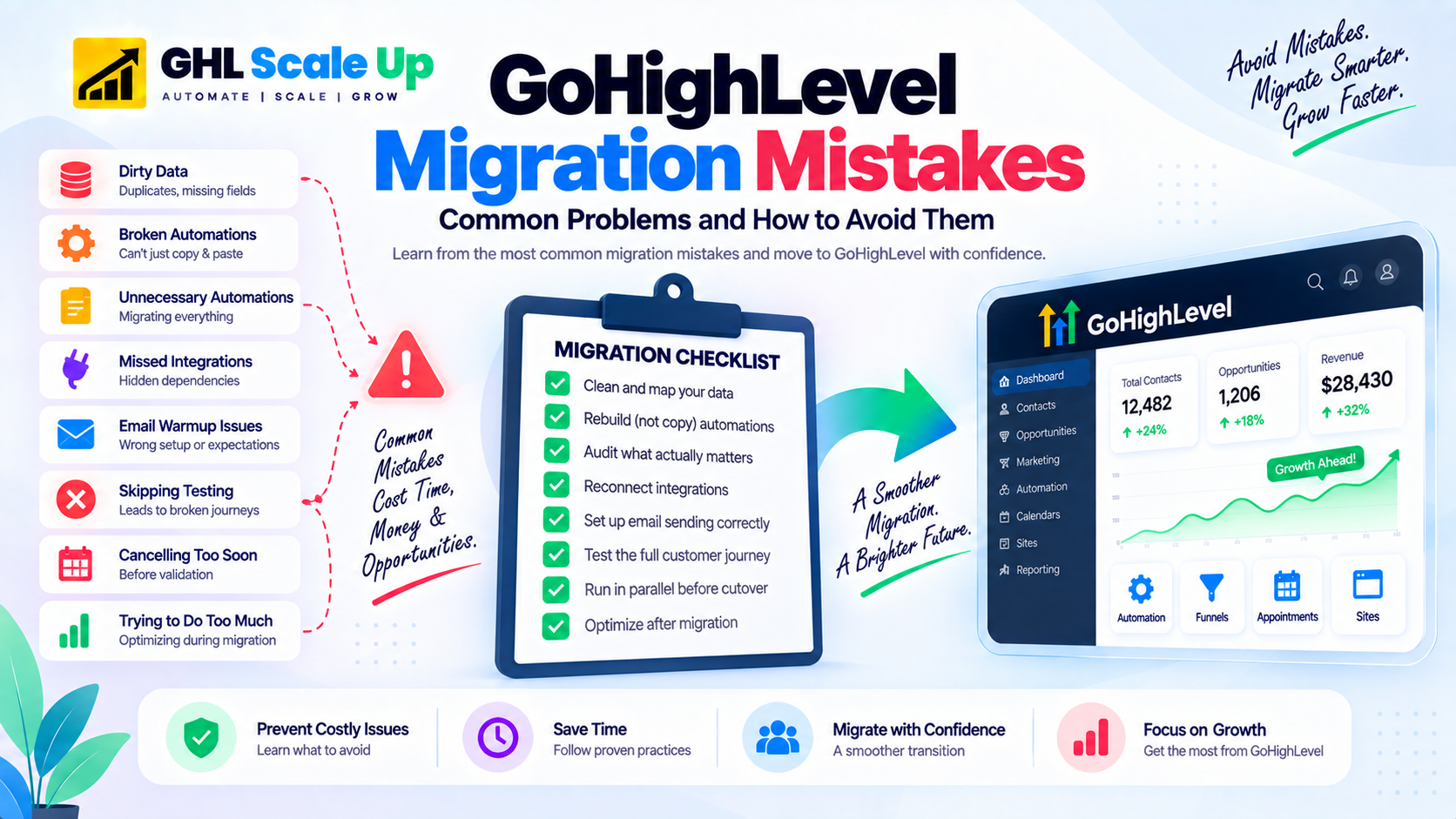
Why GoHighLevel Migrations Go Wrong
Most failures come from a small set of underlying causes that repeat across almost every problem migration: planning gaps where nobody documented what currently exists, poor data preparation before import, unclear dependencies between systems that only surface after go live, incorrect assumptions about how automations translate between platforms, weak testing that checks individual pieces but not the full customer journey, cutting over before the new system is actually validated, and scope creep where migration quietly turns into a full rebuild. Nearly every mistake below is one of these root causes showing up in a specific place.
Importing Data Before Cleaning and Mapping It
What happens: Contacts with duplicate entries, missing fields, inconsistent phone formats, or outdated email addresses get imported directly into GHL. Automations then fire on bad contacts, some customers receive duplicate messages from duplicated records, and deliverability suffers from invalid addresses.
Why it happens: Teams treat the export file as ready to import rather than as raw material that needs preparation first.
What it can break: Duplicate contact records can trigger duplicate workflow enrollment if your automation and integration logic allow it, which in turn can produce duplicate notifications or, depending on how a payment workflow is built, duplicate charges. This is a downstream risk created by the duplicates, not an automatic consequence of dirty data on its own.
How to prevent it: Before importing, remove hard bounces and unsubscribes, deduplicate records sharing the same email or phone number, standardize phone numbers to a consistent international format, and fill in missing required fields where possible. Import a clean list into a properly configured account rather than cleaning up after the fact.
If this has already happened: Pause any workflow that enrolls contacts automatically, identify the duplicate records by matching email or phone, merge or remove the duplicates, and check whether any downstream action (a payment, a notification, a booking) fired more than once because of them before resuming normal automation activity.
Assuming Automations Can Be Copied Instead of Rebuilt
What happens: Teams expect to move automations across the same way they moved contacts, as a direct transfer. It does not work that way. GHL's trigger model, conditional logic, and action library are platform specific, and there is no universal import path for workflow logic.
Why it happens: Contacts feel like data, so automations get assumed to be data too. In practice, an automation is closer to a small program than a spreadsheet row.
What it can break: Imagine a business that tried to recreate an email-only follow-up sequence by copying its structure directly into GHL without adapting it to GHL's own trigger model. The sequence could fail silently if the trigger conditions do not match GHL's logic, leaving something like appointment confirmations not firing at all until someone notices missed appointments.
How to prevent it: Treat every automation as a rebuild, not a copy. Document the trigger, conditions, and each action step from the old platform, then recreate that same intent using GHL's own trigger types and action library. For the setup mechanics, see the GoHighLevel workflow automation guide.
If this has already happened: Pause the broken workflow, compare its actual trigger and conditions against what the old platform's automation did, rebuild the specific step that is misfiring, and test with one real contact before reactivating it for everyone.
Migrating Every Automation Instead of Auditing First
What happens: A business migrates all of its existing automations, including sequences that have not run in years, flows built for a product that no longer exists, and follow-ups tied to a campaign that ended long ago.
Why it happens: Auditing feels like extra work when the goal is just to get everything moved.
What it can break: Dead automations that get rebuilt anyway waste rebuild time that should go toward the sequences that actually matter, and some can misfire against current contacts in ways nobody is watching for because nobody expected them to still be active.
How to prevent it: Before migration starts, list every automation and ask whether it has fired recently, whether it serves something that still exists, and whether another automation already covers the same purpose. Leave behind anything that fails those questions. Many businesses that have been on a platform for a couple of years or more find a meaningful share of their automations qualify, though the exact proportion depends entirely on how disciplined the team has been about retiring old ones, not a fixed industry number.
If this has already happened: It is fine to deactivate a rebuilt automation later once you realize it serves no purpose. Review your active workflow list a few weeks after go live and retire anything that has not fired.
Overlooking Integrations and Hidden Dependencies
What happens: A migration plan accounts for contacts and automations but misses the third-party tools connected to the old platform, such as payment processors, Zapier or Make scenarios, webhooks, lead source integrations, and forms embedded on external pages.
Why it happens: Integrations are often set up once, years earlier, by someone no longer on the team, and nobody maintains a current list of what is actually connected.
What it can break: A payment integration that never gets reconnected means completed purchases do not register anywhere. A webhook nobody remembered means a lead source stops reaching the CRM entirely, silently, with no error message to notice.
How to prevent it: During the audit phase, list every tool currently connected to your marketing, CRM, or client communication, and make an explicit decision for each one: keep it and simply reconnect it to GHL, replace it with a native GHL feature, rebuild its logic using GHL's own tools, or retire it if it no longer serves a purpose.
If this has already happened: Check every integration that touched money, lead capture, or client communication on the old platform, confirm each one is either reconnected or intentionally retired, and test the actual downstream behavior rather than just checking that a connection shows as active.
Treating Email Warmup as a Fixed Formula
What happens: A business completes their contact import, reconnects email sending, and sends a full campaign immediately. Open rates can drop sharply within days, and the sender reputation built up over years does not automatically carry over to a new sending setup.
Why it happens: Warmup gets treated as a single universal schedule that applies the same way to every account, when the reality is more conditional.
How to prevent it: What is actually true: GoHighLevel documents a fixed stage warmup model, but it applies specifically to eligible dedicated domains using GHL's own LC Email sending infrastructure. On that path, GHL automatically increases your daily sending caps as you send real mail, and you do not need to invent your own schedule for it. If you connect external SMTP instead, such as Mailgun, Google Workspace, or Microsoft 365, GHL's native warmup does not apply at all, and building sending volume gradually is entirely your responsibility. Either way, authentication, address quality, and complaint rates matter more than any specific daily number, so treat a fixed day by day formula as a rough starting point rather than a guarantee. Complete DKIM, SPF, and DMARC authentication before sending anything. Start with smaller sends to your most engaged contacts rather than your full list, and increase gradually while watching bounce rates and spam complaints rather than following a calendar blindly.
If this has already happened: Stop sending to your full list immediately. Review authentication, list quality, bounce rate, and complaint rate together rather than assuming slower sending alone will fix it, and reduce volume back to your most engaged segment while reputation recovers.
Skipping the Parallel Running Phase
What happens: A business treats migration as a single day cutover, old platform off, GHL on, with no overlap. Any gap in the new setup becomes an immediate, live business problem with no fallback.
Why it happens: Parallel running feels like unnecessary delay when the new system already looks ready.
What it can break: A broken trigger or missing integration that would have been caught during a quiet overlap period instead shows up as a missed lead or a customer who never received a confirmation.
How to prevent it: Route new leads into GHL while keeping the old platform active for existing contacts already partway through a sequence there. Use that overlap period, typically a couple of weeks, to catch setup gaps while a working fallback still exists, and only fully cut over once GHL has performed reliably for several consecutive business days.
If this has already happened: If the old platform is still accessible, consider reactivating it temporarily while you finish validating GHL, even if that means a short period running both again.
Cancelling the Old Platform Before GHL Is Validated
What happens: A business cancels its previous subscription as soon as GHL looks set up, before every automation has actually been tested with real activity. If a gap surfaces afterward, there may be no way back. HubSpot specifically enforces a 25 day window after cancellation before data is permanently deleted, and other platforms have their own retention limits.
Why it happens: Cancelling feels like the natural finish line, and ongoing subscription cost creates pressure to cut it as soon as possible.
What it can break: Imagine discovering, two weeks after cancelling, that a post purchase sequence had a broken trigger the entire time. Without access to the old platform, there may be no way to recover the original configuration to compare against.
How to prevent it: Keep the old platform active until contacts are validated, automations are rebuilt and tested, parallel running is complete, and every lead source points to GHL. Only then cancel, and take a final full data export first as a backup.
If this has already happened: Check whether any export or backup was taken before cancellation, contact the platform's support team to ask about data recovery options if the retention window has not fully closed, and document clearly what cannot be recovered so you can rebuild it deliberately rather than guessing.
Going Live Without Testing the Full Customer Journey
What happens: Individual pieces get checked in isolation, a form here, an email there, but nobody runs the complete path a real customer would take before real leads start arriving.
Why it happens: Testing each component feels sufficient, but a working form and a working automation do not guarantee they work correctly together.
What it can break: A follow up sequence that never fires because a trigger was configured slightly wrong is often invisible until someone notices leads going cold.
How to prevent it: Before any real lead touches the new system, submit a real form on your live funnel, confirm the contact appears correctly in GHL with the right tags, confirm the follow up sequence fires as expected, complete a real booking and confirm reminders send, and check the entire flow on mobile as well as desktop.
If this has already happened: Run the same end to end test now, even after go live, and compare against your actual lead activity to identify how many contacts may have fallen through a gap that testing would have caught earlier.
Trying to Migrate and Optimize at the Same Time
What happens: Migration turns into an opportunity to rewrite email copy, redesign funnels, and add new channels to every automation at once. When something underperforms after go live, there is no way to tell whether migration broke it or the redesign changed it.
Why it happens: Since everything is already being touched, improving it at the same time feels efficient.
What it can break: Your ability to diagnose problems. A performance drop could be a migration error or a deliberate change, and without a stable baseline there is no way to tell which.
How to prevent it: Rebuild each automation to do exactly what it did before, go live, and confirm performance is comparable to the old platform. Only then begin optimizing, one change at a time, so any effect can be attributed to something specific.
If this has already happened: If possible, roll a changed element back to its original version temporarily to establish whether the current performance reflects the migration or the change, then reintroduce improvements one at a time.
🔍 Already started your migration and hit a problem?
We can step in and get your migration back on track. Our team has fixed every one of these mistakes before.
Get Migration RescueBefore You Start: Migration Red Flags
If any of these are true, address them before starting a production migration:
A Simple Framework for Preventing Migration Failures
Audit, map, back up, rebuild, test, run in parallel, cut over, monitor. Each stage exists specifically to prevent one or more of the mistakes above: the audit catches dead automations and undocumented dependencies, mapping prevents data errors, the backup protects against an early cancellation, rebuilding and testing catch broken automation logic, parallel running provides a fallback, and monitoring catches anything that slips through after go live.
For the detailed, step by step version of this framework, use the GoHighLevel migration checklist. For estimating how long each stage takes for your specific setup, see the GHL migration timeline guide. For what migration means at a foundational level, see What Is GoHighLevel Migration?.
📊 Want to see exactly what mistakes you might be making?
Get a free migration audit that identifies your specific risks and gives you a clear path forward.
Get Your AuditFrequently Asked Questions
What are the most common GoHighLevel migration mistakes?
Importing dirty data without cleaning it, assuming automations can be copied instead of rebuilt, migrating every old automation instead of auditing which ones matter, overlooking integrations and hidden dependencies, treating email warmup as a fixed formula rather than understanding how it actually works, skipping parallel running, cancelling the old platform too early, going live without full testing, and optimizing while migrating instead of after.
Why do GoHighLevel migrations fail?
Most failures come from planning gaps rather than anything the platform cannot do: skipping the audit phase, not cleaning data before import, not testing the full customer journey before go live, and cancelling the old platform before the new one is validated. A structured process with parallel running and real testing avoids nearly all of them.
Do GoHighLevel workflows need to be rebuilt?
Generally yes. Workflow logic is platform specific, and there is no universal path for importing automation logic the way there is for contact data. Some platforms have narrow, specific import tools for particular content types, but the trigger and action logic behind an automation almost always needs to be recreated by hand in GHL's workflow builder.
Should I cancel my old CRM immediately after migrating?
No. Keep it active until contacts are validated, automations are tested with real activity, you have run both platforms in parallel for a period, and every lead source points to GHL. Take a final data export before cancelling.
How do I avoid email deliverability problems during migration?
Complete DKIM, SPF, and DMARC authentication first. If you are using GHL's own LC Email on a dedicated domain, its fixed stage warmup will manage sending caps automatically as you send real mail. If you are using external SMTP, warmup is manual: start with smaller sends to engaged contacts and increase gradually while watching bounce and complaint rates.
What should I do if my GoHighLevel migration has already gone wrong?
Identify which category the problem falls into: bad data, misfiring automations, deliverability, an early cancellation, or phone and SMS issues, and address the specific cause rather than a generic fix. In most cases this means pausing the affected system, checking what actually happened against what should have happened, and correcting the specific gap before resuming.
Can phone numbers and SMS be affected during migration?
Yes, if your business uses GHL for calls or texting. Number porting, A2P 10DLC registration for US SMS, and toll free verification all have their own processing times and requirements. This is not universal to every migration, but if messaging or calling matters to your business, test inbound and outbound behavior before relying on it in production.
A successful migration is not simply moving contacts from one system to another. It means preserving the business logic, data integrity, communication, and integrations that actually run your operations while the platform underneath changes. Most of what goes wrong comes down to skipping a step under time pressure, not a limitation in GHL itself.
Related Articles in This Series
Planning a GHL migration and want to avoid these mistakes?
GHL Scale Up has done this 200+ times. We know what goes wrong. Book a free migration assessment. We review your current setup, identify the risks specific to your account, and give you a clear plan.
Book Your Free Assessment