

What Actually Drives the Migration Timeline?
The most common misconception is that contact volume is the main factor. It usually isn't. Importing 50,000 contacts takes about the same time as importing 5,000 the CSV import process runs in minutes either way. What actually determines duration is everything around that import.
Automation count (the biggest factor by far)
Every automation from your previous platform generally has to be rebuilt manually in GHL's workflow builder there is no universal automated conversion tool across platforms. A simple three-step email sequence takes roughly 30–60 minutes to rebuild. A complex sequence with 15+ steps, multiple branches, and lead-scoring logic can take 4–8 hours.
| Active Automations to Rebuild | Estimated Rebuild Time (Work Effort) |
|---|---|
| 1–5 simple sequences | 4–10 hours total |
| 5–15 mixed sequences | 15–40 hours total |
| 15–30 complex sequences | 40–80 hours total |
| 30+ sequences with deep conditional logic | 80–150+ hours total |
For a guide to building automations in GHL correctly: GoHighLevel workflow automation guide.
Data quality
Duplicates, missing fields, inconsistent phone formatting, and years of accumulated junk records add 1–5 days to cleanup, depending on volume. Importing dirty data means dirty data inside GHL automations fire on bad contacts, deliverability suffers, and the cleanup happens later at higher cost.
Integration complexity
One integration requiring custom API work (a bespoke internal tool, a non-standard webhook contract) can take longer than dozens of basic contact imports combined. Stripe, calendars, and standard Zapier connections are typically fast; anything custom is the real variable.
Communication infrastructure
Domain authentication (DKIM/SPF/DMARC) is a technical setup task, usually completed in hours but deliverability ramp-up (warming a new sending domain) is a separate, longer process that runs in parallel with other work rather than blocking it. In the US, A2P 10DLC registration for SMS has its own carrier-side processing time that's outside your control and should be started early, since it can otherwise become the schedule's bottleneck.
Agency multi-account migrations
Migrating 10 client sub-accounts isn't one migration it's effectively 10, even with Snapshots accelerating per-client setup. Each account still needs its own data validation, workflow confirmation, and integration reconnection. As a planning rule, add roughly 3–5 business days per additional client account on top of the core migration timeline, rather than multiplying the whole timeline by account count.
Calendar Time vs. Work Effort
These are not the same thing, and conflating them is the most common source of unrealistic timelines. Work effort is the actual hours spent building rebuilding a workflow might take 4 hours of focused work. Calendar time is the total elapsed days until it's done, which is usually longer because of factors outside the builder's direct control:
- Stakeholder approval on field mapping or workflow logic before proceeding
- Testing that has to happen after a build is complete, not during it
- External dependencies like domain DNS propagation or A2P carrier processing
- Multiple people or teams needing to coordinate handoffs
A project with 40 hours of total work effort can easily span 3 calendar weeks once these dependencies are accounted for that's not inefficiency, it's realistic project structure.
Sequential vs. Parallel Work
Migration timelines are not simply additive. Some work happens simultaneously; some has to wait on earlier work finishing.
- Can run in parallel: data cleaning, GHL infrastructure setup, workflow mapping documentation, and integration credential-gathering
- Must run sequentially: contact import depends on field mapping being finished; workflow activation depends on the data structure already existing; cutover depends on testing passing; old-platform cancellation depends on validated cutover
This is why 'six phases at one week each' isn't how migration timelines should be calculated several phases overlap, while a few genuinely gate everything after them.
Estimate Your Own Timeline: A Complexity Framework
Score your own migration honestly against these variables to identify your complexity tier:
| Variable | Simple | Standard | Complex |
|---|---|---|---|
| Active automations | Under 5 | 5–20 | 20+ |
| Contacts | Under 5,000 | 5,000–25,000 | 25,000+ |
| Integrations | Standard (Stripe, calendar) | A few standard + 1 custom | Multiple custom/API-level |
| Content (funnels/courses) | Minimal | Moderate | Extensive |
| Client accounts | 1 | 1 | Multiple (agency) |
| Data cleanliness | Clean | Some cleanup needed | Significant cleanup needed |
If most of your answers land in one column, that's your realistic complexity tier. If you're split across columns, plan for the more complex end in practice, the presence of even one 'complex' variable (a deeply custom integration, for example) tends to set the pace for the whole project.
Not sure which complexity tier you're in?
Our migration assessment scores your specific setup and gives you a realistic timeline.
Get Your AssessmentMigration Timeline by Source Platform
Each platform has its own dominant complexity driver rather than a uniform profile. These ranges reflect GHL Scale Up's own project experience combined with each platform's documented migration mechanics treat them as planning ranges, not guarantees.
| Source Platform | Simple | Standard | Complex | Main Timeline Driver |
|---|---|---|---|---|
| Mailchimp | 1–2 weeks | 2–3 weeks | 3–4 weeks | Generally the lowest-complexity source in this set simple, email-centric data model |
| ClickFunnels | 1–2 weeks | 2–3 weeks | 3–6 weeks | Automation, payment, and domain reconnection behind an auto-imported page design |
| ActiveCampaign | 2–3 weeks | 3–5 weeks | 5–7 weeks | List/tag dual-segmentation mapping and automation rebuild |
| Keap | 1–2 weeks | 3–5 weeks | 6–8 weeks | Campaign Builder has no export path and must be fully documented and rebuilt |
| HubSpot | 3–4 weeks | 4–6 weeks | 8–12 weeks | Custom property and company-association volume that accumulates with account age |
| Kajabi | 1–2 weeks | 3–5 weeks | 5–8 weeks | Course structure now imports automatically via GHL's native importer, but quizzes, assignments, offers, and automations still require full manual rebuild |
| Zoho CRM | 2–3 weeks | 3–4 weeks | 4–6 weeks | Blueprint workflows and custom modules translate conceptually, not directly, to GHL's automation model |
| Salesforce | 3–4 weeks | 5–7 weeks | 8–12 weeks | Relational, multi-object data model (leads/contacts/accounts/opportunities/custom objects) doesn't map directly to GHL's contact-centric structure |
earlier guidance (including a prior version of this article) assumed Kajabi course content required full manual rebuild with no import path. GoHighLevel's native Kajabi Course Importer now handles video, image, and text content for published lessons automatically, which is why this range runs shorter than some older comparisons what still takes time is quizzes, assignments, drip settings, offers, and automation logic, none of which the importer covers. See the full breakdown in the Kajabi to GoHighLevel migration guide.
For the complete process on each platform: HubSpot to GoHighLevel migration, ClickFunnels to GoHighLevel migration, ActiveCampaign to GoHighLevel migration, Salesforce to GoHighLevel migration, or Keap to GoHighLevel migration.
What Happens in Each Phase of a GHL Migration?
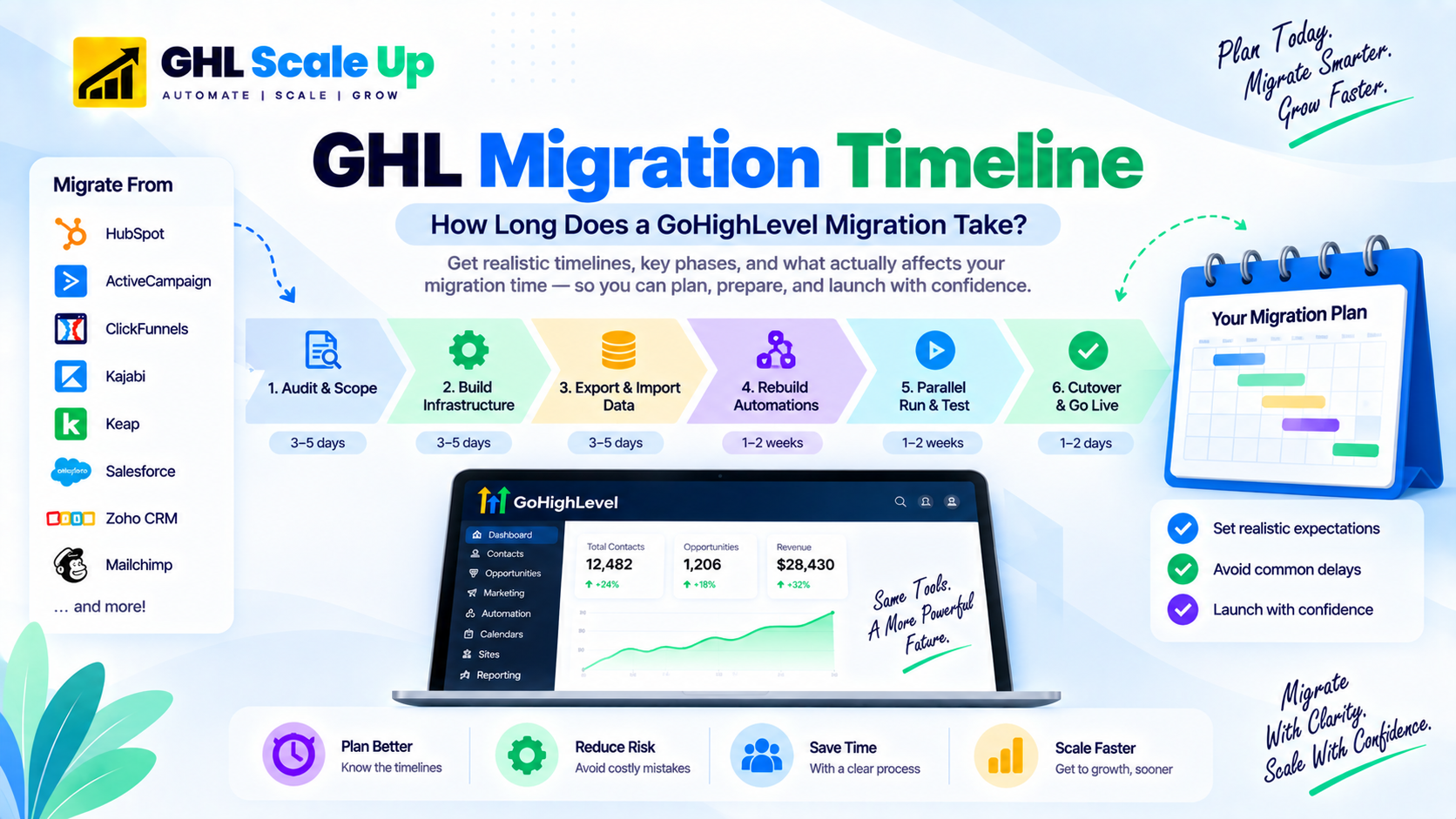
A standard 3–5 week migration typically breaks down as follows. These are duration ranges and their main dependencies, not step-by-step instructions.
| Phase | Typical Duration | Main Dependencies |
|---|---|---|
| Audit and scoping | 3–5 days | Stakeholder availability, completeness of existing documentation |
| GHL infrastructure build | 3–5 days | Can run partly in parallel with audit; gated by decisions made during scoping |
| Data export and import | 1–2 days | Depends on field mapping being finalized first |
| Automation rebuild | 1–4 weeks | The majority of total project time; depends on the data structure already existing |
| Parallel running | 1–2 weeks | Depends on automation rebuild passing validation first |
| Cutover and handover | 1–2 days | Depends on parallel-running validation succeeding |
For preparation tasks specific to each phase, see the full 50-point breakdown in the GoHighLevel migration checklist.
What Causes Migration Delays?
Undocumented legacy automations. Accounts active for 2+ years accumulate automations nobody remembers building. Discovering these mid-project extends the automation-rebuild phase unpredictably. Prevention: a full automation audit before migration starts, keeping only what's actively driving results.
Unclear field mapping. Starting data import without a finalized field-mapping document leads to rework. Prevention: finalize and sign off on field mapping before any data moves.
Missing credentials or unavailable stakeholders. API keys, admin access, or a needed approval that isn't available when the project reaches that step stalls the whole timeline. Prevention: gather all credentials and confirm stakeholder availability before starting.
Integration dependencies discovered late. A custom API integration surfacing only during testing, rather than during the initial audit, can add days of unplanned work. Prevention: inventory every external integration during the audit phase, not after.
Domain or SMS compliance delays. A2P 10DLC registration and domain authentication have external processing times outside your control. Prevention: start these the moment the project begins, in parallel with other setup work.
Scope changes mid-project. Deciding to add new automations or features partway through extends everything after that point. Prevention: freeze scope for the initial migration; treat improvements as a fast-follow phase after cutover.
How to Shorten the Timeline Without Cutting Corners
The goal is reducing avoidable work, not reducing QA.
- Audit and cut automations before migration only rebuild what's actively driving results
- Clean contact data before import, not after
- Freeze scope for the initial migration
- Gather all credentials and access before starting
- Finalize field mapping before any data moves
- Build the receiving GHL environment before importing anything into it
- Test with a representative sample (50–200 records), not the full dataset, before the full import
- Prioritize revenue-critical workflows first, then handle lower-priority automations
- Start A2P/domain authentication immediately, since these have external processing time
DIY vs. Specialist: How Does the Timeline Change?
The following ranges reflect GHL Scale Up's own observed project experience, not an independently verified industry benchmark treat them as a comparison point, not a guarantee.
| Migration Complexity | DIY (Self-Managed) | Specialist (GHL Scale Up's Observed Range) |
|---|---|---|
| Simple (under 5 automations) | 3–6 weeks | 1–2 weeks |
| Standard (5–20 automations) | 8–16 weeks | 3–5 weeks |
| Complex (20+ automations) | 16–30+ weeks | 6–10 weeks |
The gap isn't only speed it's that an experienced team has already resolved the common blockers (DKIM setup, A2P registration quirks, Stripe reconnection edge cases) many times before, where a DIY project is often solving each one for the first time.
Frequently Asked Questions
How long does a GoHighLevel migration take?
A simple migration with fewer than 5 active automations and a small, clean contact list takes 1–2 weeks. A standard migration with 5–20 automations takes 3–5 weeks. A complex migration with 20+ automations, large data volume, membership content, or multiple client accounts takes 6–10 weeks. Automation count, not contact volume, is the primary driver.
Does contact volume affect migration time?
Less than most people assume. The CSV import itself takes minutes regardless of whether you have 5,000 or 500,000 contacts. Volume matters more indirectly through data-quality cleanup time and testing thoroughness than through the import process itself.
How long does it take to rebuild workflows in GoHighLevel?
A simple 3–5 step sequence takes 30–60 minutes. A standard sequence with basic branching takes 2–4 hours. A complex automation with 15+ steps, multi-level branching, and lead-scoring logic takes 4–8 hours. Add 50–100% to these figures if you're learning GHL's workflow builder while migrating.
How long does a Kajabi to GoHighLevel migration take?
1–2 weeks for a simple setup, 3–5 weeks standard, 5–8 weeks complex. This is shorter than older estimates because GoHighLevel's native Kajabi Course Importer now handles course structure and media for published lessons automatically the remaining time goes into quizzes, assignments, offers, and automation rebuild.
Should I run both platforms in parallel during migration?
Yes, for a minimum of 1–2 weeks before cutover. New leads enter GHL while contacts already active in old-platform sequences finish there. This reveals gaps in your GHL setup while you still have a working fallback.
Can migration timelines be shortened without increasing risk?
Yes by reducing avoidable work rather than reducing testing. Cutting automations that no longer drive results, cleaning data before import, and freezing scope all shorten the timeline without cutting corners on QA.
Related Articles in This Series
Ready to start planning your GHL migration?
Book a free 30-minute migration assessment. We review your current platform, tell you exactly what the migration involves, give you a realistic timeline, and provide a fixed-fee quote. No obligation.
Book Your Free Assessment