
Data, Assets, and Automation Are Three Different Problems
Before anything else, it helps to stop using "migrate" as a single verb and start treating it as three separate technical problems, because a provider — or a piece of software — can be good at one and bad at the other two.
- Data is structured records: contacts, custom fields, tags, lists, and opportunities. This is the category CRMs are built to move in and out of, because it's just rows and columns.
- Assets are the things your marketing content lives in: HTML email templates, forms, and landing pages. These aren't structured data — they're a mix of design, content, and platform-specific formatting, which is exactly why they don't always survive a straight export/import.
- Automation is the logic that runs your follow-up: triggers, conditions, branches, delays, and actions strung together into a sequence. This is a program, not a record, and different platforms build that program on fundamentally different architectures.
The relationship each one follows during a real migration looks like this:
- Source CRM → exported data → field mapping → destination CRM (data)
- Source email template → HTML/content → destination email builder (assets)
- Source automation → trigger/logic/action structure → destination workflow (automation)
Only the first one is genuinely a transfer. The other two are closer to translation — and translation loses things a straight copy wouldn't.
Can Contacts Be Migrated Automatically?
Yes, largely. Contacts, custom fields, tags, and opportunities all move through the same basic mechanism: export as CSV from the source platform, then import with field mapping into the destination. This is confirmed directly in GoHighLevel's own migration documentation for multiple source platforms — the process is consistently described as export, clean, map, import, not a one-click sync.
What that process actually involves:
- Export. The source platform generates a CSV (or several, if contacts, deals, and other objects export separately).
- Cleaning. Date formats, character encoding, line breaks, and duplicate entries need to be standardized before the file will import cleanly. GoHighLevel's own ActiveCampaign migration guide is specific about this: dates need to be in YYYY-MM-DD format, the file needs UTF-8 encoding, and emojis and line breaks need to be stripped out before upload.
- Field mapping. Each CSV column gets matched to a GoHighLevel field during import. If a field doesn't already exist on the destination side — a custom property that only existed in the old platform — it needs to be created first, or that data has nowhere to go and gets dropped.
- Tags and lists. These typically get applied during the same import step, often used to mark which batch or source a contact came from.
- Deduplication. Reimporting the same contact twice (which happens constantly during testing) is one of the more common ways migrations produce messy duplicate records. It's worth asking a provider how they handle this specifically, since exact matching behavior can vary and is worth confirming in your own account rather than assuming a fixed rule.
The practical implication: contact migration is close to "solved" as a technical problem. Where it goes wrong is almost always process, not technology — dirty source data, custom fields created after contacts were already imported, or skipping the mapping step and letting data land in the wrong fields.
Can HTML Email Templates Be Migrated?
Sometimes directly, sometimes not — and the difference depends entirely on which platform you're migrating from, not on GoHighLevel's capability alone. This is one of the more commonly misunderstood parts of a migration scope, because "email migration" sounds like one thing and is actually two very different outcomes depending on the source.
GoHighLevel's own documentation shows both cases:
Migrating from ActiveCampaign, GoHighLevel's official guide describes generating a shareable link from an ActiveCampaign template (Campaigns → Campaign Templates → Share) and pasting that link directly into GoHighLevel's own template importer (Marketing → Emails → Email Templates → Import Template). The template — including its HTML structure — comes across without being rebuilt by hand.
Migrating from Mailchimp, the same official documentation describes a completely different process: export the campaign content, then manually copy the text, images, and links into GoHighLevel's own email builder, matching the layout by eye. There's no share-link importer for Mailchimp templates in the current documented process — the content moves, but the "migration" is really a rebuild with the original as a reference.
The reason this varies isn't arbitrary — it comes down to whether the source platform exposes a template format GoHighLevel's importer can read, or whether the only option is a rendered HTML export that has to be manually reconstructed. This is exactly the kind of detail worth confirming for your specific source platform rather than assuming either outcome. GHL Scale Up's ActiveCampaign and Mailchimp migration guides cover the platform-specific process in full if you're moving from either one.
Forms and landing pages follow the second pattern almost universally. GoHighLevel's own ActiveCampaign guide states plainly that direct import of landing pages isn't supported — they're documented, screenshotted for reference, and rebuilt in GoHighLevel's page builder. The one notable exception is ClickFunnels, where GoHighLevel provides a native URL-based importer that can pull in existing funnel pages directly, which is a meaningfully different (and easier) starting point than a from-scratch rebuild.
Are Automation Workflows Ever Transferred Automatically?
No — not as working logic. Every official GoHighLevel migration guide reviewed for this article describes automation migration as manual recreation, not import. This is the single most important thing to understand before scoping a migration, because it's the part most likely to be underestimated.
The reasoning is structural, not a GoHighLevel limitation specifically: source platforms build their automation engines on their own internal trigger/condition/action architecture, and that architecture doesn't map cleanly onto a different platform's equivalent system. GoHighLevel's own ActiveCampaign guide is direct about this: automations must be manually recreated using HighLevel's own Workflows feature. The documented process is to export or manually document each automation's triggers, actions, and conditional branches from the source platform, then rebuild that same logic — trigger by trigger, action by action — inside GoHighLevel's Workflows builder, using pre-built recipe templates as a starting point where one happens to match.
What this means in practice for scoping a migration:
- Every workflow needs to be documented before it's touched. If a workflow only exists as configured logic in a platform you're about to leave, and nobody writes down what it does, that logic is genuinely gone the moment the account is closed.
- "Similar" isn't "identical." GoHighLevel supports if/else conditional branching and timed delays, similar in concept to most other automation platforms, but the specific trigger types, available actions, and branching mechanics differ enough that a one-to-one rebuild is closer to a redesign exercise than a copy job.
- Complexity, not contact volume, drives the real cost. A list of 200,000 contacts imports in roughly the same effort as a list of 2,000. Forty branching workflows with conditional logic take meaningfully longer to rebuild and test than five simple ones, regardless of how many contacts flow through them.
If you're comparing this across several possible source platforms at once, GHL Scale Up's platform-by-platform migration comparison walks through what specifically transfers and what breaks for each one.
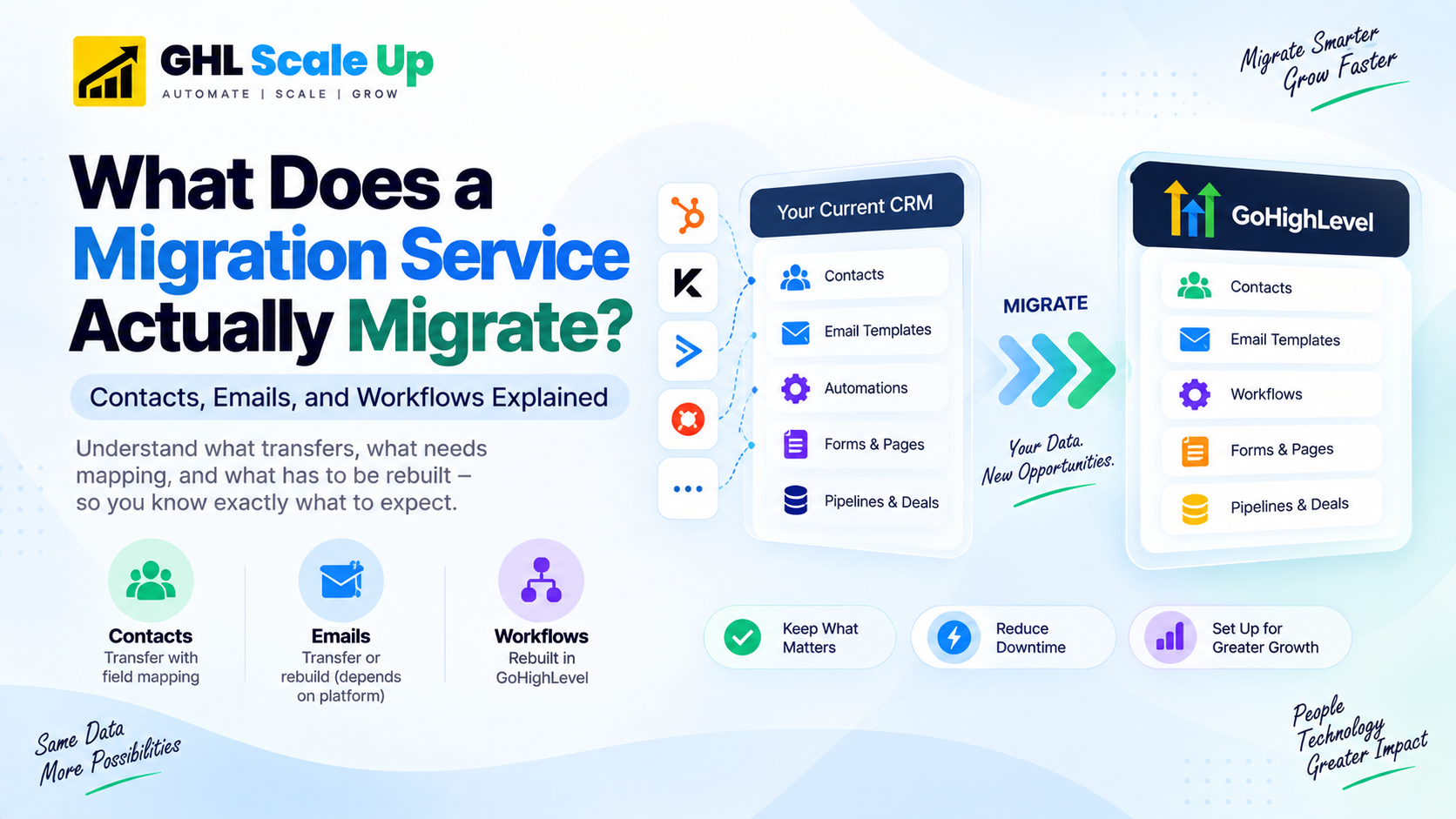
Transfer vs. Rebuild: The Full Picture
Putting the three categories together, here's how the major components of a typical marketing system behave during a migration into GoHighLevel, based on GoHighLevel's own documented migration processes:
| Component | Transfers Directly? | Requires Mapping? | Requires Rebuild? | Key Consideration |
|---|---|---|---|---|
| Contacts | Yes (CSV) | Yes | No | Data must be cleaned and formatted before import or the import fails or drops rows |
| Custom fields | Once field exists | Yes | Only to create the field first | Create the destination field before importing, or that column's data has nowhere to go |
| Tags | Yes | Minor | No | Often applied during the same import step |
| Opportunities / pipelines | Yes (CSV) | Yes (pipeline & stage) | No | Each record needs a matching contact already present in the destination |
| HTML email templates | Depends on source | Yes, where importer exists | Often, without an importer | Confirmed via share-link import from ActiveCampaign; confirmed to require manual recreation from Mailchimp |
| Forms | No | N/A | Yes | Rebuilt in GoHighLevel's own form builder; not imported from third-party platforms |
| Landing pages / funnels | Generally no | N/A | Yes | ClickFunnels is a documented exception via a native URL importer; most others require a manual rebuild |
| Workflow triggers/conditions/actions | No | N/A | Yes | Confirmed across multiple official GoHighLevel migration guides as manual recreation, not import |
| Third-party integrations | No | N/A | Reconnect | Credentials and API connections must be re-authenticated in the new platform, not carried over |
Why This Gets More Complicated for Agencies
Everything above assumes one account moving to one destination. An agency migration is usually several accounts moving at once, and that changes the shape of the problem rather than just the size of it.
A few considerations specific to agency-scale migrations:
- Multiple source platforms in one project. It's common for an agency's client base to be spread across different CRMs and email tools — one client on ActiveCampaign, another on Mailchimp, another on a spreadsheet and a separate booking tool. Each source platform behaves differently for the email and automation categories above, so a single "migration process" document doesn't cover every client the same way.
- Reusable automation templates. Rebuilding the same category of workflow (a lead-response sequence, a review-request flow) for every client individually wastes the exact effort a well-built template — a GoHighLevel Snapshot, configured once and deployed repeatedly — is meant to eliminate. Agencies that skip this step end up rebuilding the same logic from scratch for every account.
- Naming and structure standardization. When one person is managing dozens of sub-accounts, inconsistent field names, tag conventions, and workflow naming between clients turn a manageable system into one nobody can maintain six months later.
- Repeatable QA. Testing needs to happen the same way for every client migration, not improvised fresh each time — otherwise the quality of a given migration depends entirely on which team member happened to run it.
None of this changes what transfers versus what gets rebuilt at the technical level — it changes how much of that rebuild work is genuinely necessary to repeat versus standardize.
What a Complete Migration Service Should Cover
Given the distinction above, a migration quote that only discusses contact volume is answering the easiest 20% of the question. A provider capable of handling the full scope should be able to speak specifically to each of these before quoting a price:
Data
- Contact volume and which fields, tags, and segments exist
- Opportunity/pipeline data and how source stages map to destination stages
- Data quality issues (duplicates, missing required fields) and how they'll be cleaned before import
Email assets
- How many templates exist, and whether the source platform supports a direct template import or requires manual recreation
- What happens to personalization tokens, images, and links during the move
- How sending domain and deliverability setup is handled during cutover, not just template design
Automation
- How many workflows exist and their relative complexity (a linear 3-step sequence versus a 15-branch conditional tree are very different scopes)
- Which triggers and actions the destination platform supports natively, and which require an alternate approach
- How external integrations tied to those workflows get reconnected
QA
- How test records are used to validate the migration before real contacts are touched
- Whether workflows are tested branch by branch, not just on the "happy path"
- Whether there's a documented pre- and post-migration comparison, not just an assurance that "everything transferred"
Questions to Ask a Migration Provider Before You Hire One
A short, direct list is more useful here than a long one. These specifically separate providers who understand the data/asset/automation distinction from providers who are quoting based on contact count alone:
Do you migrate contacts only, or do you also rebuild automation logic?
For my specific source platform, can email templates be imported directly, or do they need to be manually recreated?
How do you handle custom fields that don't already exist in the destination account?
What is your process for testing a rebuilt workflow before it goes live with real contacts?
What happens to my existing automations during the cutover period — do both systems run in parallel, or is there a gap?
Which parts of my current setup do you expect will need to be rebuilt rather than imported, based on what I've described?
How do you validate that migrated data matches the source, beyond a total record count?
What's explicitly included in the quoted scope, and what would trigger an additional cost?
A provider who can answer these specifically — not generically — is telling you they've actually scoped your system rather than quoting a template price.
Testing and Validation
Testing a migration means checking more than whether the import ran without an error message. A useful validation pass checks each category separately: spot-check a sample of imported contacts against the source for field accuracy, send a real test through each rebuilt email template to confirm rendering and personalization tokens work, and run actual test contacts through every rebuilt workflow — including branches that don't represent the most common path — before it touches a live lead.
This is intentionally a summary, not the full process. GHL Scale Up's GoHighLevel migration checklist covers the complete phase-by-phase testing and go-live sequence in detail, including the parallel-running period most migrations should include before the source platform is switched off. And if you want to see how migrations commonly go wrong at each of these stages, the common migration mistakes guide documents the specific, recurring failure points.
Frequently Asked Questions
Can migration services move contacts automatically?
Largely yes. Contacts, custom fields, tags, and opportunities move through CSV export and import with field mapping — a well-documented, largely mechanical process, though it still requires clean source data and correctly mapped fields to avoid dropped or duplicated records.
Can HTML email templates be migrated directly, or do they need to be rebuilt?
It depends on the source platform. GoHighLevel's own documentation confirms a direct share-link import from ActiveCampaign, but manual recreation (copying content into GoHighLevel's builder) from Mailchimp. Ask specifically about your source platform rather than assuming either answer.
Do automation workflows transfer automatically?
No. Every official GoHighLevel migration guide reviewed describes workflow migration as a manual rebuild process — documenting the original logic, then recreating triggers, actions, and conditions inside GoHighLevel's own Workflows builder.
What's the difference between data migration and automation migration?
Data migration moves structured records (contacts, fields, tags) through export/import with mapping. Automation migration recreates behavioral logic (triggers, conditions, actions) that has to be rebuilt because source and destination platforms use different underlying automation architectures — it's a redesign exercise, not a file transfer.
How much of a CRM can actually be migrated without manual work?
Structured data — contacts, custom fields, tags, and opportunities — is the part that transfers with the least manual effort, provided the data is clean beforehand. Almost everything else (automations always, email templates and forms on most platforms) requires some level of manual recreation.
The Takeaway
A migration service should be evaluated by what it can preserve and rebuild across your entire system — data, email assets, and automation logic — not by whether it can import a contact CSV. Contact import is the easiest part of the job and the part every provider can do. The real difference between migration providers shows up in how carefully they handle the parts that don't transfer cleanly: recreating email templates without losing your design, and rebuilding automation logic that actually behaves the way your old workflows did, tested branch by branch before it touches a real lead.
Related Articles in This Series
Migrating to GoHighLevel?
We handle complete migrations — contacts, email templates, automations, and everything in between. Book a free migration assessment.
Book Your Free Migration Assessment
GHL Scale Up is a specialised GoHighLevel implementation and migration agency. Based in India, we serve agencies and businesses across 6 countries with 200+ GoHighLevel builds and migrations delivered. This guide reflects direct experience migrating from ActiveCampaign, Mailchimp, HubSpot, Kajabi, and other platforms. All migration claims verified against GoHighLevel's official documentation as of September 2026.
ghlscaleup.com